
X12 transaction guide · Ordering
EDI 850 Purchase Order
The X12 document a buyer uses to order goods or services from a supplier. It starts most B2B order-to-cash cycles.
- Sent by
- Buyer (retailer, distributor, manufacturer)
- Received by
- Supplier or vendor
- Standard
- ANSI ASC X12
- EDIFACT equivalent
- ORDERS
What is an EDI 850?
The EDI 850 Purchase Order is the ANSI X12 transaction set a buyer sends to a supplier to order goods or services. It carries the same information as a paper or emailed purchase order, including who is buying, where to ship, what items and quantities are needed, agreed prices, dates and terms, but in a standardized structure that software can process without re-keying.
For most suppliers, the 850 is the first document in the order-to-cash cycle. Once received and validated, it typically becomes a sales order in the supplier's ERP, and it triggers the documents that follow, such as an acknowledgment, a ship notice and an invoice.
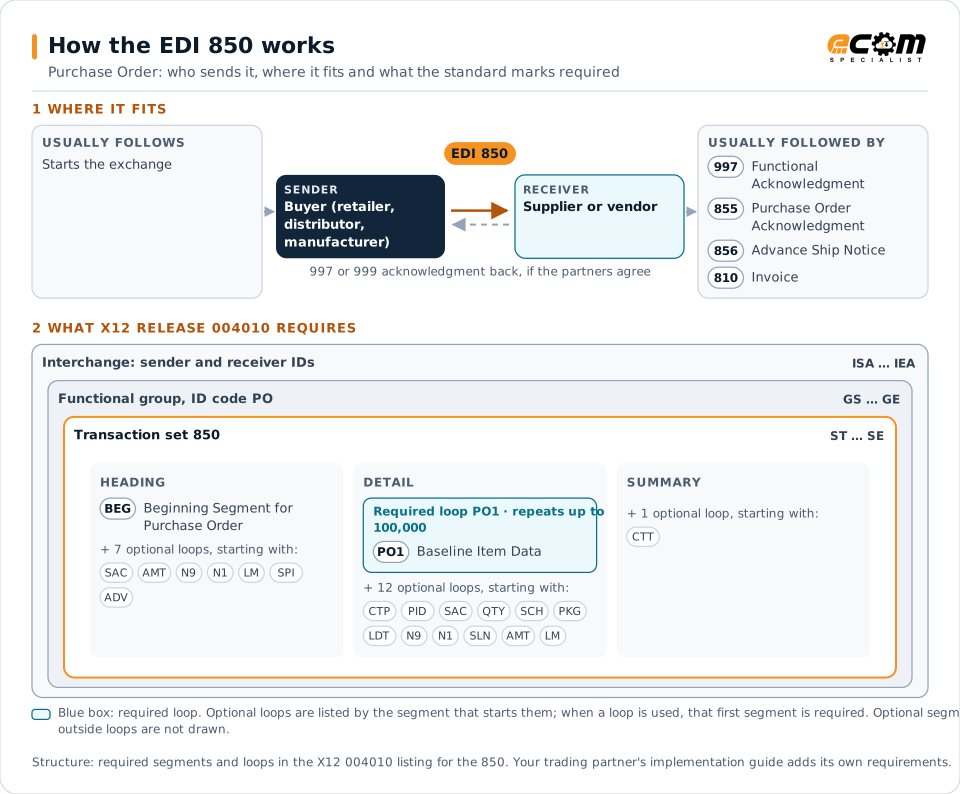
How to read this diagram: the top row shows who sends the 850, to whom, and which documents usually come before and after it. The lower part shows what X12 release 004010 itself requires: the envelopes around the 850 and the segments and loops the standard marks as required, area by area. Optional loops are listed by the segment that starts them rather than drawn in full. This is the standard's minimum, not a trading partner's requirement: each partner's implementation guide usually makes some optional loops mandatory, restricts the codes and may use a different release.
When it is used
- Retailers ordering merchandise for stores, distribution centers or online customers
- Distributors and manufacturers buying materials or components from suppliers
- Drop-ship programs sending consumer orders to vendors for direct fulfillment
- Bulk, stand-alone or release orders, depending on the purchase order type code
Where it fits in the document flow
Structure
Key segments in the 850
The segments most implementations use, described in plain language. The last column shows what X12 release 004010 itself requires: "Required" marks a segment the standard requires in every 850; "Optional, common" marks a segment the standard leaves optional, or that sits in an optional loop, but that implementations often use. This is the standard's requirement, not your trading partner's: each partner's implementation guide names the release it uses, makes some optional segments mandatory and restricts the values, and requirements can differ between releases. The requirement status comes from one published X12 reference listing and has not been checked against a second source.
| Segment | Name | What it carries | In X12 004010 |
|---|---|---|---|
| BEG | Beginning Segment for Purchase Order | Purpose of the order, purchase order type, purchase order number and order date. | Required |
| REF | Reference Identification | Additional references such as department, vendor number or internal order references. | Optional, common |
| DTM | Date/Time Reference | Requested delivery, ship or cancel-after dates. | Optional, common |
| N1 loop | Party Identification | Buyer, ship-to and bill-to parties with names and location codes, often followed by N3 and N4 address segments. | Optional, common |
| PO1 | Baseline Item Data | One line per item with quantity, unit of measure, unit price and product identifiers such as UPC, buyer item and vendor item numbers. | Required |
| PID | Product/Item Description | Free-form or coded description of the item on the preceding line. | Optional, common |
| CTT | Transaction Totals | Number of line items, used as a control total. | Optional, common |
Example
Sample EDI 850
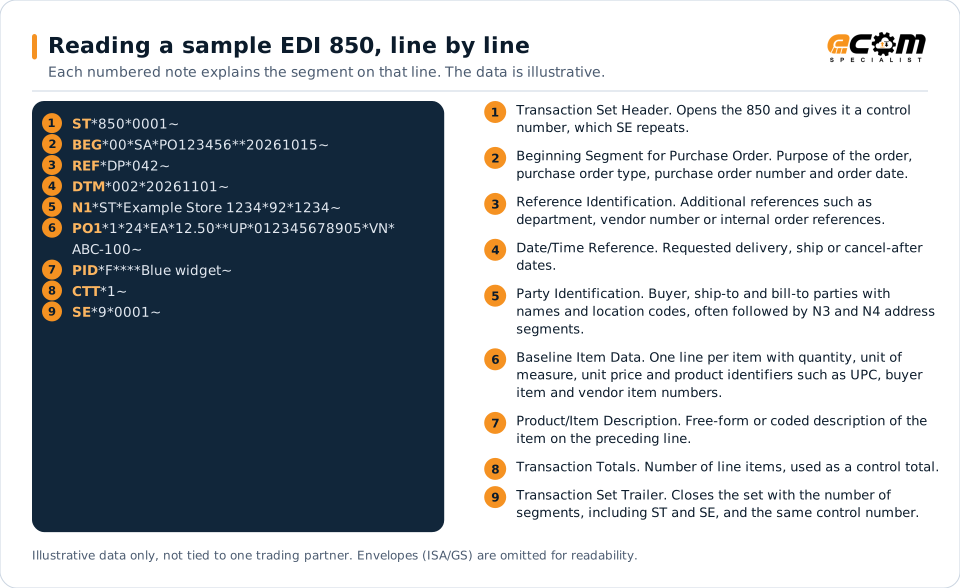
A stand-alone order (SA) for 24 units of one item, delivered to store 1234 by the requested date. BEG carries the purchase order number, REF the department and PO1 the quantity, price, UPC and vendor item number.
Illustrative data only, not tied to one X12 release or trading partner. The interchange (ISA/IEA) and functional group (GS/GE) envelopes are omitted for readability.
ST*850*0001~
BEG*00*SA*PO123456**20261015~
REF*DP*042~
DTM*002*20261101~
N1*ST*Example Store 1234*92*1234~
PO1*1*24*EA*12.50**UP*012345678905*VN*ABC-100~
PID*F****Blue widget~
CTT*1~
SE*9*0001~The sample is the same one shown above, with a note beside each segment the first time it appears. Segment IDs are highlighted at the start of each line; the fields after them are separated by asterisks, and each segment ends with a tilde.
Avoid problems
Common 850 errors and how to prevent them
Unknown item identifiers
Orders fail to post when the buyer's UPC or item number is not cross-referenced in the supplier's ERP. Maintain item cross-references for every partner.
Ignoring purchase order type
Stand-alone, bulk and release orders behave differently. Mapping them the same way can create duplicate or missing sales orders.
Missing ship-to mapping
Store and distribution center codes in the N1 loop must map to valid ship-to locations, or orders route to the wrong place.
Price discrepancies not flagged
Prices on the 850 should be validated against agreed pricing so differences are caught before shipment and invoicing.
Trading partners
Integration guides that include the 850



















How ECOM helps
Automate the 850 with ECOM
Solution
Order-to-Cash Automation
Automate the flow from purchase order to payment across every customer channel.
Solution
EDI Integration
Exchange X12 and EDIFACT documents with partners and integrate them directly with your ERP.
Product
PRISM-WebEDI
Browser-based transaction management for trading partners without traditional EDI systems, on the supplier side and the customer side.
EDI 850 FAQs
What is an EDI 850 used for?
The EDI 850 is used by a buyer to place an order with a supplier electronically, specifying items, quantities, prices, dates and shipping locations.
What is the response to an EDI 850?
The receiver usually returns a 997 functional acknowledgment to confirm receipt, and many partners also require an 855 purchase order acknowledgment to confirm the order details.
What is the EDIFACT equivalent of the 850?
The UN/EDIFACT equivalent is the ORDERS message, which is widely used outside North America.
How does an 850 get into an ERP?
An EDI translator converts the 850 into the ERP's import format, such as an SAP IDoc, API call or staging table, where it is validated and created as a sales order.
More general questions about EDI are answered in the EDI FAQ.
Related transactions
Related ordering documents
- 855Purchase Order Acknowledgment
- 860Purchase Order Change Request
- 870Order Status Report
- 869Order Status Inquiry
- 836Procurement Notices
- 843Response to Request for Quotation
- 875Grocery Products Purchase Order
- 865Purchase Order Change Acknowledgment/Request - Seller Initiated
- 876Grocery Products Purchase Order Change
Need help with the EDI 850?
ECOM maps, tests and monitors X12 documents for your trading partners and integrates them with your ERP.