
X12 transaction guide · Ordering
EDI 876 Grocery Products Purchase Order Change
The X12 document grocery retailers and wholesalers use to change a grocery purchase order they have already sent to a supplier.
- Sent by
- Grocery retailer or wholesaler
- Received by
- Supplier, manufacturer or broker
- Standard
- ANSI ASC X12
- EDIFACT equivalent
- ORDCHG
What is an EDI 876?
The EDI 876 Grocery Products Purchase Order Change is the ANSI X12 transaction set grocery retailers and wholesalers use to request changes to a purchase order for finished goods that was already sent, usually as an 875. It follows grocery-industry practice and uses the grocery G-segments rather than the segments of the general 860.
Changes are made by restating the values that change, such as quantities, items, allowances or dates. Because grocery orders feed tightly scheduled warehouse and transport plans, suppliers need to apply each change to the original order quickly and accurately.
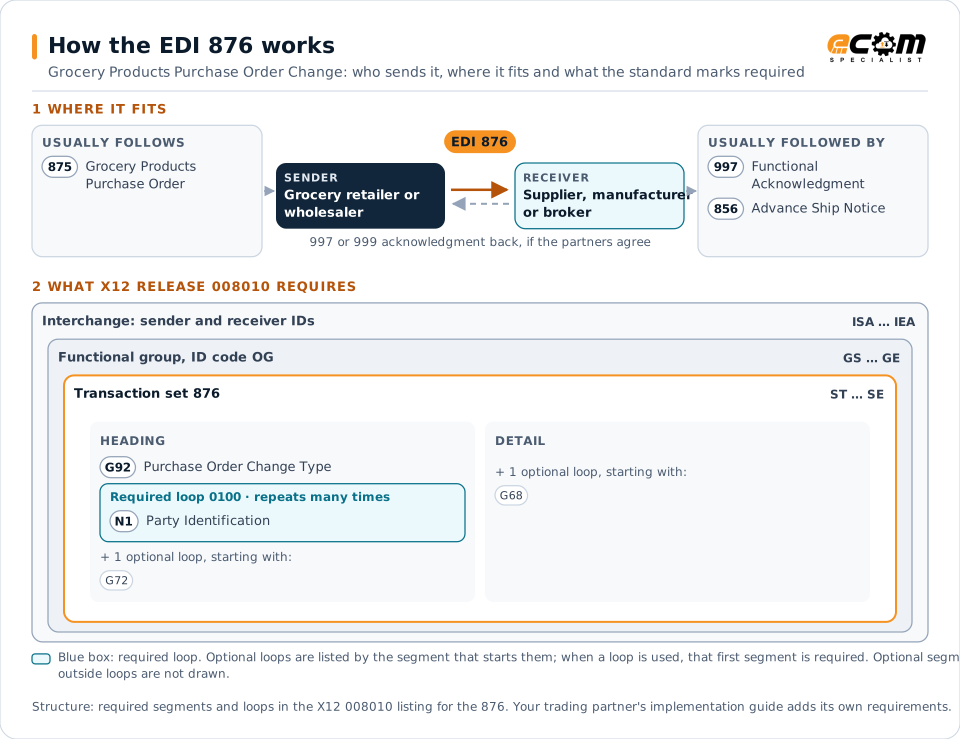
How to read this diagram: the top row shows who sends the 876, to whom, and which documents usually come before and after it. The lower part shows what X12 release 008010 itself requires: the envelopes around the 876 and the segments and loops the standard marks as required, area by area. Optional loops are listed by the segment that starts them rather than drawn in full. This is the standard's minimum, not a trading partner's requirement: each partner's implementation guide usually makes some optional loops mandatory, restricts the codes and may use a different release.
When it is used
- Changing quantities on an open grocery order
- Adding or removing items before shipment
- Updating allowances, charges or dates on an order
Where it fits in the document flow
Structure
Mandatory segments in the 876 (X12 release 008010)
The segments X12 release 008010 marks as mandatory at their level, in order. Segments inside optional loops are needed only when the loop is used. This is the standard's requirement, not your trading partner's: each partner's implementation guide names the release it uses, adds the optional segments it requires and restricts the values. The requirement status comes from one published X12 reference listing and has not been checked against a second source.
- ST
- G92
- N1
- G72
- G68
- SLN
- SE
Practical example
The 876 in practice
A grocery wholesaler sent an 875 for 80 cases of two soup items. A day later, demand forecasts drop, so it sends an 876 restating the quantity of one item as 40 cases. The supplier's system matches the change to the original order number, reduces the quantity on its sales order and ships 40 cases, so the invoice and receipt agree.
Implementation
Implementation considerations for the 876
- Match every change to the original order number and apply it as an update, never as a new order.
- Read restated values carefully, because the 876 states the new value rather than the difference.
- Route changes that arrive after picking has started to a person for review.
How ECOM helps
Automate the 876 with ECOM
Industry
Food and Beverage
Grocery and foodservice EDI for food and beverage manufacturers, with lot, date and inventory data.
Solution
Order-to-Cash Automation
Automate the flow from purchase order to payment across every customer channel.
Solution
EDI Integration
Exchange X12 and EDIFACT documents with partners and integrate them directly with your ERP.
More general questions about EDI are answered in the EDI FAQ.
Need help with the EDI 876?
ECOM maps, tests and monitors X12 documents for your trading partners and integrates them with your ERP.