
X12 transaction guide · Ordering
EDI 875 Grocery Products Purchase Order
The X12 purchase order grocery retailers and wholesalers send to suppliers and brokers, following grocery-industry (UCS) conventions.
- Sent by
- Grocery retailer or wholesaler
- Received by
- Supplier, manufacturer or broker
- Standard
- ANSI ASC X12
- EDIFACT equivalent
- ORDERS
What is an EDI 875?
The EDI 875 Grocery Products Purchase Order is the ANSI X12 transaction set a grocery retailer or wholesaler uses to order finished goods from a supplier or broker and request delivery. It follows grocery-industry practice from the Uniform Communication Standard (UCS) tradition, which is why it uses its own "G" segments, such as G50 and G68, rather than the segments of the general 850 purchase order.
The 875 is used only for new orders. Changes travel in their own grocery transaction set, the 876 purchase order change, and acknowledgments follow each partner's requirements. Items are typically identified by U.P.C. case codes, and order totals in quantity, weight and volume let the supplier plan loads.
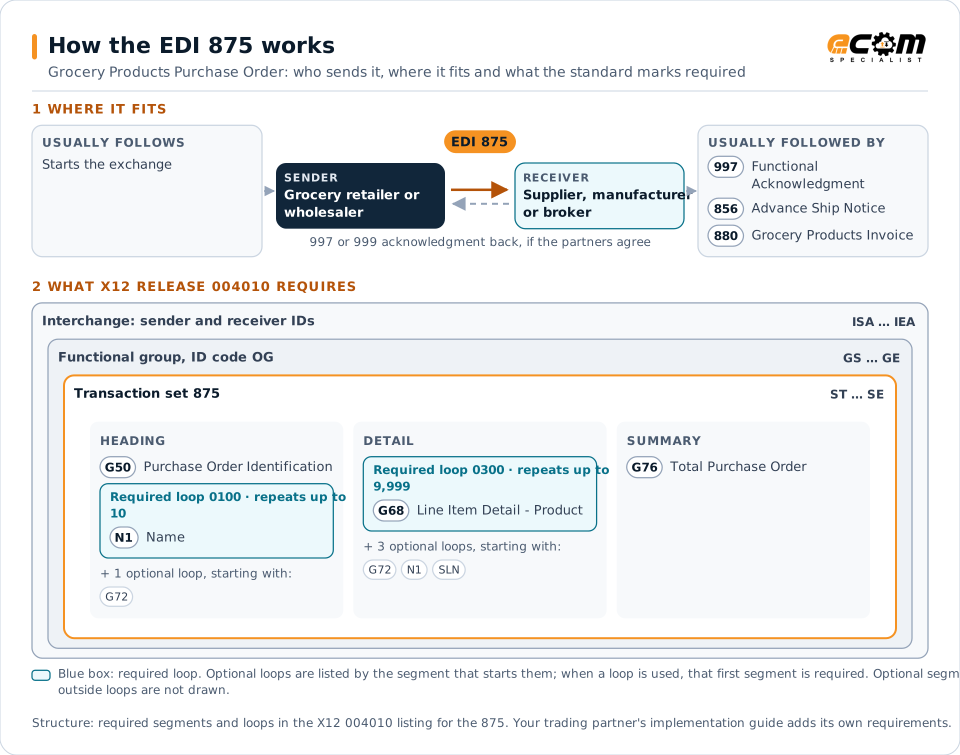
How to read this diagram: the top row shows who sends the 875, to whom, and which documents usually come before and after it. The lower part shows what X12 release 004010 itself requires: the envelopes around the 875 and the segments and loops the standard marks as required, area by area. Optional loops are listed by the segment that starts them rather than drawn in full. This is the standard's minimum, not a trading partner's requirement: each partner's implementation guide usually makes some optional loops mandatory, restricts the codes and may use a different release.
When it is used
- Grocery retailers ordering from manufacturers and brokers
- Wholesale grocery distributors replenishing warehouse stock
- Orders identified by U.P.C. case codes and case quantities
Where it fits in the document flow
Structure
Key segments in the 875
The segments most implementations use, described in plain language. The last column shows what X12 release 004010 itself requires: "Required" marks a segment the standard requires in every 875; "Optional, common" marks a segment the standard leaves optional, or that sits in an optional loop, but that implementations often use. This is the standard's requirement, not your trading partner's: each partner's implementation guide names the release it uses, makes some optional segments mandatory and restricts the values, and requirements can differ between releases. The requirement status comes from one published X12 reference listing and has not been checked against a second source.
| Segment | Name | What it carries | In X12 004010 |
|---|---|---|---|
| G50 | Purchase Order Identification | Order status code (such as original), order date and purchase order number. | Required |
| N1 loop | Name | Parties to the order. One N1 must identify the ship-to party. | Required |
| G68 | Line Item Detail - Product | Quantity ordered and unit, list cost and the U.P.C. case code or other product identifier. | Required |
| G69 | Line Item Detail - Description | Free-form description of the item. | Optional, common |
| G76 | Total Purchase Order | Total quantity ordered, with optional weight, volume and order amount. | Required |
Example
Sample EDI 875
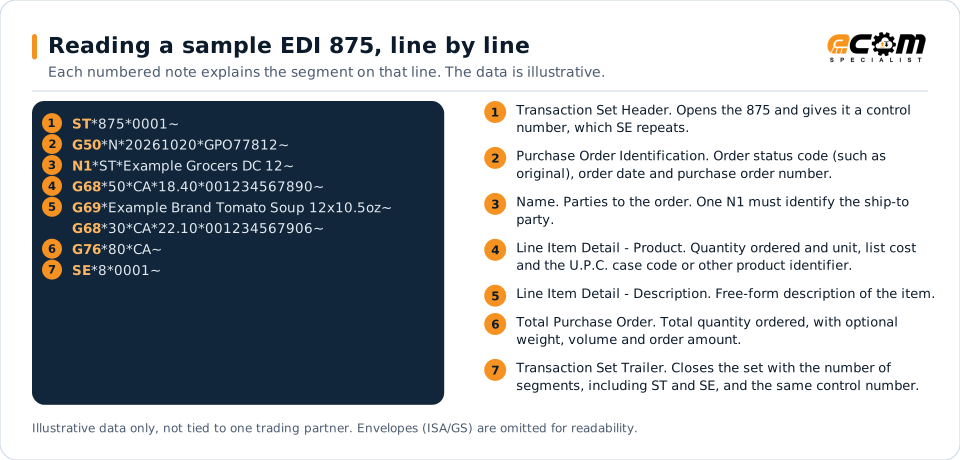
An original order (G50 status N) GPO77812 for delivery to distribution center 12. Two lines order 50 and 30 cases (CA) by U.P.C. case code, and G76 totals 80 cases.
Illustrative data only, not tied to one X12 release or trading partner. The interchange (ISA/IEA) and functional group (GS/GE) envelopes are omitted for readability.
ST*875*0001~
G50*N*20261020*GPO77812~
N1*ST*Example Grocers DC 12~
G68*50*CA*18.40*001234567890~
G69*Example Brand Tomato Soup 12x10.5oz~
G68*30*CA*22.10*001234567906~
G76*80*CA~
SE*8*0001~The sample is the same one shown above, with a note beside each segment the first time it appears. Segment IDs are highlighted at the start of each line; the fields after them are separated by asterisks, and each segment ends with a tilde.
Avoid problems
Common 875 errors and how to prevent them
Treating the 875 like an 850
The 875 uses grocery G-segments with different element positions. Maps copied from an 850 will misread quantities, costs and item codes.
Case code and consumer code mixed up
Grocery orders identify items by U.P.C. case codes. Matching them against consumer unit codes in the item master causes failed lookups and wrong pack sizes.
Using the 875 for changes
The 875 is for new orders only. Order changes come in a separate transaction set, which must update the original order rather than create a new one.
Trading partners
Integration guides that include the 875

How ECOM helps
Automate the 875 with ECOM
Industry
Food and Beverage
Grocery and foodservice EDI for food and beverage manufacturers, with lot, date and inventory data.
Industry
Retail
Retail and eCommerce EDI for suppliers and retailers, from purchase order to payment, with compliance built in.
Solution
Order-to-Cash Automation
Automate the flow from purchase order to payment across every customer channel.
EDI 875 FAQs
What is the difference between an 850 and an 875?
Both are purchase orders. The 875 is the grocery-industry version, built from G-segments and grocery conventions such as U.P.C. case codes, while the 850 is used across most other industries.
What does UCS mean?
The Uniform Communication Standard is the grocery industry's EDI convention, now maintained within X12. Grocery transaction sets such as the 875 and 880 come from that tradition.
Do all grocery retailers still use the 875?
No. Many grocery retailers and wholesalers now send the 850 instead, so suppliers often support both. Each partner's requirements state which one applies.
More general questions about EDI are answered in the EDI FAQ.
Need help with the EDI 875?
ECOM maps, tests and monitors X12 documents for your trading partners and integrates them with your ERP.