
X12 transaction guide · Ordering
EDI 836 Procurement Notices
The X12 document a buyer uses to notify sellers and other parties of the award, or pending award, of a contract.
- Sent by
- Buyer, often a government agency
- Received by
- Sellers and other interested parties
- Standard
- ANSI ASC X12
What is an EDI 836?
The EDI 836 Procurement Notices is the ANSI X12 transaction set a buyer uses to notify the seller or other interested parties of the award or pending award of a contract. The contract may contain indefinite features, such as the delivery schedule, location or quantity.
Government agencies publish award notices so bidders and the public know who won a contract and on what terms. The 836 gives these notices a structured format that procurement systems and subcontractors can process. Notices can also announce modifications to awards.
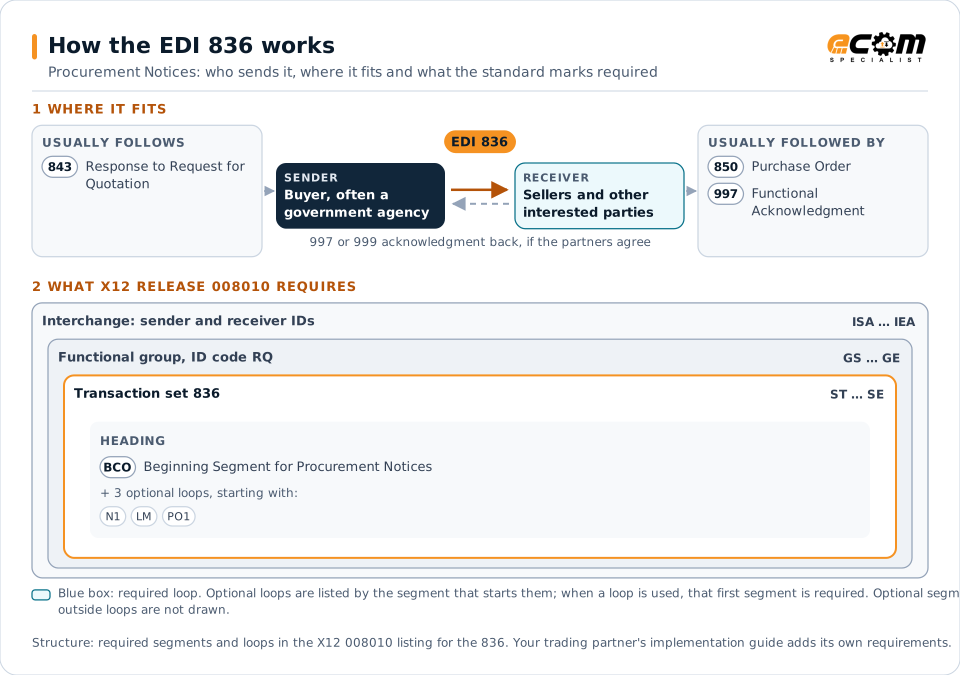
How to read this diagram: the top row shows who sends the 836, to whom, and which documents usually come before and after it. The lower part shows what X12 release 008010 itself requires: the envelopes around the 836 and the segments and loops the standard marks as required, area by area. Optional loops are listed by the segment that starts them rather than drawn in full. This is the standard's minimum, not a trading partner's requirement: each partner's implementation guide usually makes some optional loops mandatory, restricts the codes and may use a different release.
When it is used
- Announcing contract awards
- Notifying pending awards
- Informing unsuccessful bidders
Where it fits in the document flow
Structure
Mandatory segments in the 836 (X12 release 008010)
The segments X12 release 008010 marks as mandatory at their level, in order. Segments inside optional loops are needed only when the loop is used. This is the standard's requirement, not your trading partner's: each partner's implementation guide names the release it uses, adds the optional segments it requires and restricts the values. The requirement status comes from one published X12 reference listing and has not been checked against a second source.
- ST
- BCO
- N1
- LM
- LQ
- PO1
- REF
- SLN
- SE
Practical example
The 836 in practice
A government agency completes a competition for office supplies. It sends an 836 notifying the winning supplier of the award, the contract number, ceiling value and period, and publishes the notice to other bidders. The supplier sets up the contract and awaits delivery orders.
Implementation
Implementation considerations for the 836
- Follow the agency's procurement regulations for notices.
- Reference the solicitation the award relates to.
- State indefinite terms clearly, such as ceilings and periods.
- Link the award to the orders placed under it.
How ECOM helps
Automate the 836 with ECOM
Solution
Procure-to-Pay Automation
Automate purchasing, receiving and supplier invoicing across EDI, portals and documents.
Solution
EDI Integration
Exchange X12 and EDIFACT documents with partners and integrate them directly with your ERP.
Industry
Industrial Manufacturing
Distributor, OEM customer and supplier integration for industrial manufacturers.
More general questions about EDI are answered in the EDI FAQ.
Related transactions
Related ordering documents
Need help with the EDI 836?
ECOM maps, tests and monitors X12 documents for your trading partners and integrates them with your ERP.