
Guides

Infor CloudSuite Industrial (SyteLine) EDI integration guide

How manufacturers connect Infor CloudSuite Industrial (SyteLine) to EDI customers and suppliers, from schedules and orders to ship notices and invoices.

2 min read · Updated October 19, 2026

The short answer

Infor CloudSuite Industrial, also known as SyteLine, connects to EDI through an integration layer that translates partner documents. Data reaches the ERP through Infor ION using Business Object Documents (BODs) or through Intelligent Data Objects (IDOs). Inbound orders and schedules update customer orders and releases, while shipments and invoices drive outbound ship notices and invoices.

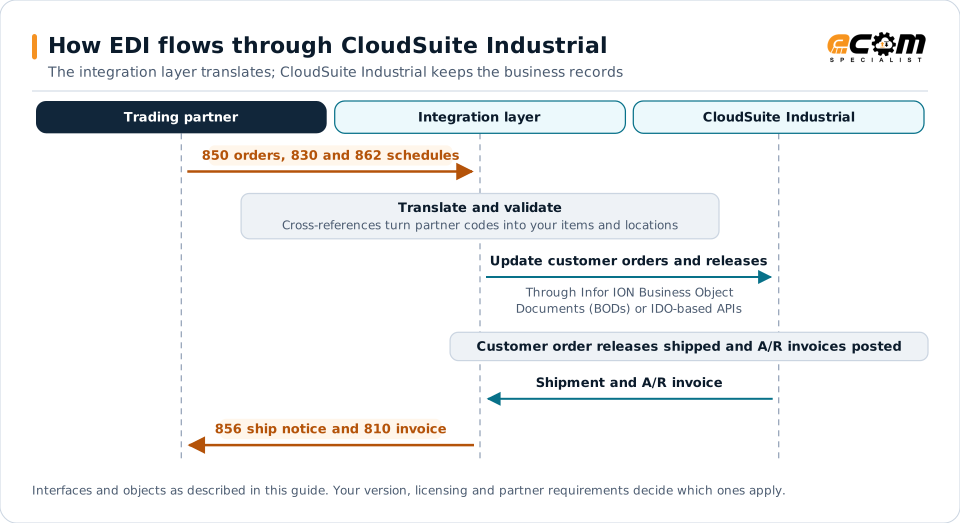
How EDI flows through CloudSuite IndustrialSequence diagram for CloudSuite Industrial. The trading partner sends a 850 orders, 830 and 862 schedules to the integration layer, which translates and validates it and update customer orders and releases through Infor ION Business Object Documents (BODs) or IDO-based APIs. In CloudSuite Industrial, customer order releases shipped and A/R invoices posted. Shipment and A/R invoice, and the integration layer sends the 856 ship notice and 810 invoice to the partner.How EDI flows through CloudSuite IndustrialThe integration layer translates; CloudSuite Industrial keeps the business recordsTrading partnerIntegration layerCloudSuite Industrial850 orders, 830 and 862 schedulesTranslate and validateCross-references turn partner codes into your items and locationsUpdate customer orders and releasesThrough Infor ION Business ObjectDocuments (BODs) or IDO-based APIsCustomer order releases shipped and A/R invoices postedShipment and A/R invoice856 ship notice and 810 invoiceInterfaces and objects as described in this guide. Your version, licensing and partner requirements decide which ones apply.
How EDI flows through CloudSuite IndustrialSequence diagram for CloudSuite Industrial. The trading partner sends a 850 orders, 830 and 862 schedules to the integration layer, which translates and validates it and update customer orders and releases through Infor ION Business Object Documents (BODs) or IDO-based APIs. In CloudSuite Industrial, customer order releases shipped and A/R invoices posted. Shipment and A/R invoice, and the integration layer sends the 856 ship notice and 810 invoice to the partner.How EDI flows throughCloudSuite IndustrialThe integration layer translates; CloudSuiteIndustrial keeps the business recordsTradingpartnerIntegrationlayerCloudSuiteIndustrial850 orders, 830 and 862schedulesTranslate and validateCross-references turnpartner codes into youritems and locationsUpdate customer ordersand releasesThrough Infor ION BusinessObject Documents (BODs) orIDO-based APIsCustomer orderreleases shipped andA/R invoices postedShipment and A/R invoice856 ship notice and 810invoiceInterfaces and objects as described in this guide.Your version, licensing and partner requirementsdecide which ones apply.

Read the diagram from top to bottom. CloudSuite Industrial does not exchange X12 itself in this design: the integration layer handles the partner connection and translation, and CloudSuite Industrial creates and posts the business records. Outbound documents are built from what CloudSuite Industrial actually recorded.
Expand diagram Download SVG

How EDI connects to CloudSuite Industrial

Infor CloudSuite Industrial (SyteLine) serves discrete manufacturers, including suppliers to automotive, industrial and aerospace customers. These manufacturers receive purchase orders and planning and shipping schedules, and must send accurate ship notices and invoices. An EDI integration layer handles partner connectivity and translation and exchanges data with CloudSuite Industrial.

Document mapping

EDI documentDirectionCloudSuite Industrial object
850 purchase orderInboundCustomer order
830 planning scheduleInboundForecasts and customer order releases
862 shipping scheduleInboundFirm customer order releases
855 acknowledgmentOutboundCustomer order status
856 ship noticeOutboundShipment
810 invoiceOutboundA/R invoice

Integration options

  • Infor ION: Infor’s integration platform, exchanging standardized Business Object Documents (BODs), such as sales order and shipment messages, between CloudSuite Industrial and other systems. ION is the usual path in Infor’s multi-tenant cloud.
  • IDO-based APIs: Intelligent Data Objects expose business logic and data for direct integration, including through web service and REST options.
  • EDI interfaces and staging: inbound and outbound EDI processing within the application, where configured.

The right choice depends on deployment, cloud or on-premises, and on what your environment already uses.

Schedules and releases

Schedule-driven customers resend demand frequently. Design schedule processing to:

  • Replace or adjust open releases rather than add duplicates.
  • Reconcile cumulative shipped and received quantities with the customer.
  • Separate firm releases from forecast so planning sees the right horizon.
  • Flag large changes inside the frozen period for review.

Partner data

  • Customer item cross-references map customer part numbers to your items.
  • Ship-to records hold customer plant and dock codes.
  • Partner settings store identifiers and document requirements per customer.

Shipping data

Automotive customers typically require container counts, packaging and label serial numbers in ship notices, matching AIAG-style or GS1-128 labels on each container. Generate labels and ship notices from the same shipping data so they always agree.

Best practices

  • Test schedule processing with real customer schedule histories before go-live.
  • Keep partner-specific rules in the integration layer, not in customizations.
  • Send ship notices at shipment, inside each customer’s time window.
  • Monitor ION or interface errors daily and route business errors to owners.
  • Plan EDI early in cloud migrations. See the ERP migration checklist.
Infor CloudSuite Industrial (SyteLine) integration and implementationIntegration methods, document mappings and ECOM services for Infor CloudSuite Industrial (SyteLine).

Frequently asked questions

Is SyteLine the same as CloudSuite Industrial?

Yes. Infor CloudSuite Industrial is the current name of the product historically known as SyteLine, and many teams still use both names.

What are BODs and IDOs?

Business Object Documents (BODs) are standardized XML messages exchanged through Infor ION. Intelligent Data Objects (IDOs) are the business objects that expose CloudSuite Industrial logic and data to forms and integrations.

How should automotive schedules be handled?

Planning and shipping schedules should replace or adjust existing releases based on cumulative quantities and dates, so demand is not duplicated when a customer resends a schedule.

Have an EDI question we did not answer?

ECOM's integration specialists can review your partners, documents and systems and recommend next steps.