
The short answer
During an ERP migration, keep trading partners stable by separating partner connectivity from the ERP, inventorying every integration early, mapping each EDI document to the new ERP's objects, migrating cross-references and master data, testing in parallel with real partner data, and planning cutover so no orders, shipments or invoices are lost.
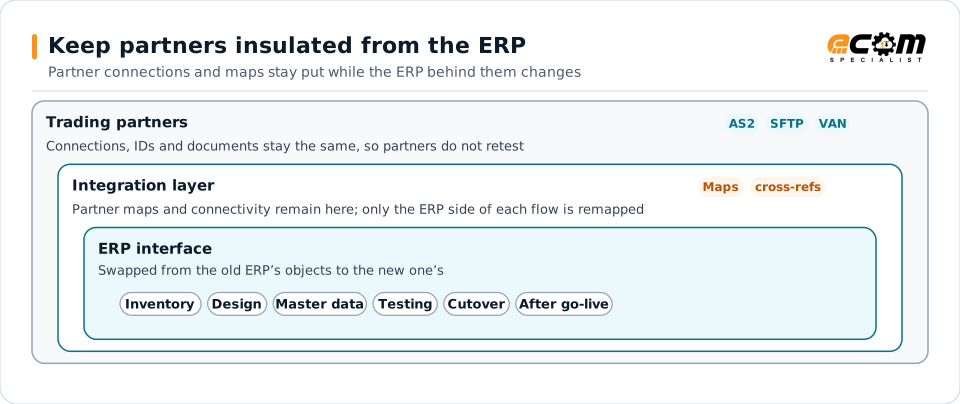
When partner maps live in the integration layer, only the ERP interface changes during the migration. The labels in the center are the checklist stages in this guide.
Why EDI is the riskiest part of many ERP projects
An ERP migration changes the system that creates and receives your partners’ documents. If EDI is treated as an afterthought, the first sign of trouble is often a customer calling about a missing order or a retailer issuing chargebacks. The good news: with the right design, partners do not need to notice the change at all.
Principle: keep partners insulated from the ERP
Keep partner connectivity, translation and partner-specific rules in an integration layer rather than inside the ERP. The new ERP then connects to that layer, and partners keep the same connections, identifiers and document formats. This is the single most important decision for a low-risk migration.
Checklist
Inventory
- List every trading partner, document type and direction
- Record connection methods, identifiers and certificates
- Identify maps, custom logic and partner-specific rules
- Find non-EDI integrations too: portals, emailed orders, bank files, APIs
- Note volumes and seasonal peaks to avoid for cutover
Design
- Map each EDI document to the new ERP’s objects and integration method
- Decide where partner-specific logic will live, ideally in the integration layer
- Define how outbound documents will be triggered in the new ERP
- Plan validation and exception handling for the new ERP
Master data
- Migrate customer item cross-references and partner identifiers
- Migrate ship-to locations, pricing and terms
- Reconcile units of measure and pack sizes
Testing
- Unit-test each document against the new ERP
- Run parallel tests: process the same partner documents in old and new systems and compare results
- Test end to end for top partners and document types
- Test exception paths, not just the happy path
- Confirm whether any partner requires retesting or notification
Cutover
- Choose a low-volume window and communicate it internally
- Define how in-flight orders, shipments and invoices are handled
- Prevent duplicate outbound documents from old and new systems
- Re-point the integration layer from old to new ERP
- Monitor every document closely during the first days
After go-live
- Hold daily reviews of exceptions during hypercare
- Track acknowledgments, posting errors and partner feedback
- Retire old interfaces only when the new flows are stable
Common mistakes
- Rebuilding partner maps inside the new ERP, which forces partner retesting.
- Forgetting cross-references, so the first orders fail to post.
- Testing only with synthetic data instead of real partner documents.
- Cutting over during peak season.
ERP-specific details matter too. See our guides for SAP, NetSuite and Business Central.