
The short answer
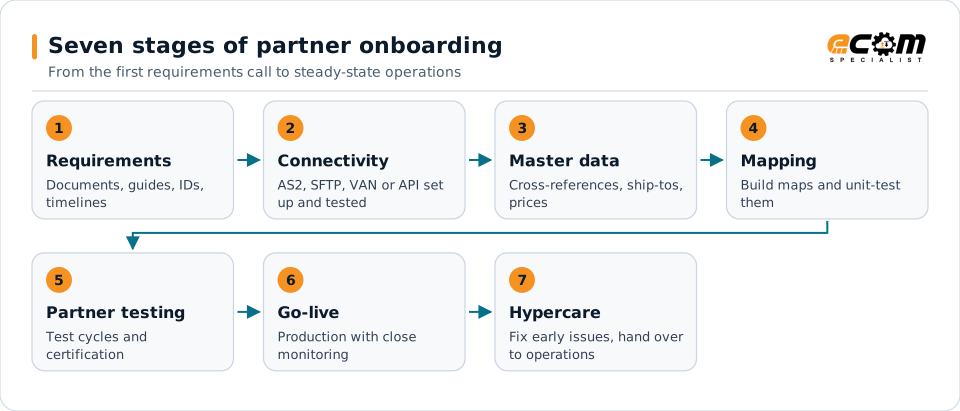
Onboarding an EDI trading partner follows seven stages: gather requirements, set up connectivity, prepare master data, build and unit-test maps, complete partner testing and certification, go live with close monitoring, and hand over to steady-state operations. Most delays come from missing requirements, master data gaps and partner testing schedules, so start those early.
Each numbered stage matches a section of the checklist. Most delays come from missing requirements, master data gaps and partner testing time.
How to use this checklist
Copy this checklist for each new trading partner. The stages run roughly in order, but connectivity, master data and mapping can proceed in parallel once requirements are clear. The items most often forgotten are marked in bold.
1. Requirements
- Identify the business owner and the partner’s EDI contact
- Obtain the partner’s implementation guides for every document in scope
- Confirm the standard and version, such as X12 4010 or 5010, or EDIFACT D96A
- List documents and directions, such as inbound 850, outbound 855, 856 and 810
- Confirm timing expectations for acknowledgments, ship notices and invoices
- Confirm labeling, packaging and routing requirements
- Understand the partner’s testing and certification process and timeline
- Identify compliance programs, scorecards and chargeback policies
2. Connectivity
- Agree on the channel: AS2, SFTP, VAN or API
- Exchange EDI identifiers and qualifiers (ISA and GS IDs)
- For AS2: exchange AS2 IDs, URLs and certificates; record certificate expiry dates
- For SFTP: exchange hosts, folders, keys or credentials
- Send and receive a connectivity test file
- Confirm acknowledgment expectations (997 or 999, AS2 MDNs)
3. Master data
- Set up customer item cross-references for every item the partner will order
- Load ship-to locations, such as stores and distribution centers
- Configure pricing, terms and allowances in the ERP
- Set up partner identifiers and any partner-specific fields
- Confirm units of measure and pack sizes
4. Mapping and unit testing
- Start from a template map for each document type where available
- Apply partner-specific rules from the implementation guide
- Map inbound documents to ERP transactions and outbound documents from ERP events
- Generate labels from the same data as ship notices
- Unit-test each map with representative and edge-case data
- Validate output against the partner’s guide or validator tools
5. Partner testing and certification
- Agree test scenarios with the partner, including changes and cancellations
- Exchange test documents end to end, ERP to partner and partner to ERP
- Track and fix every issue the partner reports
- Test physical labels and packaging if the partner audits them
- Obtain written approval or certification to move to production
6. Go-live
- Agree the production cutover date with the partner
- Switch connections and identifiers to production
- Monitor the first production documents end to end
- Confirm acknowledgments for every outbound document
- Check that the first orders post correctly and the first shipments and invoices are accepted
7. Hypercare and handover
- Monitor closely for the first weeks, reviewing every exception
- Document the partner setup, maps, contacts and special rules
- Add the partner to standard monitoring and alerting
- Schedule a review of early performance and scorecards
- Hand over to steady-state support
Common onboarding pitfalls
- Starting mapping before requirements are complete, which leads to rework.
- Forgetting master data, so the first production orders fail to post.
- Underestimating partner testing time, especially at busy times of year.
- Treating go-live as the finish line. The first weeks of production reveal problems testing missed.
A repeatable process, template maps and end-to-end monitoring turn onboarding from a project into a routine.