
The short answer
Most EDI exceptions come from a few root causes: missing or outdated master data, maps that drift from partner requirements, timing problems and failures nobody notices. Reduce them by cleaning cross-references, validating documents before they reach the ERP or the partner, monitoring every document across its lifecycle, and fixing recurring errors at the source instead of reworking them one by one.
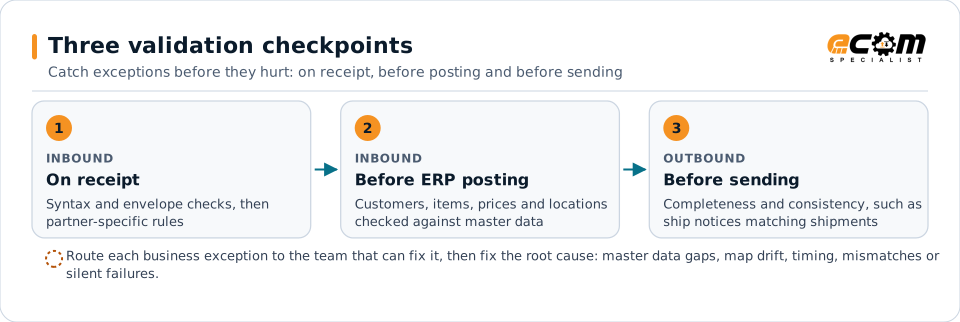
The checkpoints follow the order a document moves through your systems. Most exceptions trace back to the five root causes this guide describes.
Why exceptions matter
Every EDI exception has a cost. An order that fails to post delays fulfillment. A ship notice that does not match the shipment can trigger a chargeback. An invoice that fails validation delays payment. And every exception pulls someone away from other work to investigate it. Reducing exceptions is one of the highest-return improvements an EDI team can make.
Know your exceptions
Before fixing anything, measure. For at least a few weeks, record every exception with:
- The trading partner and document type
- Whether it was technical (connection, syntax, envelope) or business (data or process)
- The root cause, once found
- How long it took to resolve and who fixed it
Most teams find that a small number of causes account for most exceptions. Those are where to start.
The most common root causes
1. Master data gaps
Unknown item numbers, missing customer item cross-references, new ship-to locations and outdated prices are the biggest single source of orders that fail to post.
Prevent them by:
- Maintaining customer item cross-references for every partner and reviewing them when new items launch.
- Loading partner location lists, such as store and distribution center codes, before go-live and updating them regularly.
- Validating prices on inbound orders against agreed pricing and routing differences to the pricing team.
2. Map drift
Partners update their implementation guides. If maps are not updated, documents start failing or, worse, pass syntax checks but carry the wrong data.
Prevent it by tracking partner guide versions, subscribing to partner change notices, and regression-testing maps with sample documents before changes reach production.
3. Timing failures
Many partners expect acknowledgments, ship notices and invoices within set windows. Batch jobs that run too infrequently, manual steps and weekend gaps cause late documents.
Prevent them by triggering outbound documents from business events, such as shipment confirmation, instead of fixed schedules, and alerting when a document is late rather than when it has already failed.
4. Physical and data mismatches
Ship notices that do not match cartons and labels are among the most expensive errors in retail.
Prevent them by generating ship notices and GS1-128 labels from the same warehouse data, and blocking shipments whose label and ship notice data disagree. See the 856 guide.
5. Silent failures
A document that was never received, or a missing 997 acknowledgment, causes no visible error until a customer complains.
Prevent them by reconciling every outbound document against its acknowledgment, and every expected inbound document against what actually arrived.
Validate before it hurts
Catch problems as early as possible:
- On receipt: syntax and envelope checks, then partner-specific rules.
- Before ERP posting: master data checks for customers, items, prices and locations.
- Before sending: completeness and consistency checks on outbound documents, such as ship notices matching orders.
Each layer should produce a clear, actionable message, not a generic error code.
Resolve faster
When exceptions do happen, speed matters:
- Route by type. Send business exceptions directly to the team that can fix them, with the document and context attached.
- Search by business identifiers. Let people find a document by purchase order, invoice or shipment number, not file names.
- Group related failures. Ten failed orders for the same unknown item are one problem, not ten.
- Act on partner feedback. Monitor 824 application advice and rejected acknowledgments and route them to owners.
Fix the source, not the symptom
Reprocessing a failed document fixes one exception. Updating the cross-reference, map or process prevents the next hundred. Review your exception log monthly, pick the top recurring causes and fix them permanently.
A simple improvement plan
- Log every exception with partner, document, type and root cause for four weeks
- Rank root causes by volume and business impact
- Clean item and location cross-references for top partners
- Add pre-posting validation for master data
- Trigger outbound documents from business events
- Reconcile acknowledgments daily and alert on gaps
- Route business exceptions to business owners
- Review recurring exceptions monthly and fix root causes