
Guides

Business Central EDI integration guide

How to connect Microsoft Dynamics 365 Business Central to EDI trading partners, from APIs and item references to shipments and invoices.

2 min read · Updated October 19, 2026

The short answer

Business Central relies on an integration layer for EDI translation. Partner purchase orders become sales orders through Business Central's REST APIs or OData web services, item references translate customer item numbers, and posted shipments and invoices drive outbound ship notices and invoices. Extensions add partner-specific fields, and job queues schedule background processing.

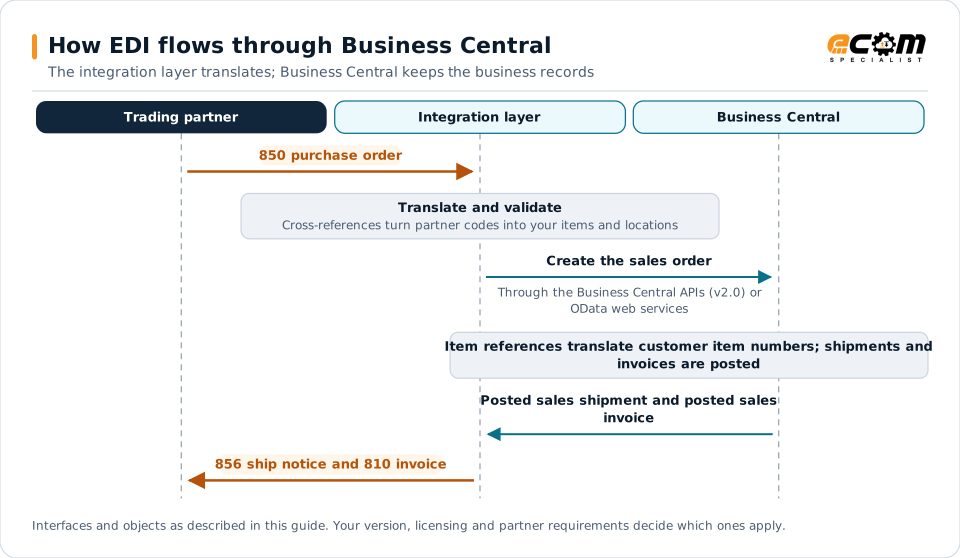
How EDI flows through Business CentralSequence diagram for Business Central. The trading partner sends a 850 purchase order to the integration layer, which translates and validates it and create the sales order through the Business Central APIs (v2.0) or OData web services. In Business Central, item references translate customer item numbers; shipments and invoices are posted. Posted sales shipment and posted sales invoice, and the integration layer sends the 856 ship notice and 810 invoice to the partner.How EDI flows through Business CentralThe integration layer translates; Business Central keeps the business recordsTrading partnerIntegration layerBusiness Central850 purchase orderTranslate and validateCross-references turn partner codes into your items and locationsCreate the sales orderThrough the Business Central APIs (v2.0) orOData web servicesItem references translate customer item numbers; shipments andinvoices are postedPosted sales shipment and posted salesinvoice856 ship notice and 810 invoiceInterfaces and objects as described in this guide. Your version, licensing and partner requirements decide which ones apply.
How EDI flows through Business CentralSequence diagram for Business Central. The trading partner sends a 850 purchase order to the integration layer, which translates and validates it and create the sales order through the Business Central APIs (v2.0) or OData web services. In Business Central, item references translate customer item numbers; shipments and invoices are posted. Posted sales shipment and posted sales invoice, and the integration layer sends the 856 ship notice and 810 invoice to the partner.How EDI flows throughBusiness CentralThe integration layer translates; BusinessCentral keeps the business recordsTradingpartnerIntegrationlayerBusinessCentral850 purchase orderTranslate and validateCross-references turnpartner codes into youritems and locationsCreate the sales orderThrough the Business CentralAPIs (v2.0) or OData webservicesItem referencestranslate customeritem numbers;shipments andinvoices are postedPosted sales shipment andposted sales invoice856 ship notice and 810invoiceInterfaces and objects as described in this guide.Your version, licensing and partner requirementsdecide which ones apply.

Read the diagram from top to bottom. Business Central does not exchange X12 itself in this design: the integration layer handles the partner connection and translation, and Business Central creates and posts the business records. Outbound documents are built from what Business Central actually recorded.
Expand diagram Download SVG

How EDI connects to Business Central

Dynamics 365 Business Central serves many small and midsize distributors and manufacturers who sell to retailers requiring EDI. An integration layer handles translation and partner connectivity and exchanges data with Business Central through its APIs.

Document mapping

EDI documentDirectionBusiness Central document
850 purchase orderInboundSales order
855 acknowledgmentOutboundSales order lines and status
856 ship noticeOutboundPosted sales shipment, warehouse shipment
810 invoiceOutboundPosted sales invoice
846 inventoryOutboundItem availability

Integration options

  • Business Central APIs (v2.0): standard REST endpoints for customers, items, sales orders, sales shipments and sales invoices. Suitable for most EDI scenarios.
  • OData web services: publish pages or queries for data not covered by standard APIs.
  • AL extensions: add partner-specific fields and logic, such as EDI identifiers or original purchase order line numbers.

Partner data

  • Item references map customer item numbers to your items.
  • Ship-to addresses store retailer store and distribution center codes.
  • Customer fields hold EDI identifiers and partner settings, often added through an extension.

Shipping data

Retail ship notices need carton-level detail and GS1-128 labels. Basic shipments can be built from posted sales shipments, but carton contents usually require warehouse functionality, an extension or a WMS. Plan this with the warehouse team before go-live.

Scheduling and limits

  • Job queue entries can run background processing, such as posting imported orders.
  • Business Central applies API rate limits per environment, so design batch sizes and frequencies accordingly.
  • Trigger time-sensitive outbound documents, such as ship notices, promptly after posting.

Best practices

  • Validate items, customers and prices before creating sales orders.
  • Keep original partner references so outbound documents echo them exactly.
  • Keep partner-specific logic in the integration layer or a well-documented extension.
  • Monitor each order through acknowledgment, shipment and invoice.
  • Start with web EDI for low-volume partners and integrate as volume grows. See web EDI vs integrated EDI.
Microsoft Dynamics 365 Business Central integration and implementationIntegration methods, document mappings and ECOM services for Microsoft Dynamics 365 Business Central.

Frequently asked questions

Does Business Central include EDI?

Business Central does not translate X12 or EDIFACT natively. An EDI integration layer or extension converts partner documents into Business Central documents and back.

How does Business Central handle customer item numbers?

Item references let you store a customer's item numbers against your items, so inbound orders can be translated to the correct items.

Can small suppliers on Business Central start with web EDI?

Yes. Many start with web EDI for a few partners and integrate Business Central once order volumes grow.

Have an EDI question we did not answer?

ECOM's integration specialists can review your partners, documents and systems and recommend next steps.