
The short answer
SAP EDI integration usually runs through IDocs. An EDI translator converts partner documents into IDocs such as ORDERS for sales orders, and SAP generates outbound IDocs such as ORDRSP, DESADV and INVOIC from output determination. Partner profiles, ports, customer material info records and EDI conversion tables tie it together; S/4HANA adds released APIs and new output management options.
Read from top to bottom. IDoc message types map to X12 documents: ORDERS to the 850, ORDRSP to the 855, DESADV to the 856 and INVOIC to the 810. WE02 and WE05 show each IDoc and its status history.
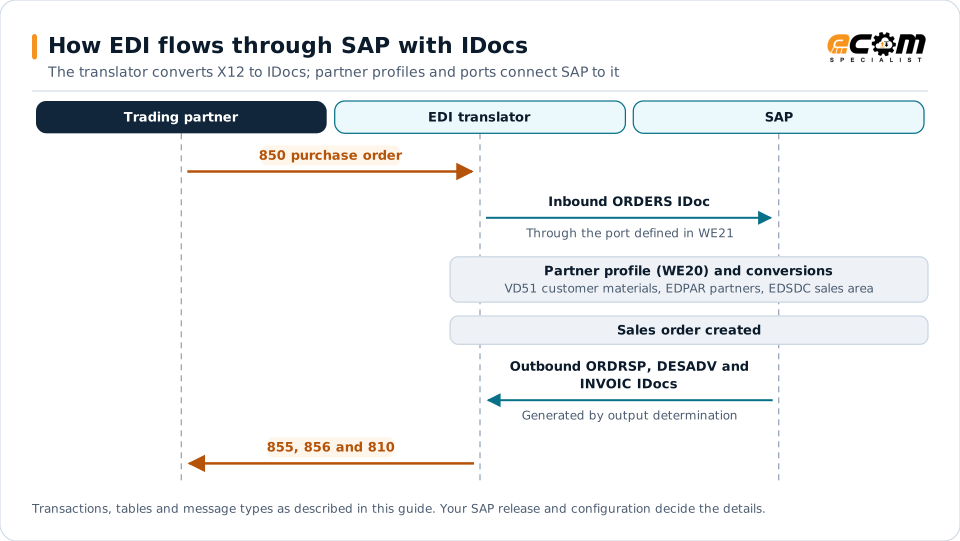
How EDI and SAP fit together
SAP does not exchange X12 or EDIFACT directly. It exchanges IDocs (intermediate documents), structured messages that represent business objects such as orders, deliveries and invoices. An EDI translator or integration platform sits between SAP and trading partners, converting partner documents to IDocs and back.
Partner (X12 850) → Translator → ORDERS IDoc → SAP sales order
SAP delivery → DESADV IDoc → Translator → Partner (X12 856)
Common message types
| Business document | X12 | SAP message type | Typical basic type |
|---|---|---|---|
| Customer order | 850 | ORDERS | ORDERS05 |
| Order response | 855 | ORDRSP | ORDERS05 |
| Order change | 860 | ORDCHG | ORDERS05 |
| Ship notice | 856 | DESADV | DELVRY series |
| Invoice | 810 | INVOIC | INVOIC02 |
| Remittance advice | 820 | REMADV | PEXR2002 |
Exact basic types depend on your release and configuration.
Key configuration
Partner profiles and ports
- Partner profiles (WE20) define, for each trading partner, which message types are exchanged, in which direction, and how they are processed.
- Ports (WE21) define how IDocs move between SAP and the integration layer, such as file, tRFC or HTTP ports.
Inbound processing
Inbound IDocs are assigned a process code that calls the posting logic. For customer orders, standard processing creates sales orders from ORDERS IDocs. Failed IDocs keep an error status that can be corrected and reprocessed.
Outbound processing
Outbound IDocs are typically triggered by output determination: an order confirmation output on the sales order, a shipping notification output on the delivery, an invoice output on the billing document. ECC uses the condition technique; S/4HANA can use the same approach or the newer output management framework, depending on configuration.
Master data conversion
Several standard tables translate partner data into SAP data:
- Customer material info records (VD51) map customer item numbers to SAP materials.
- EDI partner conversion (VOE4, table EDPAR) converts external partner numbers, such as store numbers, into SAP customer numbers.
- Sales area determination for EDI (VOE2, table EDSDC) assigns the sales area for inbound orders.
Missing entries in these tables are among the most common reasons inbound orders fail.
Monitoring and testing
- WE02 / WE05: display IDocs and their status history.
- BD87: reprocess IDocs after fixing the cause.
- WE19: test tool for creating and processing test IDocs.
These tools show IDoc status, but not whether the partner received an acknowledgment or whether the order eventually shipped and was invoiced. End-to-end monitoring in the integration layer fills that gap.
S/4HANA considerations
- Edition matters. Public cloud editions rely more on released APIs, such as OData services for sales orders, while private cloud and on-premises editions commonly continue with IDocs.
- Migrating from ECC. Many IDoc interfaces carry forward, but output determination, custom IDoc extensions and partner profiles need review. See the ERP migration checklist.
- Clean core. Keeping partner-specific logic in the integration layer rather than custom ABAP simplifies future upgrades.
Best practices
- Keep partner-specific mapping in the integration layer; keep SAP on standard IDocs where possible.
- Maintain customer material info records and EDI conversion tables as part of partner onboarding.
- Use output determination consistently so outbound documents are triggered by business events.
- Monitor IDoc errors and business outcomes together.
- Document every extension to standard IDocs.