
EDIFACT message guide · Master data
SAFHAZ Safety and hazard data
The UN/EDIFACT message used to send safety data and advice on materials supplied to industrial customers.
- Sent by
- Material supplier or manufacturer
- Received by
- Industrial customer
- Standard
- UN/EDIFACT · Batch message
- X12 equivalent
- 848 Material Safety Data Sheet
What is the EDIFACT SAFHAZ message?
SAFHAZ is the UN/EDIFACT safety and hazard data message. The directory defines it as a message that communicates safety data and advice on materials supplied to industrial customers, so that they can take measures to protect their employees and the environment from potentially harmful effects.
It carries the content of a safety data sheet, such as hazard identification, composition, handling and storage, exposure controls and emergency measures, in structured form. Customers can load it directly into their health, safety and environmental systems.
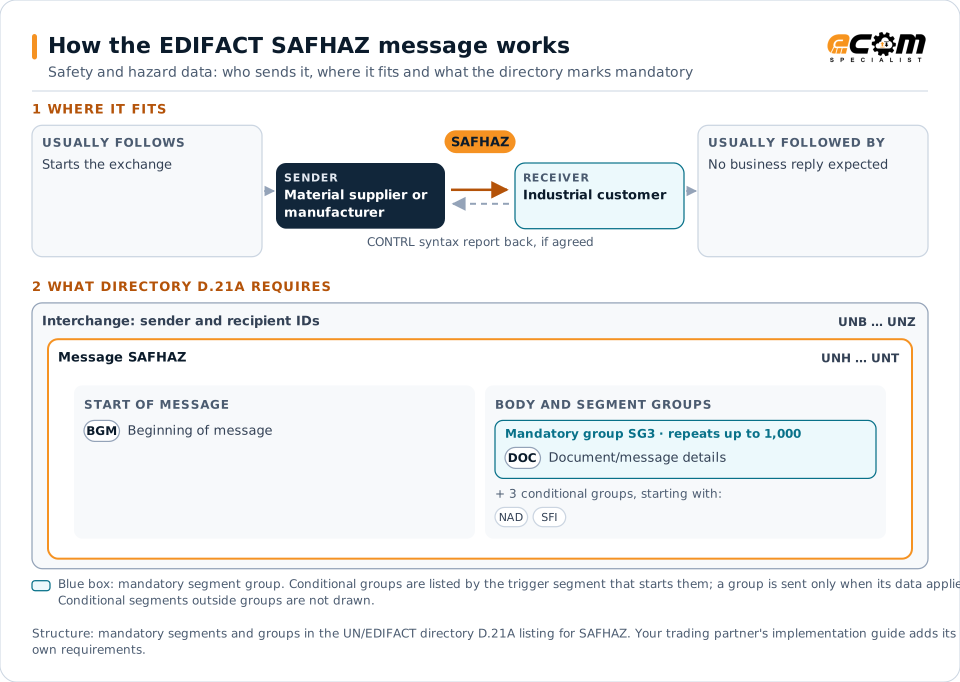
How to read this diagram: the top row shows who sends SAFHAZ, to whom, and which messages usually come before and after it. The lower part shows what the directory D.21A itself requires: the envelopes around SAFHAZ and the segments and segment groups it marks mandatory. Conditional groups are listed by their trigger segment rather than drawn in full. This is the directory's minimum, not a trading partner's requirement: a message implementation guide, such as an industry subset or a partner’s own guide, usually makes some conditional groups mandatory, restricts the codes and may use an older directory.
When it is used
- Sending safety data with the first delivery of a material
- Distributing revised safety data after a change
- Providing hazard data for regulatory compliance
Where it fits in the message flow
No other message routinely comes directly before or after SAFHAZ; it is exchanged when the business event occurs. If the partners agree, the receiver confirms each interchange with a CONTRL syntax and service report.
Structure
Mandatory segments in SAFHAZ (directory D.21A)
In UN/EDIFACT directory D.21A, the SAFHAZ message has 53 segment positions arranged in 15 segment groups. These are the segments and segment groups marked mandatory at message level, in order; a mandatory group is shown with the segment that starts it. Segments inside conditional groups are needed only when the group is used. This is the directory’s requirement, not your trading partner’s: each partner’s message implementation guide names the directory it uses, often an older one such as D.96A or D.01B where the structure can differ, makes some conditional segments mandatory and restricts the codes.
- UNH
- BGM
- SG3 (DOC)
- UNT
Practical example
SAFHAZ in practice
A chemicals distributor supplies a solvent to a manufacturing plant for the first time. It sends the plant a SAFHAZ with the product's hazard classification, composition, protective equipment required, storage conditions and first-aid measures. The plant's safety system loads the data and makes it available at the point of use.
Implementation
Implementation considerations for SAFHAZ
- Keep content aligned with the applicable safety data sheet regulations.
- Send revisions to every customer who received the material.
- Version safety data with revision dates.
- Keep a readable copy available for workers and inspectors.
How ECOM helps
Automate SAFHAZ with ECOM
Industry
Manufacturing
Customer schedules, supplier connectivity and shipping integrated with the ERP for manufacturers.
Industry
Wholesale Distribution
Customer orders, supplier purchasing, catalogs and drop-ship for distributors.
Solution
B2B Integration
Connect every customer, supplier, carrier and bank across EDI, API, file and portal channels.
Compare X12 and EDIFACT, or see answers to general questions in the EDI FAQ.
Need help with SAFHAZ?
ECOM maps, tests and monitors EDIFACT messages for your trading partners and integrates them with your ERP.