
X12 transaction guide · Master data
EDI 848 Material Safety Data Sheet
The X12 document suppliers use to send the hazard, handling and safety information of a Material Safety Data Sheet electronically.
- Sent by
- Chemical manufacturer or supplier
- Received by
- Customer, distributor or user of the material
- Standard
- ANSI ASC X12
What is an EDI 848?
The EDI 848 Material Safety Data Sheet is the ANSI X12 transaction set for communicating the chemical characteristics, hazards and precautions for the safe handling and use of a material. It was designed to carry the information required for a Material Safety Data Sheet under the US OSHA Hazard Communication Standard, Canada's WHMIS and state and local right-to-know rules.
The 848 lets a customer receive safety data as structured information that can be loaded into an environmental, health and safety system. Many regulations now use the term Safety Data Sheet (SDS) with a standard 16-section format, so implementations should confirm which regulatory content each partner expects.
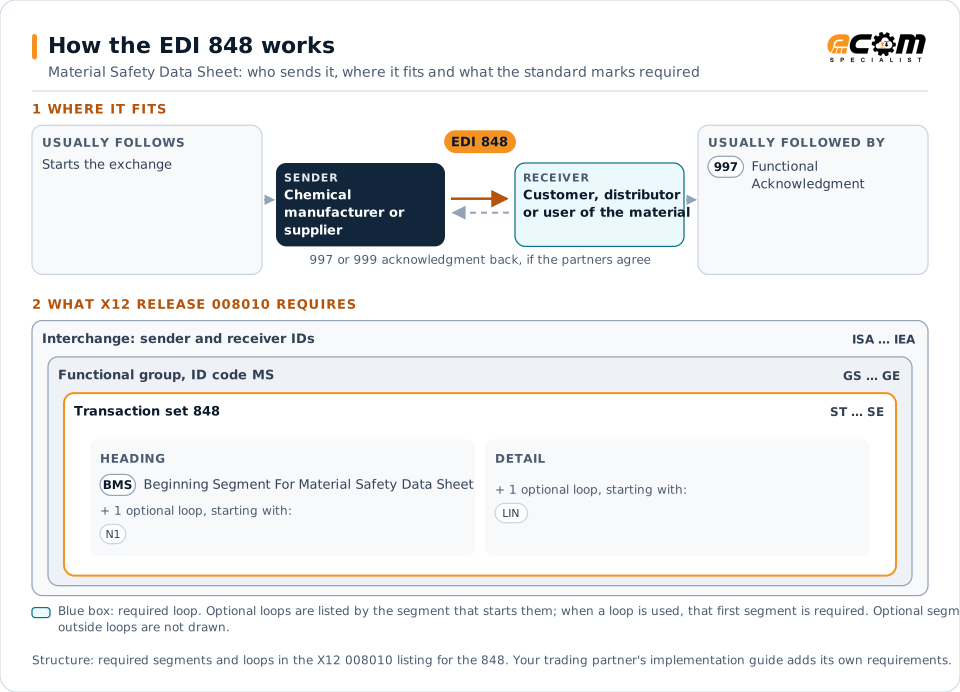
How to read this diagram: the top row shows who sends the 848, to whom, and which documents usually come before and after it. The lower part shows what X12 release 008010 itself requires: the envelopes around the 848 and the segments and loops the standard marks as required, area by area. Optional loops are listed by the segment that starts them rather than drawn in full. This is the standard's minimum, not a trading partner's requirement: each partner's implementation guide usually makes some optional loops mandatory, restricts the codes and may use a different release.
When it is used
- Sending safety data with the first shipment of a chemical product
- Distributing revised safety data after a formulation or regulatory change
- Supplying hazard data to distributors who resell the product
Where it fits in the document flow
Structure
Mandatory segments in the 848 (X12 release 008010)
The segments X12 release 008010 marks as mandatory at their level, in order. Segments inside optional loops are needed only when the loop is used. This is the standard's requirement, not your trading partner's: each partner's implementation guide names the release it uses, adds the optional segments it requires and restricts the values. The requirement status comes from one published X12 reference listing and has not been checked against a second source.
- ST
- BMS
- N1
- LIN
- MSS
- SD1
- CID
- MEA
- LX
- SE
Practical example
The 848 in practice
A coatings manufacturer reformulates an industrial primer and must give every customer the revised safety data. Its regulatory system sends an 848 to each customer that bought the product, identifying the product, the revision date, hazard classifications, composition, handling and storage precautions and emergency measures. The customers' safety systems load the revision and make it available on the shop floor.
Implementation
Implementation considerations for the 848
- Confirm the regulatory format partners need, such as the current GHS-aligned Safety Data Sheet content.
- Version each sheet and send revisions to every customer who bought the product.
- Keep a readable copy available, because many users still need the formatted document.
- Align product identifiers with the ones used on orders and labels.
How ECOM helps
Automate the 848 with ECOM
Industry
Manufacturing
Customer schedules, supplier connectivity and shipping integrated with the ERP for manufacturers.
Industry
Wholesale Distribution
Customer orders, supplier purchasing, catalogs and drop-ship for distributors.
Solution
B2B Integration
Connect every customer, supplier, carrier and bank across EDI, API, file and portal channels.
More general questions about EDI are answered in the EDI FAQ.
Related transactions
Related master data documents
Need help with the EDI 848?
ECOM maps, tests and monitors X12 documents for your trading partners and integrates them with your ERP.