
X12 transaction guide · Master data
EDI 897 Data Synchronization
The X12 document used to furnish or request information for synchronizing product or service data between trading partners.
- Sent by
- Manufacturer, supplier, retailer or data pool
- Received by
- Trading partner or data pool
- Standard
- ANSI ASC X12
What is an EDI 897?
The EDI 897 Data Synchronization is the ANSI X12 transaction set that supports the established business practice of furnishing or requesting information about data synchronization for products or services.
Data synchronization makes sure that buyers and sellers hold the same item data, such as identifiers, descriptions, dimensions and prices. Errors cause invoice discrepancies, failed scans and supply chain delays. Many companies now synchronize item data through GS1 networks, but the 897 provides an EDI option between partners. It supports ongoing data quality between partners.
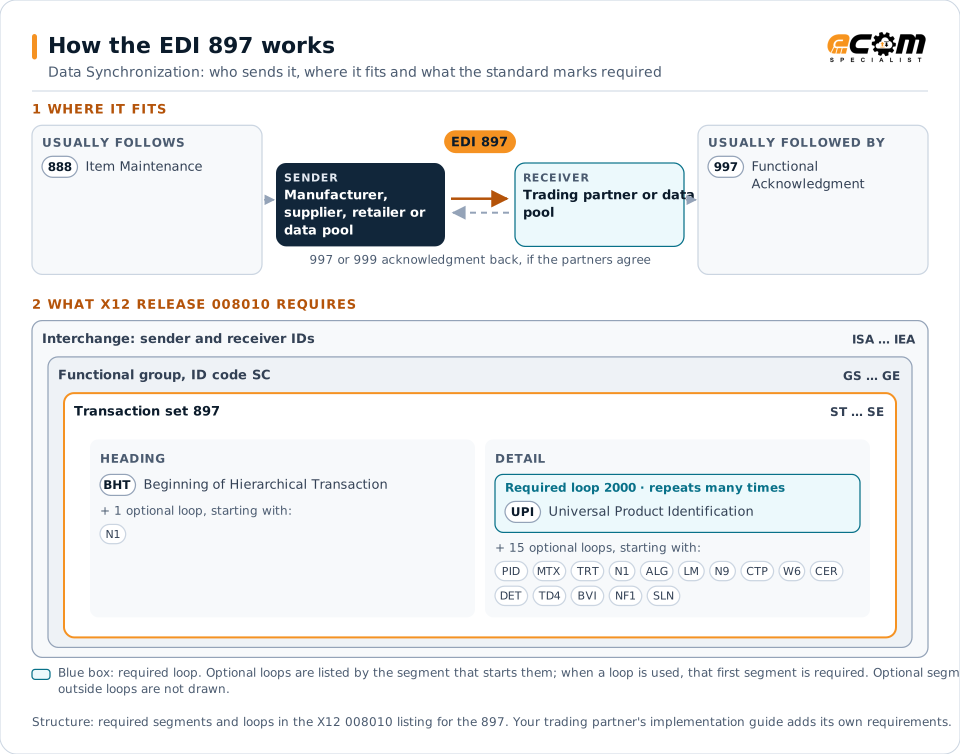
How to read this diagram: the top row shows who sends the 897, to whom, and which documents usually come before and after it. The lower part shows what X12 release 008010 itself requires: the envelopes around the 897 and the segments and loops the standard marks as required, area by area. Optional loops are listed by the segment that starts them rather than drawn in full. This is the standard's minimum, not a trading partner's requirement: each partner's implementation guide usually makes some optional loops mandatory, restricts the codes and may use a different release.
When it is used
- Requesting synchronization of item data
- Confirming that partner data matches
- Reporting data synchronization status
Where it fits in the document flow
Structure
Mandatory segments in the 897 (X12 release 008010)
The segments X12 release 008010 marks as mandatory at their level, in order. Segments inside optional loops are needed only when the loop is used. This is the standard's requirement, not your trading partner's: each partner's implementation guide names the release it uses, adds the optional segments it requires and restricts the values. The requirement status comes from one published X12 reference listing and has not been checked against a second source.
- ST
- BHT
- N1
- UPI
- PID
- MTX
- TRT
- ALG
- LM
- LQ
- N9
- CTP
- W6
- CER
- DET
- TD4
- BVI
- NF1
- LX
- NFE
- NFB
- SLN
- SE
Practical example
The 897 in practice
A retailer and a supplier find frequent price mismatches on invoices. They agree to synchronize item data, and the supplier sends its item records while the retailer returns 897 transactions confirming which items match and flagging those whose data differs. Both sides correct the flagged items.
Implementation
Implementation considerations for the 897
- Agree which party is the source for each data item.
- Check whether partners use GS1 synchronization networks instead.
- Resolve flagged data differences promptly on both sides.
- Re-synchronize after changes on either side.
How ECOM helps
Automate the 897 with ECOM
Industry
Retail
Retail and eCommerce EDI for suppliers and retailers, from purchase order to payment, with compliance built in.
Industry
Consumer Goods
Retail, distributor, marketplace and direct-channel integration for consumer brands.
Solution
B2B Integration
Connect every customer, supplier, carrier and bank across EDI, API, file and portal channels.
More general questions about EDI are answered in the EDI FAQ.
Need help with the EDI 897?
ECOM maps, tests and monitors X12 documents for your trading partners and integrates them with your ERP.