
X12 transaction guide · Master data
EDI 816 Organizational Relationships
The X12 document a parent organization uses to share its members, such as stores or facilities, and how they relate to the parent and to each other.
- Sent by
- Parent organization (retail chain, group purchasing organization or holding company)
- Received by
- Supplier, distributor or service provider
- Standard
- ANSI ASC X12
What is an EDI 816?
The EDI 816 Organizational Relationships is the ANSI X12 transaction set that describes a parent organization, its members and the relationships between them. The parent might be a retail chain, a buying group or association, a multi-hospital system or a holding company. Its members are typically stores, facilities or companies that buy under the parent's agreements.
Suppliers use the 816 to keep location master data current: which stores or facilities exist, their addresses and identifiers, and which parent or region each belongs to. It can also confirm whether a member is eligible to buy under the parent's negotiated terms. Because the data is hierarchical, the 816 uses HL segments to build the structure from the parent down to each member.
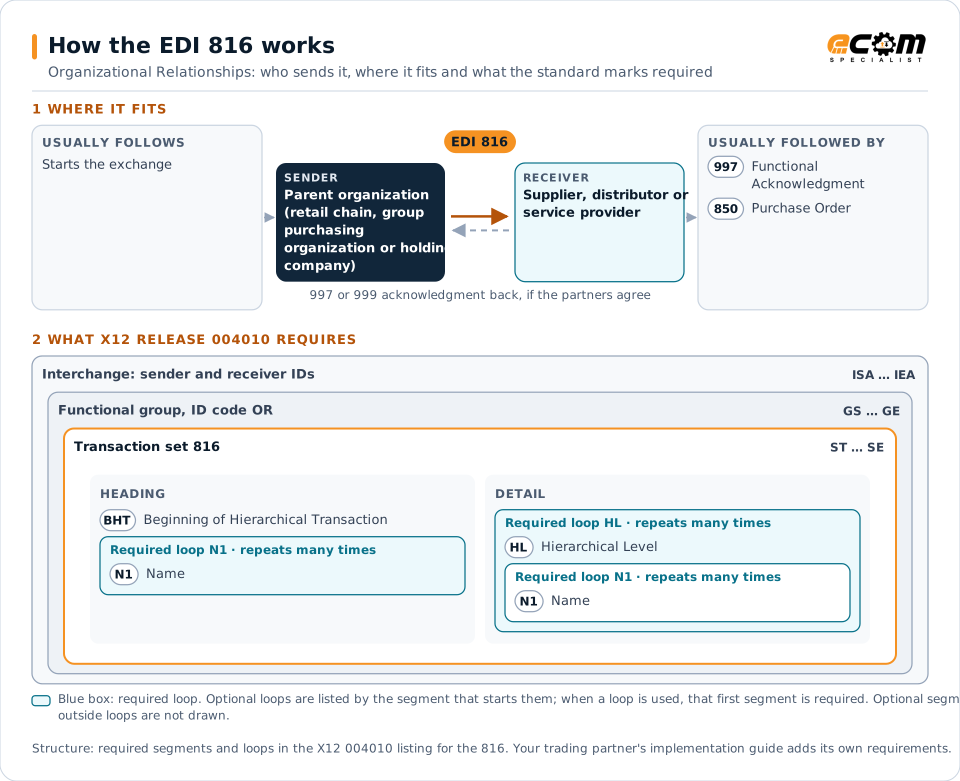
How to read this diagram: the top row shows who sends the 816, to whom, and which documents usually come before and after it. The lower part shows what X12 release 004010 itself requires: the envelopes around the 816 and the segments and loops the standard marks as required, area by area. Optional loops are listed by the segment that starts them rather than drawn in full. This is the standard's minimum, not a trading partner's requirement: each partner's implementation guide usually makes some optional loops mandatory, restricts the codes and may use a different release.
When it is used
- Sharing store or facility lists, addresses and location numbers
- Adding, changing or closing member locations
- Confirming which members can buy under a parent's contract pricing
- Keeping ship-to and bill-to master data aligned between partners
Where it fits in the document flow
Structure
Key segments in the 816
The segments most implementations use, described in plain language. The last column shows what X12 release 004010 itself requires: "Required" marks a segment the standard requires in every 816; "Optional, common" marks a segment the standard leaves optional, or that sits in an optional loop, but that implementations often use. This is the standard's requirement, not your trading partner's: each partner's implementation guide names the release it uses, makes some optional segments mandatory and restricts the values, and requirements can differ between releases. The requirement status comes from one published X12 reference listing and has not been checked against a second source.
| Segment | Name | What it carries | In X12 004010 |
|---|---|---|---|
| BHT | Beginning of Hierarchical Transaction | The hierarchical structure used, the purpose code, a reference number and the creation date. | Required |
| N1 loop (header) | Name | The organization issuing the transaction set. | Required |
| HL loop | Hierarchical Level | One level of the structure, such as the parent, a region or a member, linked to its parent level. | Required |
| N1 (in HL loop) | Name | The organization at that level, its identifier and, in N105, its relationship to the parent. | Required |
| ASI | Action or Status Indicator | Whether the member is being added, changed or deleted. | Optional, common |
Example
Sample EDI 816
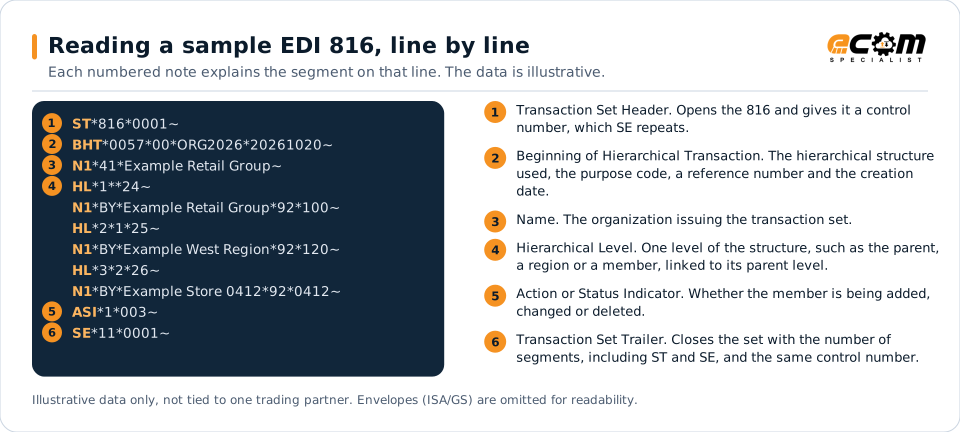
Example Retail Group (the submitter, code 41) describes a three-level structure (BHT01 0057). The group is the supergroup (HL03 24), its West region the subgroup (25) and store 0412 a member (26). ASI adds the store (action 1) with full detail (003).
Illustrative data only, not tied to one X12 release or trading partner. The interchange (ISA/IEA) and functional group (GS/GE) envelopes are omitted for readability.
ST*816*0001~
BHT*0057*00*ORG2026*20261020~
N1*41*Example Retail Group~
HL*1**24~
N1*BY*Example Retail Group*92*100~
HL*2*1*25~
N1*BY*Example West Region*92*120~
HL*3*2*26~
N1*BY*Example Store 0412*92*0412~
ASI*1*003~
SE*11*0001~The sample is the same one shown above, with a note beside each segment the first time it appears. Segment IDs are highlighted at the start of each line; the fields after them are separated by asterisks, and each segment ends with a tilde.
Avoid problems
Common 816 errors and how to prevent them
Location numbers that do not match orders
The location identifiers in the 816 must be the same ones used as ship-to codes on purchase orders. Mismatches cause rejected orders and misrouted shipments.
Ignoring closures and changes
Deleted or changed locations matter as much as new ones. Apply every action code so closed stores stop receiving shipments.
Flattening the hierarchy
Loading only the member list loses which region or parent a location belongs to, which pricing and reporting often depend on.
How ECOM helps
Automate the 816 with ECOM
Industry
Retail
Retail and eCommerce EDI for suppliers and retailers, from purchase order to payment, with compliance built in.
Industry
Healthcare
Secure B2B integration and file transfer for providers, suppliers, distributors and healthcare partners.
Solution
EDI Integration
Exchange X12 and EDIFACT documents with partners and integrate them directly with your ERP.
EDI 816 FAQs
What is the EDI 816 used for?
It lets a parent organization share its member locations and how they relate, so suppliers can keep ship-to, bill-to and eligibility data current without manual updates.
Why does the 816 use HL segments?
The data is a hierarchy, for example chain, region and store. HL segments link each level to its parent, so the receiver can rebuild the structure.
How often is an 816 sent?
It depends on the partner. Some send a full list on a schedule, others send changes only when locations open, close or move.
More general questions about EDI are answered in the EDI FAQ.
Related transactions
Related master data documents
Need help with the EDI 816?
ECOM maps, tests and monitors X12 documents for your trading partners and integrates them with your ERP.