
EDIFACT message guide · Ordering
ORDERS Purchase order
The UN/EDIFACT message a buyer sends to order goods or services from a seller under agreed conditions.
- Sent by
- Buyer
- Received by
- Seller or supplier
- Standard
- UN/EDIFACT · Batch message
- X12 equivalent
- 850 Purchase Order
What is the EDIFACT ORDERS message?
ORDERS is the UN/EDIFACT purchase order message. The directory defines it as a message specifying details for goods or services ordered under conditions agreed between the seller and the buyer. It carries the order number and date, the parties (buyer, supplier, delivery and invoice locations), terms of delivery and payment, and a line for each product with quantities, prices and requested dates.
ORDERS is one of the most widely used EDIFACT messages and often starts the order-to-cash cycle in European and international trade. A supplier typically answers with ORDRSP, ships with a DESADV and bills with an INVOIC. Retail and automotive sectors use subsets defined by GS1 EANCOM and by industry bodies such as Odette and VDA.
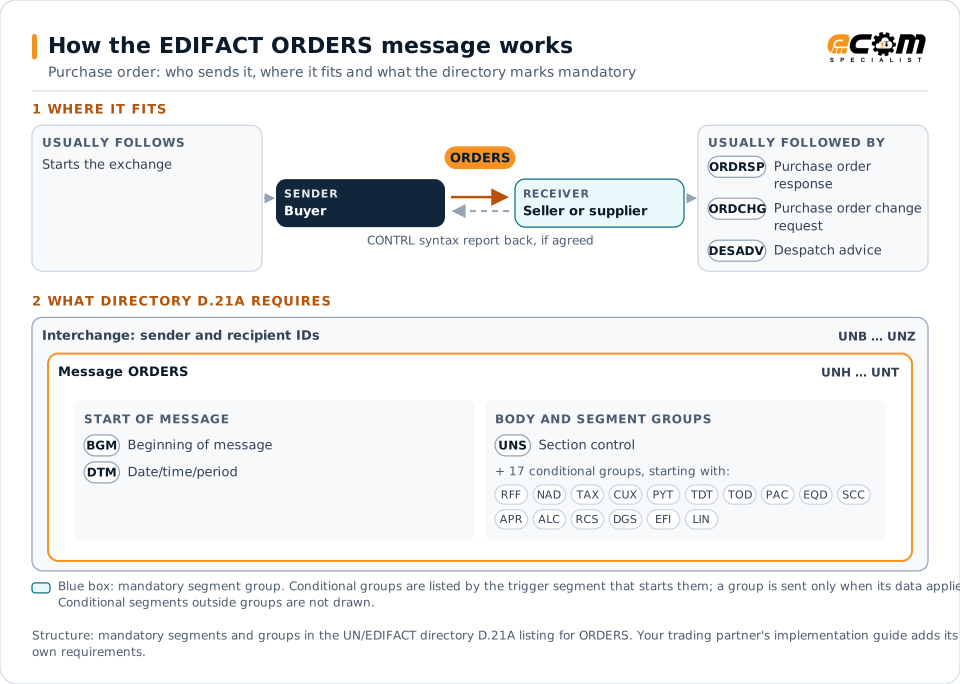
How to read this diagram: the top row shows who sends ORDERS, to whom, and which messages usually come before and after it. The lower part shows what the directory D.21A itself requires: the envelopes around ORDERS and the segments and segment groups it marks mandatory. Conditional groups are listed by their trigger segment rather than drawn in full. This is the directory's minimum, not a trading partner's requirement: a message implementation guide, such as an industry subset or a partner’s own guide, usually makes some conditional groups mandatory, restricts the codes and may use an older directory.
When it is used
- Placing orders for stock replenishment
- Ordering made-to-order or project goods
- Placing call-off orders against a contract
- Ordering services as well as goods
Where it fits in the message flow
Structure
Mandatory segments in ORDERS (directory D.21A)
In UN/EDIFACT directory D.21A, the ORDERS message has 193 segment positions arranged in 63 segment groups. These are the segments and segment groups marked mandatory at message level, in order; a mandatory group is shown with the segment that starts it. Segments inside conditional groups are needed only when the group is used. This is the directory’s requirement, not your trading partner’s: each partner’s message implementation guide names the directory it uses, often an older one such as D.96A or D.01B where the structure can differ, makes some conditional segments mandatory and restricts the codes.
- UNH
- BGM
- DTM
- UNS
- UNT
Practical example
ORDERS in practice
A Dutch supermarket chain replenishes its distribution center from a beverage producer in Belgium. Its replenishment system sends an ORDERS message with the order number, requested delivery date, the delivery point's GLN and each item's GTIN and quantity in cases. The producer's ERP creates a sales order automatically and returns an ORDRSP confirming quantities and the delivery date.
Implementation
Implementation considerations for ORDERS
- Agree on the directory version and subset, such as EANCOM D96A, before mapping.
- Use the party and product identifiers the partner expects, for example GLNs and GTINs in retail.
- Decide how order changes and cancellations are sent, either as ORDCHG or as a new ORDERS with a function code.
- Map units of measure and price bases carefully, since EDIFACT qualifiers differ from internal codes.
How ECOM helps
Automate ORDERS with ECOM
Solution
Order-to-Cash Automation
Automate the flow from purchase order to payment across every customer channel.
Solution
EDI Integration
Exchange X12 and EDIFACT documents with partners and integrate them directly with your ERP.
Industry
Retail
Retail and eCommerce EDI for suppliers and retailers, from purchase order to payment, with compliance built in.
Compare X12 and EDIFACT, or see answers to general questions in the EDI FAQ.
Related messages
Related ordering messages
Need help with ORDERS?
ECOM maps, tests and monitors EDIFACT messages for your trading partners and integrates them with your ERP.