
EDIFACT message guide · Ordering
OSTENQ Order status enquiry
The UN/EDIFACT message a buyer or its agent uses to ask a seller for the current status of orders already sent.
- Sent by
- Buyer or buyer's agent
- Received by
- Seller or seller's agent
- Standard
- UN/EDIFACT · Batch message
- X12 equivalent
- 869 Order Status Inquiry
What is the EDIFACT OSTENQ message?
OSTENQ is the UN/EDIFACT order status enquiry message. The directory defines it as a message between a buyer or buyer's agent and a seller or seller's agent asking for information on the current status of previously sent orders.
An enquiry can cover a single order, specific lines or all open orders matching criteria such as a date range. The seller answers with an order status report (OSTRPT). Buyers use enquiries to chase late orders automatically instead of by phone or email, and to keep their own expected receipt dates realistic.
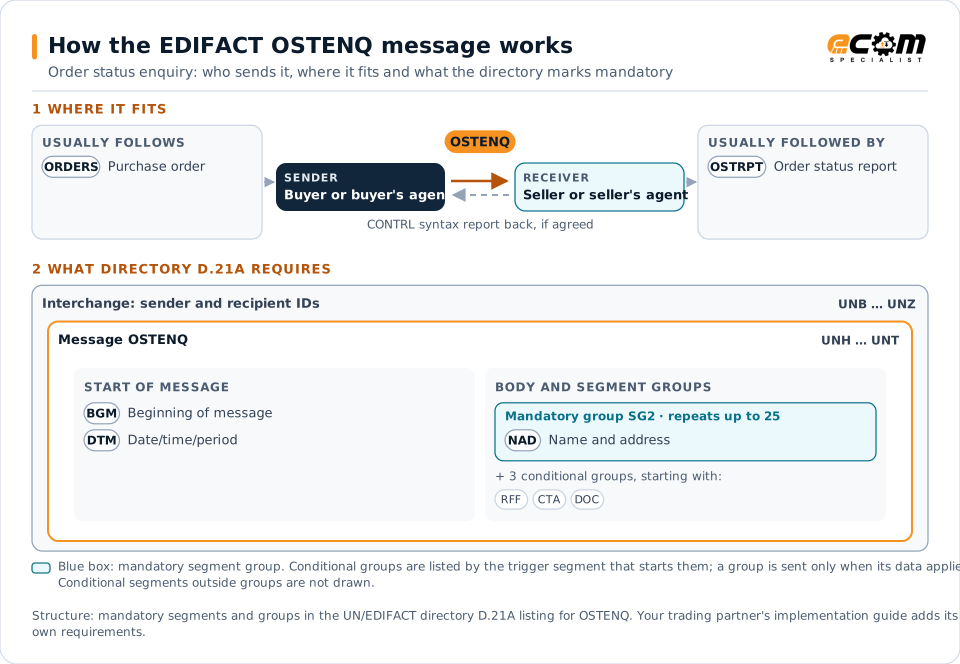
How to read this diagram: the top row shows who sends OSTENQ, to whom, and which messages usually come before and after it. The lower part shows what the directory D.21A itself requires: the envelopes around OSTENQ and the segments and segment groups it marks mandatory. Conditional groups are listed by their trigger segment rather than drawn in full. This is the directory's minimum, not a trading partner's requirement: a message implementation guide, such as an industry subset or a partner’s own guide, usually makes some conditional groups mandatory, restricts the codes and may use an older directory.
When it is used
- Checking the status of overdue orders
- Asking for status of all open orders for a period
- Following up specific order lines
Where it fits in the message flow
Structure
Mandatory segments in OSTENQ (directory D.21A)
In UN/EDIFACT directory D.21A, the OSTENQ message has 23 segment positions arranged in 7 segment groups. These are the segments and segment groups marked mandatory at message level, in order; a mandatory group is shown with the segment that starts it. Segments inside conditional groups are needed only when the group is used. This is the directory’s requirement, not your trading partner’s: each partner’s message implementation guide names the directory it uses, often an older one such as D.96A or D.01B where the structure can differ, makes some conditional segments mandatory and restricts the codes.
- UNH
- BGM
- DTM
- SG2 (NAD)
- UNT
Practical example
OSTENQ in practice
A distributor's purchasing system finds 15 order lines past their confirmed delivery date. It sends each supplier an OSTENQ listing the overdue orders and lines. The suppliers reply with OSTRPT messages giving the current status and new expected dates, and the distributor updates its availability promises to customers.
Implementation
Implementation considerations for OSTENQ
- Reference orders and lines exactly as originally sent.
- Use enquiries for exceptions rather than polling every order.
- Agree with suppliers how quickly they must respond.
- Feed the replies into planning, not only into a mailbox.
How ECOM helps
Automate OSTENQ with ECOM
Solution
Supply Chain Visibility
Track orders, shipments and invoices across partners and catch exceptions early.
Solution
Procure-to-Pay Automation
Automate purchasing, receiving and supplier invoicing across EDI, portals and documents.
Industry
Wholesale Distribution
Customer orders, supplier purchasing, catalogs and drop-ship for distributors.
Compare X12 and EDIFACT, or see answers to general questions in the EDI FAQ.
Related messages
Related ordering messages
Need help with OSTENQ?
ECOM maps, tests and monitors EDIFACT messages for your trading partners and integrates them with your ERP.