
EDIFACT message guide · Ordering
ORDCHG Purchase order change request
The UN/EDIFACT message a buyer sends to request changes to, or cancellation of, a purchase order already sent.
- Sent by
- Buyer
- Received by
- Seller or supplier
- Standard
- UN/EDIFACT · Batch message
- X12 equivalent
- 860 Purchase Order Change Request
What is the EDIFACT ORDCHG message?
ORDCHG is the UN/EDIFACT purchase order change request message. The directory defines it as a message from the buyer to the seller, specifying details of the buyer's request to change a purchase order. Changes can add, cancel or alter lines, or change header data such as dates and delivery locations.
Because it is a request, the seller confirms or rejects the change, usually with an ORDRSP. Some partners prefer to resend a complete ORDERS with a replacement function code instead of using ORDCHG, so the change method is an important part of any agreement.
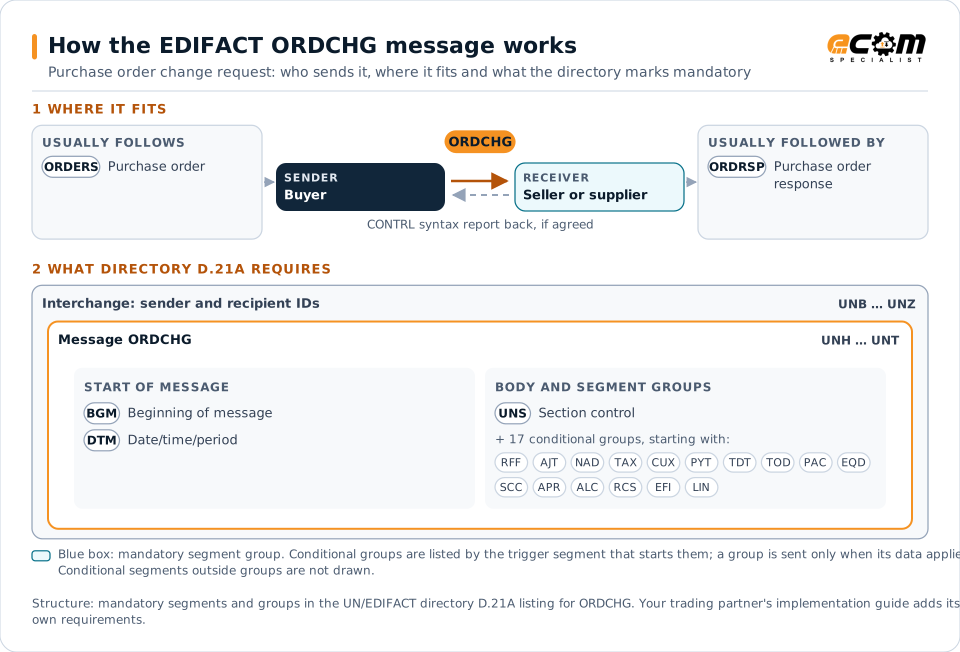
How to read this diagram: the top row shows who sends ORDCHG, to whom, and which messages usually come before and after it. The lower part shows what the directory D.21A itself requires: the envelopes around ORDCHG and the segments and segment groups it marks mandatory. Conditional groups are listed by their trigger segment rather than drawn in full. This is the directory's minimum, not a trading partner's requirement: a message implementation guide, such as an industry subset or a partner’s own guide, usually makes some conditional groups mandatory, restricts the codes and may use an older directory.
When it is used
- Changing quantities or delivery dates on an open order
- Adding or cancelling order lines
- Cancelling a whole order
Where it fits in the message flow
Structure
Mandatory segments in ORDCHG (directory D.21A)
In UN/EDIFACT directory D.21A, the ORDCHG message has 185 segment positions arranged in 60 segment groups. These are the segments and segment groups marked mandatory at message level, in order; a mandatory group is shown with the segment that starts it. Segments inside conditional groups are needed only when the group is used. This is the directory’s requirement, not your trading partner’s: each partner’s message implementation guide names the directory it uses, often an older one such as D.96A or D.01B where the structure can differ, makes some conditional segments mandatory and restricts the codes.
- UNH
- BGM
- DTM
- UNS
- UNT
Practical example
ORDCHG in practice
A fashion retailer moves a promotion forward by a week. Its buying system sends an ORDCHG to the garment supplier for the affected order, bringing the delivery date forward and increasing two lines. The supplier checks capacity and replies with an ORDRSP accepting the date and one increase but not the other.
Implementation
Implementation considerations for ORDCHG
- Agree whether changes use ORDCHG or a replacement ORDERS.
- Identify each changed line with the original line number.
- Agree a cut-off for changes, such as despatch, and how later changes are handled.
- Process the supplier's response before treating the change as accepted.
How ECOM helps
Automate ORDCHG with ECOM
Solution
Order-to-Cash Automation
Automate the flow from purchase order to payment across every customer channel.
Solution
Procure-to-Pay Automation
Automate purchasing, receiving and supplier invoicing across EDI, portals and documents.
Industry
Retail
Retail and eCommerce EDI for suppliers and retailers, from purchase order to payment, with compliance built in.
Compare X12 and EDIFACT, or see answers to general questions in the EDI FAQ.
Related messages
Related ordering messages
Need help with ORDCHG?
ECOM maps, tests and monitors EDIFACT messages for your trading partners and integrates them with your ERP.