
EDIFACT message guide · Shipping and logistics
DESADV Despatch advice
The UN/EDIFACT message that describes goods despatched or ready for despatch, including their packaging, so the receiver can prepare.
- Sent by
- Supplier or shipper
- Received by
- Buyer or consignee
- Standard
- UN/EDIFACT · Batch message
- X12 equivalent
- 856 Advance Ship Notice
What is the EDIFACT DESADV message?
DESADV is the UN/EDIFACT despatch advice message. The directory defines it as a message specifying details for goods despatched or ready for despatch under agreed conditions, and it serves both as a delivery despatch advice and as a returns despatch advice. It describes the consignment, its packaging hierarchy (pallets, cartons, items), the serial shipping container codes on labels and the order lines being shipped.
Receivers use the DESADV to plan unloading and to receive goods by scanning labels instead of counting. In retail and automotive it is often mandatory, and inaccurate despatch advices can lead to penalties.
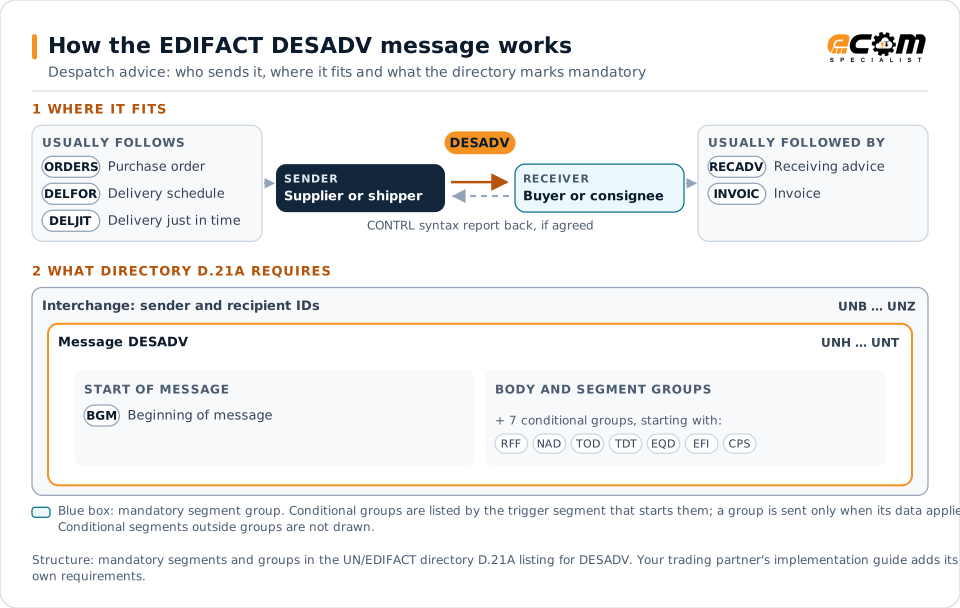
How to read this diagram: the top row shows who sends DESADV, to whom, and which messages usually come before and after it. The lower part shows what the directory D.21A itself requires: the envelopes around DESADV and the segments and segment groups it marks mandatory. Conditional groups are listed by their trigger segment rather than drawn in full. This is the directory's minimum, not a trading partner's requirement: a message implementation guide, such as an industry subset or a partner’s own guide, usually makes some conditional groups mandatory, restricts the codes and may use an older directory.
When it is used
- Notifying a customer of goods despatched
- Describing pallet and carton contents for scan-based receiving
- Announcing returns despatched back to a supplier
Where it fits in the message flow
Structure
Mandatory segments in DESADV (directory D.21A)
In UN/EDIFACT directory D.21A, the DESADV message has 109 segment positions arranged in 28 segment groups. These are the segments and segment groups marked mandatory at message level, in order; a mandatory group is shown with the segment that starts it. Segments inside conditional groups are needed only when the group is used. This is the directory’s requirement, not your trading partner’s: each partner’s message implementation guide names the directory it uses, often an older one such as D.96A or D.01B where the structure can differ, makes some conditional segments mandatory and restricts the codes.
- UNH
- BGM
- UNT
Practical example
DESADV in practice
A supplier ships four pallets of household goods to a retailer's distribution center. When the truck leaves, its warehouse system sends a DESADV with the despatch note number, the order references and, for each pallet, its SSCC and the items and quantities on it. The DC receives the pallets by scanning the SSCC labels and confirms receipt with a RECADV.
Implementation
Implementation considerations for DESADV
- Send the DESADV when goods leave, before they arrive at the receiver.
- Make sure SSCC codes in the message match the physical labels.
- Follow the partner's packaging hierarchy rules exactly.
- Reference the orders or delivery schedules being fulfilled.
How ECOM helps
Automate DESADV with ECOM
Solution
Logistics Automation
Automate tenders, status updates, freight invoices and warehouse orders with logistics partners.
Industry
Retail
Retail and eCommerce EDI for suppliers and retailers, from purchase order to payment, with compliance built in.
Industry
Automotive
Schedules, ship notices, labels, self-billing and multi-plant routing for automotive suppliers.
Compare X12 and EDIFACT, or see answers to general questions in the EDI FAQ.
Related messages
Related shipping and logistics messages
Need help with DESADV?
ECOM maps, tests and monitors EDIFACT messages for your trading partners and integrates them with your ERP.