
EDIFACT message guide · Finance
INVOIC Invoice
The UN/EDIFACT message a seller uses to claim payment for goods or services, also used for credit and debit notes.
- Sent by
- Seller or supplier
- Received by
- Buyer
- Standard
- UN/EDIFACT · Batch message
- X12 equivalent
- 810 Invoice
What is the EDIFACT INVOIC message?
INVOIC is the UN/EDIFACT invoice message. The directory defines it as a message claiming payment for goods or services supplied under conditions agreed between the seller and the buyer, and, with the right qualifiers, it also serves as the specification for credit notes and debit notes.
An invoice carries the invoice number and date, the parties and their tax registrations, references to orders and despatches, line items with quantities and prices, allowances and charges, tax breakdowns and totals. In many countries electronic invoices must also meet tax and archiving rules, so INVOIC implementations often involve legal as well as technical requirements.
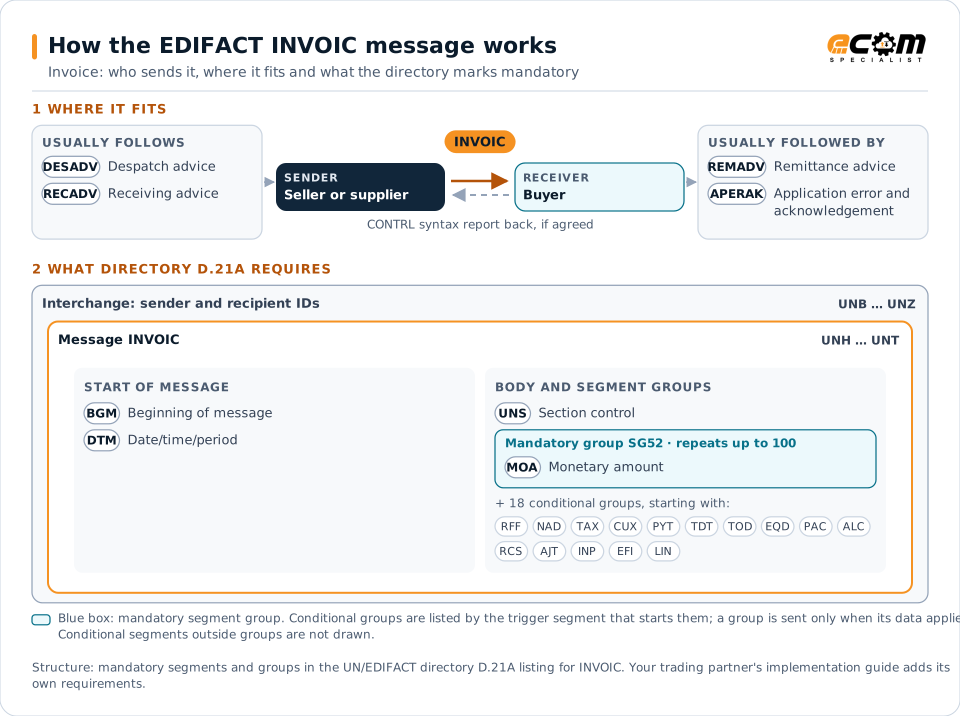
How to read this diagram: the top row shows who sends INVOIC, to whom, and which messages usually come before and after it. The lower part shows what the directory D.21A itself requires: the envelopes around INVOIC and the segments and segment groups it marks mandatory. Conditional groups are listed by their trigger segment rather than drawn in full. This is the directory's minimum, not a trading partner's requirement: a message implementation guide, such as an industry subset or a partner’s own guide, usually makes some conditional groups mandatory, restricts the codes and may use an older directory.
When it is used
- Invoicing delivered goods or services
- Issuing credit notes for returns or price corrections
- Issuing debit notes for additional charges
Where it fits in the message flow
Structure
Mandatory segments in INVOIC (directory D.21A)
In UN/EDIFACT directory D.21A, the INVOIC message has 192 segment positions arranged in 55 segment groups. These are the segments and segment groups marked mandatory at message level, in order; a mandatory group is shown with the segment that starts it. Segments inside conditional groups are needed only when the group is used. This is the directory’s requirement, not your trading partner’s: each partner’s message implementation guide names the directory it uses, often an older one such as D.96A or D.01B where the structure can differ, makes some conditional segments mandatory and restricts the codes.
- UNH
- BGM
- DTM
- UNS
- SG52 (MOA)
- UNT
Practical example
INVOIC in practice
A packaging manufacturer delivers to a food producer in France. After each delivery its ERP sends an INVOIC with the order and despatch references, the lines delivered, unit prices, VAT at the applicable rate and totals. The buyer's accounts payable system matches the invoice to the order and receipt and schedules payment, and the supplier later receives a REMADV.
Implementation
Implementation considerations for INVOIC
- Check national e-invoicing and VAT rules that apply to the invoice flow.
- Reference the order and despatch so three-way matching works.
- Calculate tax per line and in total exactly as the partner validates it.
- Use the invoice type code to distinguish invoices, credit notes and debit notes.
How ECOM helps
Automate INVOIC with ECOM
Solution
Financial Document Automation
Automate invoices, remittances, payment files and bank statements from capture to posting.
Solution
Order-to-Cash Automation
Automate the flow from purchase order to payment across every customer channel.
Industry
Manufacturing
Customer schedules, supplier connectivity and shipping integrated with the ERP for manufacturers.
Compare X12 and EDIFACT, or see answers to general questions in the EDI FAQ.
Related messages
Related finance messages
Need help with INVOIC?
ECOM maps, tests and monitors EDIFACT messages for your trading partners and integrates them with your ERP.