
EDIFACT message guide · Planning and inventory
DELJIT Delivery just in time
The UN/EDIFACT message customers use to give suppliers precise delivery sequence and just-in-time schedule requirements.
- Sent by
- Customer, typically a manufacturer
- Received by
- Supplier
- Standard
- UN/EDIFACT · Batch message
- X12 equivalent
- 862 Shipping Schedule
What is the EDIFACT DELJIT message?
DELJIT is the UN/EDIFACT delivery just in time message. The directory defines it as a message giving a customer the ability to convey precise delivery sequence and just-in-time schedule requirements to a supplier, intended to supplement the delivery schedule message (DELFOR).
Where DELFOR plans weeks and months ahead, DELJIT tells the supplier exactly what to deliver in the next hours or days, sometimes in the order in which vehicles will be built. Suppliers that deliver in sequence use it to load parts in line-side order.
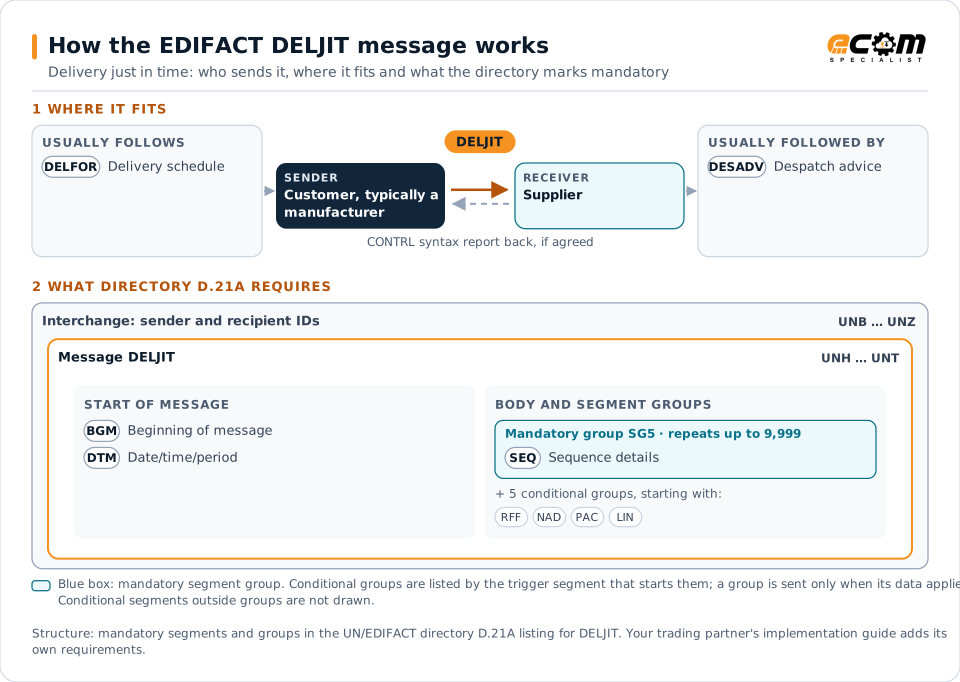
How to read this diagram: the top row shows who sends DELJIT, to whom, and which messages usually come before and after it. The lower part shows what the directory D.21A itself requires: the envelopes around DELJIT and the segments and segment groups it marks mandatory. Conditional groups are listed by their trigger segment rather than drawn in full. This is the directory's minimum, not a trading partner's requirement: a message implementation guide, such as an industry subset or a partner’s own guide, usually makes some conditional groups mandatory, restricts the codes and may use an older directory.
When it is used
- Calling off parts for delivery within hours or days
- Sending build sequences for in-sequence delivery
- Adjusting near-term deliveries within the DELFOR plan
Where it fits in the message flow
Structure
Mandatory segments in DELJIT (directory D.21A)
In UN/EDIFACT directory D.21A, the DELJIT message has 46 segment positions arranged in 16 segment groups. These are the segments and segment groups marked mandatory at message level, in order; a mandatory group is shown with the segment that starts it. Segments inside conditional groups are needed only when the group is used. This is the directory’s requirement, not your trading partner’s: each partner’s message implementation guide names the directory it uses, often an older one such as D.96A or D.01B where the structure can differ, makes some conditional segments mandatory and restricts the codes.
- UNH
- BGM
- DTM
- SG5 (SEQ)
- UNT
Practical example
DELJIT in practice
An assembly plant sends its cockpit module supplier a DELJIT every hour listing the modules needed for the next vehicles in build order, each with its sequence number and variant. The supplier builds and loads the modules in that order, and each delivery is announced with a DESADV before the truck arrives at the line.
Implementation
Implementation considerations for DELJIT
- Process messages continuously; delays affect the production line.
- Keep sequence numbers intact from receipt to loading.
- Reconcile DELJIT call-offs with the DELFOR plan.
- Monitor the connection closely, with fallback procedures for outages.
How ECOM helps
Automate DELJIT with ECOM
Industry
Automotive
Schedules, ship notices, labels, self-billing and multi-plant routing for automotive suppliers.
Industry
Manufacturing
Customer schedules, supplier connectivity and shipping integrated with the ERP for manufacturers.
Solution
Logistics Automation
Automate tenders, status updates, freight invoices and warehouse orders with logistics partners.
Compare X12 and EDIFACT, or see answers to general questions in the EDI FAQ.
Related messages
Related planning and inventory messages
Need help with DELJIT?
ECOM maps, tests and monitors EDIFACT messages for your trading partners and integrates them with your ERP.