
EDIFACT message guide · Planning and inventory
PRODEX Product exchange reconciliation
The UN/EDIFACT message used between partners that lend products to each other to report movements and reconcile outstanding balances.
- Sent by
- Trading partner in a product exchange agreement
- Received by
- The other partner
- Standard
- UN/EDIFACT · Batch message
- X12 equivalent
- No direct equivalent
What is the EDIFACT PRODEX message?
PRODEX is the UN/EDIFACT product exchange reconciliation message. The directory describes it as a communication between two trading partners with agreements to lend products to each other, providing information about movements of products to and from locations on particular dates, and about the outstanding balance.
Exchange agreements are common for bulk products such as fuels and chemicals, where companies supply each other's customers from the nearest terminal and settle in product rather than cash. PRODEX lets both sides reconcile who owes whom how much.
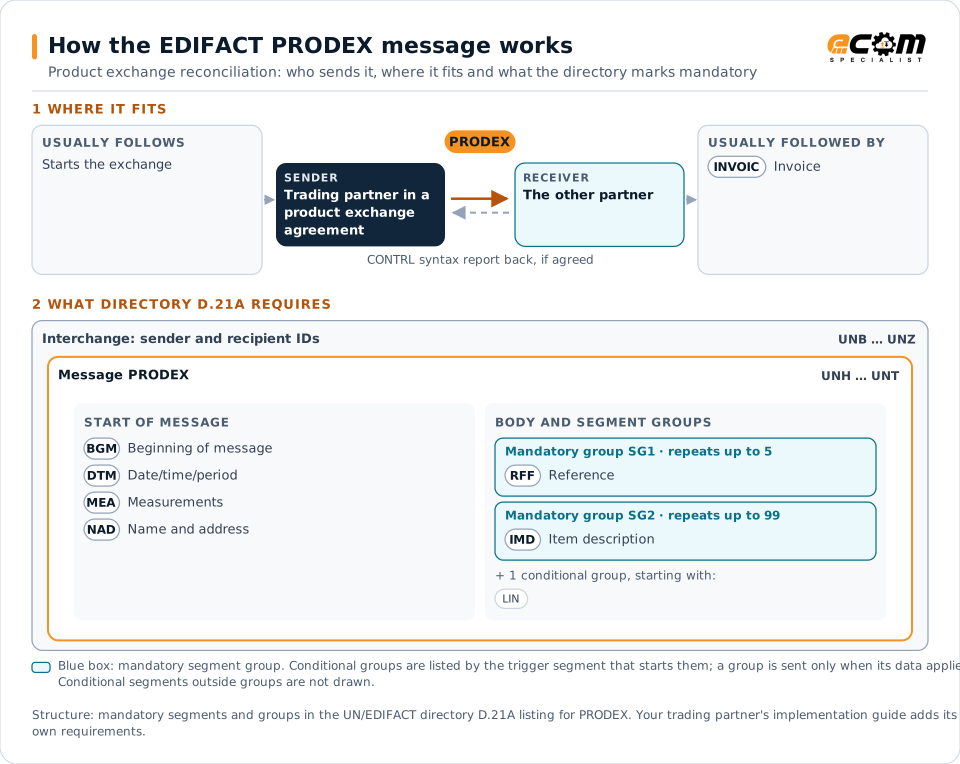
How to read this diagram: the top row shows who sends PRODEX, to whom, and which messages usually come before and after it. The lower part shows what the directory D.21A itself requires: the envelopes around PRODEX and the segments and segment groups it marks mandatory. Conditional groups are listed by their trigger segment rather than drawn in full. This is the directory's minimum, not a trading partner's requirement: a message implementation guide, such as an industry subset or a partner’s own guide, usually makes some conditional groups mandatory, restricts the codes and may use an older directory.
When it is used
- Reporting product lifted under an exchange agreement
- Reconciling exchange balances between partners
- Settling differences at period end
Where it fits in the message flow
Structure
Mandatory segments in PRODEX (directory D.21A)
In UN/EDIFACT directory D.21A, the PRODEX message has 19 segment positions arranged in 4 segment groups. These are the segments and segment groups marked mandatory at message level, in order; a mandatory group is shown with the segment that starts it. Segments inside conditional groups are needed only when the group is used. This is the directory’s requirement, not your trading partner’s: each partner’s message implementation guide names the directory it uses, often an older one such as D.96A or D.01B where the structure can differ, makes some conditional segments mandatory and restricts the codes.
- UNH
- BGM
- DTM
- MEA
- NAD
- SG1 (RFF)
- SG2 (IMD)
- UNT
Practical example
PRODEX in practice
Two fuel distributors exchange product: each lifts diesel at the other's terminal near its customers. At month end each sends the other a PRODEX listing every lifting, the volumes, terminals and dates, and the running balance. The partners agree the net balance and settle the difference in product the following month.
Implementation
Implementation considerations for PRODEX
- Agree units, temperature correction and measurement bases for bulk volumes.
- Reconcile each movement, not only the totals.
- Settle differences on the schedule in the agreement.
- Keep exchange movements separate from ordinary sales.
How ECOM helps
Automate PRODEX with ECOM
Industry
Manufacturing
Customer schedules, supplier connectivity and shipping integrated with the ERP for manufacturers.
Industry
Trucking and Transportation
Load tenders, responses, status and freight invoices for carriers, brokers and shippers, integrated with the TMS.
Solution
Supply Chain Visibility
Track orders, shipments and invoices across partners and catch exceptions early.
Compare X12 and EDIFACT, or see answers to general questions in the EDI FAQ.
Related messages
Related planning and inventory messages
Need help with PRODEX?
ECOM maps, tests and monitors EDIFACT messages for your trading partners and integrates them with your ERP.