
X12 transaction guide · Catalogs and pricing
EDI 889 Promotion Announcement
The X12 document a broker, distributor or manufacturer uses to announce promotion allowances, dates and conditions, or to replace or cancel a promotion.
- Sent by
- Manufacturer, broker or distributor
- Received by
- Retailer or wholesaler
- Standard
- ANSI ASC X12
What is an EDI 889?
The EDI 889 Promotion Announcement is the ANSI X12 transaction set used to announce promotion allowance amounts, the dates they apply and any performance conditions attached to them. It can also replace a promotion sent earlier in its entirety or cancel it.
Promotions drive a large share of consumer goods volume, and the allowances they carry reduce what the buyer pays. Announcing them electronically lets the buyer plan orders around the promotion and apply the right allowances when invoices arrive, which reduces deductions and disputes.
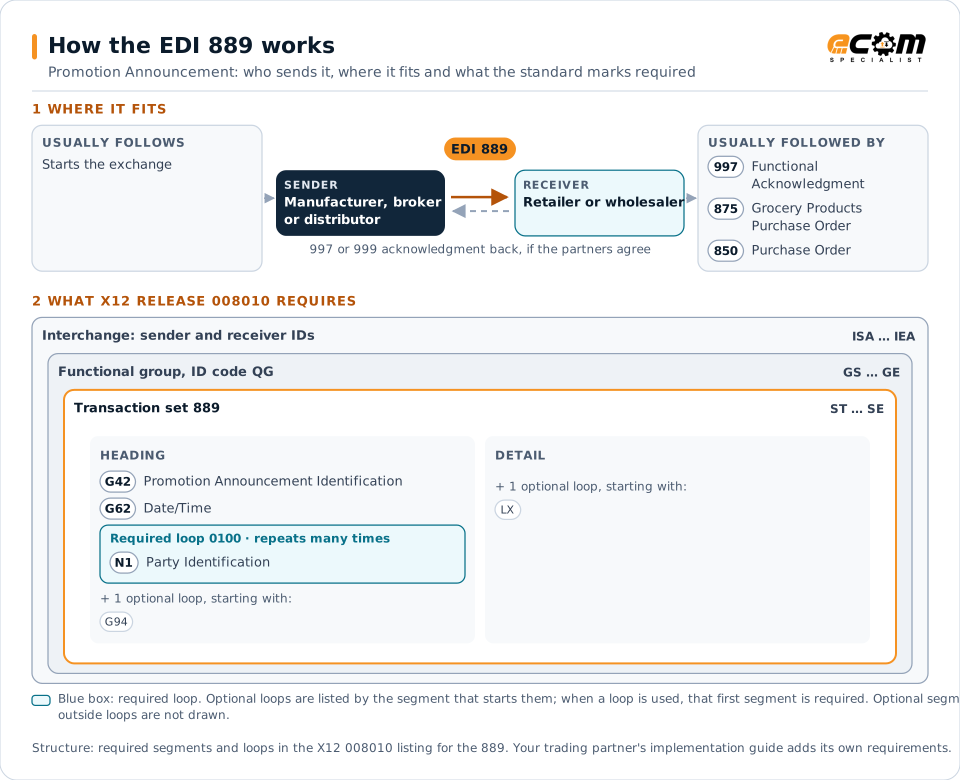
How to read this diagram: the top row shows who sends the 889, to whom, and which documents usually come before and after it. The lower part shows what X12 release 008010 itself requires: the envelopes around the 889 and the segments and loops the standard marks as required, area by area. Optional loops are listed by the segment that starts them rather than drawn in full. This is the standard's minimum, not a trading partner's requirement: each partner's implementation guide usually makes some optional loops mandatory, restricts the codes and may use a different release.
When it is used
- Announcing a new trade promotion and its allowances
- Replacing a promotion with revised terms
- Cancelling a promotion before it starts
Where it fits in the document flow
Structure
Mandatory segments in the 889 (X12 release 008010)
The segments X12 release 008010 marks as mandatory at their level, in order. Segments inside optional loops are needed only when the loop is used. This is the standard's requirement, not your trading partner's: each partner's implementation guide names the release it uses, adds the optional segments it requires and restricts the values. The requirement status comes from one published X12 reference listing and has not been checked against a second source.
- ST
- G42
- G62
- N1
- G94
- LX
- G95
- G45
- SE
Practical example
The 889 in practice
A coffee brand offers wholesalers an off-invoice allowance on selected items for a four-week period, provided they feature the items in their weekly ads. It sends an 889 with the items, the allowance per case, the dates and the performance condition. The wholesaler plans larger orders for the period and applies the allowance when invoices arrive.
Implementation
Implementation considerations for the 889
- Make the promotion identifiers on later orders and invoices match the 889.
- Treat replacements and cancellations as updates to the original promotion, not new ones.
- Record performance conditions so proof of performance can be matched before payment.
How ECOM helps
Automate the 889 with ECOM
Industry
Food and Beverage
Grocery and foodservice EDI for food and beverage manufacturers, with lot, date and inventory data.
Industry
Consumer Goods
Retail, distributor, marketplace and direct-channel integration for consumer brands.
Solution
Order-to-Cash Automation
Automate the flow from purchase order to payment across every customer channel.
More general questions about EDI are answered in the EDI FAQ.
Related transactions
Related catalogs and pricing documents
Need help with the EDI 889?
ECOM maps, tests and monitors X12 documents for your trading partners and integrates them with your ERP.