
X12 transaction guide · Healthcare and insurance
EDI 834 Benefit Enrollment and Maintenance
The X12 document plan sponsors such as employers use to send benefit enrollments, changes and terminations to insurers and administrators.
- Sent by
- Plan sponsor (employer, union, agency or association) or its administrator
- Received by
- Insurer, payer or third-party administrator
- Standard
- ANSI ASC X12
What is an EDI 834?
The EDI 834 Benefit Enrollment and Maintenance is the ANSI X12 transaction set used to establish communication between the sponsor of an insurance product and the payer, directly or through a third-party administrator. The sponsor is the party that ultimately pays for the coverage, such as an employer, union, government agency or association.
Sponsors use the 834 to enroll members, change their coverage or personal details and terminate coverage. HIPAA designates it as the standard for benefit enrollment in the United States. Files may contain only changes or a full list of members, depending on the agreement.
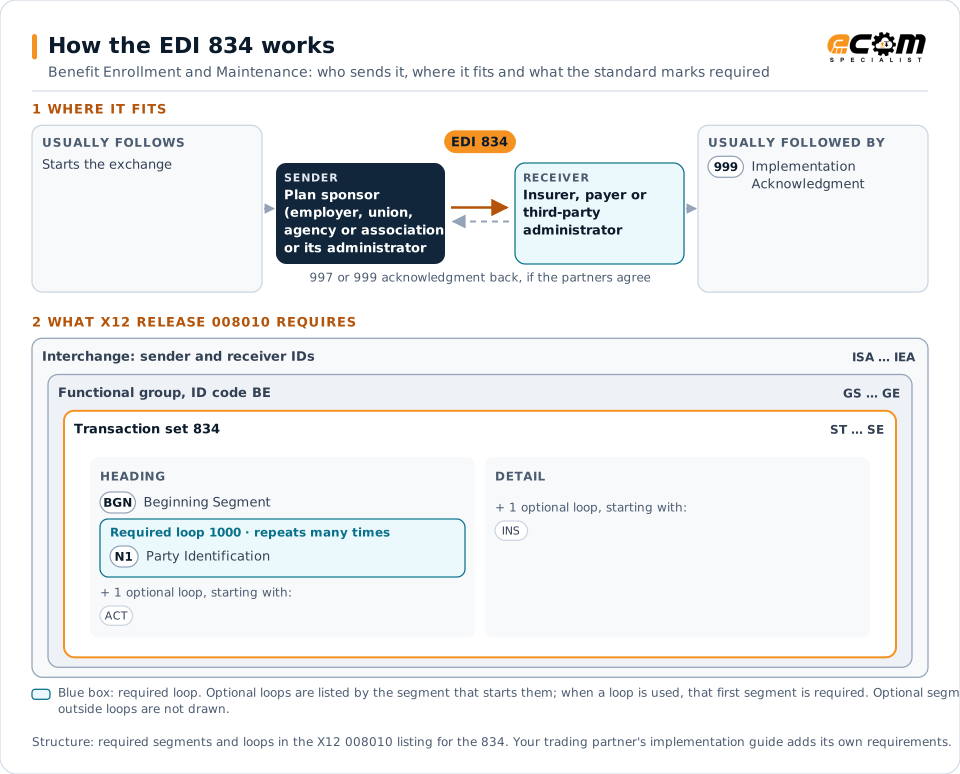
How to read this diagram: the top row shows who sends the 834, to whom, and which documents usually come before and after it. The lower part shows what X12 release 008010 itself requires: the envelopes around the 834 and the segments and loops the standard marks as required, area by area. Optional loops are listed by the segment that starts them rather than drawn in full. This is the standard's minimum, not a trading partner's requirement: each partner's implementation guide usually makes some optional loops mandatory, restricts the codes and may use a different release.
When it is used
- Enrolling new employees in health and other benefits
- Reporting life events and coverage changes
- Terminating coverage when employment ends
- Sending periodic full-file enrollment audits
Where it fits in the document flow
Structure
Mandatory segments in the 834 (X12 release 008010)
The segments X12 release 008010 marks as mandatory at their level, in order. Segments inside optional loops are needed only when the loop is used. This is the standard's requirement, not your trading partner's: each partner's implementation guide names the release it uses, adds the optional segments it requires and restricts the values. The requirement status comes from one published X12 reference listing and has not been checked against a second source.
- ST
- BGN
- N1
- ACT
- INS
- REF
- NM1
- DSB
- HD
- LX
- COB
- LC
- BEN
- FSA
- RP
- NX1
- FC
- INV
- AIN
- SE
Practical example
The 834 in practice
During open enrollment, an employer's HR system collects benefit elections for 2,000 employees. It sends each insurer an 834 with the new elections, dependents and effective dates. After enrollment, weekly change files report new hires and terminations, and a monthly full file lets the insurer reconcile its records.
Implementation
Implementation considerations for the 834
- Agree whether files are change-only or full replacements, as loading the wrong type can terminate coverage.
- Validate dependents, effective dates and coverage codes before sending.
- Reconcile insurer records with full files regularly to catch missed changes.
How ECOM helps
Automate the 834 with ECOM
Industry
Healthcare
Secure B2B integration and file transfer for providers, suppliers, distributors and healthcare partners.
Industry
Financial Services
Secure file transfer and B2B integration for banks and financial institutions.
Solution
EDI Integration
Exchange X12 and EDIFACT documents with partners and integrate them directly with your ERP.
More general questions about EDI are answered in the EDI FAQ.
Related transactions
Related healthcare and insurance documents
- 111Individual Insurance Policy and Client Information
- 148Report of Injury, Illness or Incident
- 186Insurance Underwriting Requirements Reporting
- 255Underwriting Information Services
- 269Health Care Benefit Coordination Verification
- 270Eligibility, Coverage or Benefit Inquiry
- 271Eligibility, Coverage or Benefit Information
- 100Insurance Plan Description
- 112Property Damage Report
- 124Vehicle Damage
- 187Premium Audit Request and Return
- 252Insurance Producer Administration
Need help with the EDI 834?
ECOM maps, tests and monitors X12 documents for your trading partners and integrates them with your ERP.