
X12 transaction guide · Healthcare and insurance
EDI 187 Premium Audit Request and Return
The X12 document used to communicate premium audit information between property and casualty insurers and premium audit service providers.
- Sent by
- Insurer or premium audit service provider
- Received by
- Premium audit service provider or insurer
- Standard
- ANSI ASC X12
What is an EDI 187?
The EDI 187 Premium Audit Request and Return is the ANSI X12 transaction set used to communicate premium audit information between property and casualty insurers and independent premium audit service providers.
Policies such as workers' compensation and general liability are priced on estimated payroll or sales, then audited after the policy period to calculate the final premium. The insurer requests the audit, and the audit firm returns the verified exposures by classification, from which the insurer calculates any additional or returned premium.
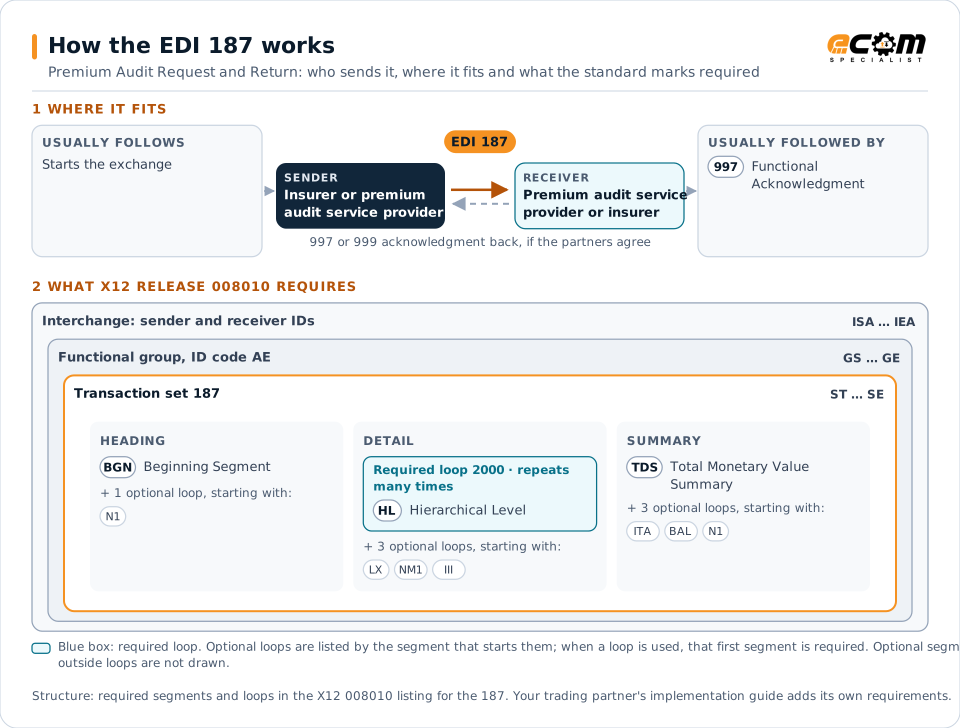
How to read this diagram: the top row shows who sends the 187, to whom, and which documents usually come before and after it. The lower part shows what X12 release 008010 itself requires: the envelopes around the 187 and the segments and loops the standard marks as required, area by area. Optional loops are listed by the segment that starts them rather than drawn in full. This is the standard's minimum, not a trading partner's requirement: each partner's implementation guide usually makes some optional loops mandatory, restricts the codes and may use a different release.
When it is used
- Ordering premium audits at policy expiration
- Returning audited payroll or sales by class
- Supporting final premium calculation
Where it fits in the document flow
Structure
Mandatory segments in the 187 (X12 release 008010)
The segments X12 release 008010 marks as mandatory at their level, in order. Segments inside optional loops are needed only when the loop is used. This is the standard's requirement, not your trading partner's: each partner's implementation guide names the release it uses, adds the optional segments it requires and restricts the values. The requirement status comes from one published X12 reference listing and has not been checked against a second source.
- ST
- BGN
- N1
- HL
- LX
- QTY
- EFI
- NM1
- III
- SUP
- LQ
- ITA
- TDS
- BAL
- SE
Practical example
The 187 in practice
A contractor's workers' compensation policy expires. The insurer sends its audit firm a 187 request with the policy, period and classifications. The auditor reviews the contractor's payroll records and returns the audited payroll by class, and the insurer bills additional premium for higher-than-estimated payroll.
Implementation
Implementation considerations for the 187
- Use the classification codes of the applicable rating system.
- Request audits promptly after policy expiration.
- Reconcile audited exposures with original estimates.
- Protect policyholders' confidential business data.
How ECOM helps
Automate the 187 with ECOM
Industry
Financial Services
Secure file transfer and B2B integration for banks and financial institutions.
Solution
Financial Document Automation
Automate invoices, remittances, payment files and bank statements from capture to posting.
Solution
EDI Integration
Exchange X12 and EDIFACT documents with partners and integrate them directly with your ERP.
More general questions about EDI are answered in the EDI FAQ.
Related transactions
Related healthcare and insurance documents
- 100Insurance Plan Description
- 111Individual Insurance Policy and Client Information
- 112Property Damage Report
- 124Vehicle Damage
- 148Report of Injury, Illness or Incident
- 186Insurance Underwriting Requirements Reporting
- 252Insurance Producer Administration
- 255Underwriting Information Services
- 256Periodic Compensation
- 259Residential Mortgage Insurance Explanation of Benefits
- 260Application for Mortgage Insurance Benefits
- 263Residential Mortgage Insurance Application Response
Need help with the EDI 187?
ECOM maps, tests and monitors X12 documents for your trading partners and integrates them with your ERP.