
X12 transaction guide · Healthcare and insurance
EDI 255 Underwriting Information Services
The X12 document used to request underwriting services from information providers and to request or receive the status of those requests.
- Sent by
- Insurance company or distributor
- Received by
- Information provider
- Standard
- ANSI ASC X12
What is an EDI 255?
The EDI 255 Underwriting Information Services is the ANSI X12 transaction set that can be used to request specific services from information providers in support of underwriting. It can also be used between trading partners to request and receive the status of those requests.
Underwriting an individual policy can require several services from different providers. Ordering them electronically and tracking their status lets the insurer manage the underwriting timeline and tell the agent what is outstanding. Results come back in the 186.
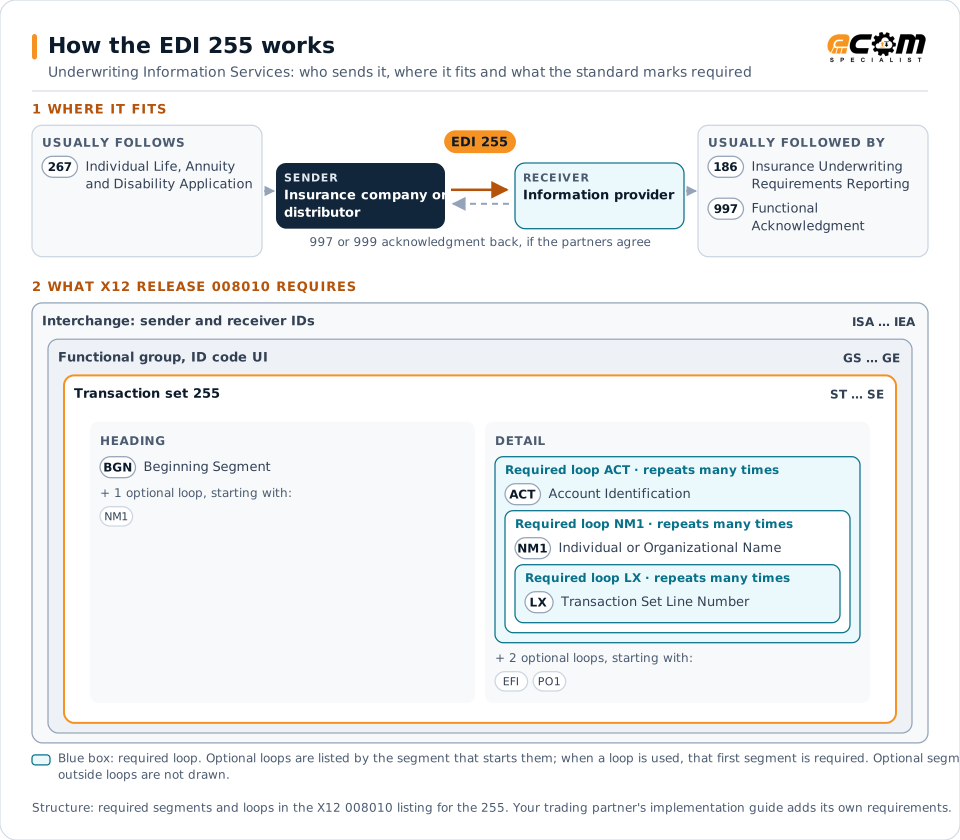
How to read this diagram: the top row shows who sends the 255, to whom, and which documents usually come before and after it. The lower part shows what X12 release 008010 itself requires: the envelopes around the 255 and the segments and loops the standard marks as required, area by area. Optional loops are listed by the segment that starts them rather than drawn in full. This is the standard's minimum, not a trading partner's requirement: each partner's implementation guide usually makes some optional loops mandatory, restricts the codes and may use a different release.
When it is used
- Ordering medical exams and lab tests
- Ordering records such as physician statements
- Checking the status of outstanding requirements
Where it fits in the document flow
Structure
Mandatory segments in the 255 (X12 release 008010)
The segments X12 release 008010 marks as mandatory at their level, in order. Segments inside optional loops are needed only when the loop is used. This is the standard's requirement, not your trading partner's: each partner's implementation guide names the release it uses, adds the optional segments it requires and restricts the values. The requirement status comes from one published X12 reference listing and has not been checked against a second source.
- ST
- BGN
- NM1
- ACT
- LX
- EFI
- PO1
- SE
Practical example
The 255 in practice
An insurer receives a life application with a large face amount. Its underwriting system sends providers 255 orders for a paramedical exam, a blood profile and an attending physician statement. A week later, a status request shows the physician statement is still pending, and the insurer informs the agent.
Implementation
Implementation considerations for the 255
- Protect applicants' personal and health data.
- Track every underwriting requirement to completion.
- Use the service codes each provider supports.
- Share status with agents to manage client expectations.
How ECOM helps
Automate the 255 with ECOM
Industry
Financial Services
Secure file transfer and B2B integration for banks and financial institutions.
Industry
Healthcare
Secure B2B integration and file transfer for providers, suppliers, distributors and healthcare partners.
Solution
EDI Integration
Exchange X12 and EDIFACT documents with partners and integrate them directly with your ERP.
More general questions about EDI are answered in the EDI FAQ.
Related transactions
Related healthcare and insurance documents
- 186Insurance Underwriting Requirements Reporting
- 267Individual Life, Annuity and Disability Application
- 111Individual Insurance Policy and Client Information
- 148Report of Injury, Illness or Incident
- 834Benefit Enrollment and Maintenance
- 252Insurance Producer Administration
- 278Health Care Services Review Information
- 100Insurance Plan Description
- 112Property Damage Report
- 124Vehicle Damage
- 187Premium Audit Request and Return
- 256Periodic Compensation
Need help with the EDI 255?
ECOM maps, tests and monitors X12 documents for your trading partners and integrates them with your ERP.