
X12 transaction guide · Healthcare and insurance
EDI 124 Vehicle Damage
The X12 document used to exchange vehicle damage estimates and repair cost details between insurers, agents, repairers and others.
- Sent by
- Repairer, appraiser or insurer
- Received by
- Insurer, agent, repairer or financial institution
- Standard
- ANSI ASC X12
What is an EDI 124?
The EDI 124 Vehicle Damage is the ANSI X12 transaction set that provides a flow of vehicle damage information between property and casualty insurance companies, independent agents, service providers, information providers, self-insurers and financial institutions. Its business functions are estimating vehicle damage and reporting in detail the parts and labor costs of repairing it.
After an accident, an appraiser or body shop estimates the damage and the insurer approves the repair. Exchanging the estimate in structured form lets insurers check parts prices and labor times automatically and process claims faster.
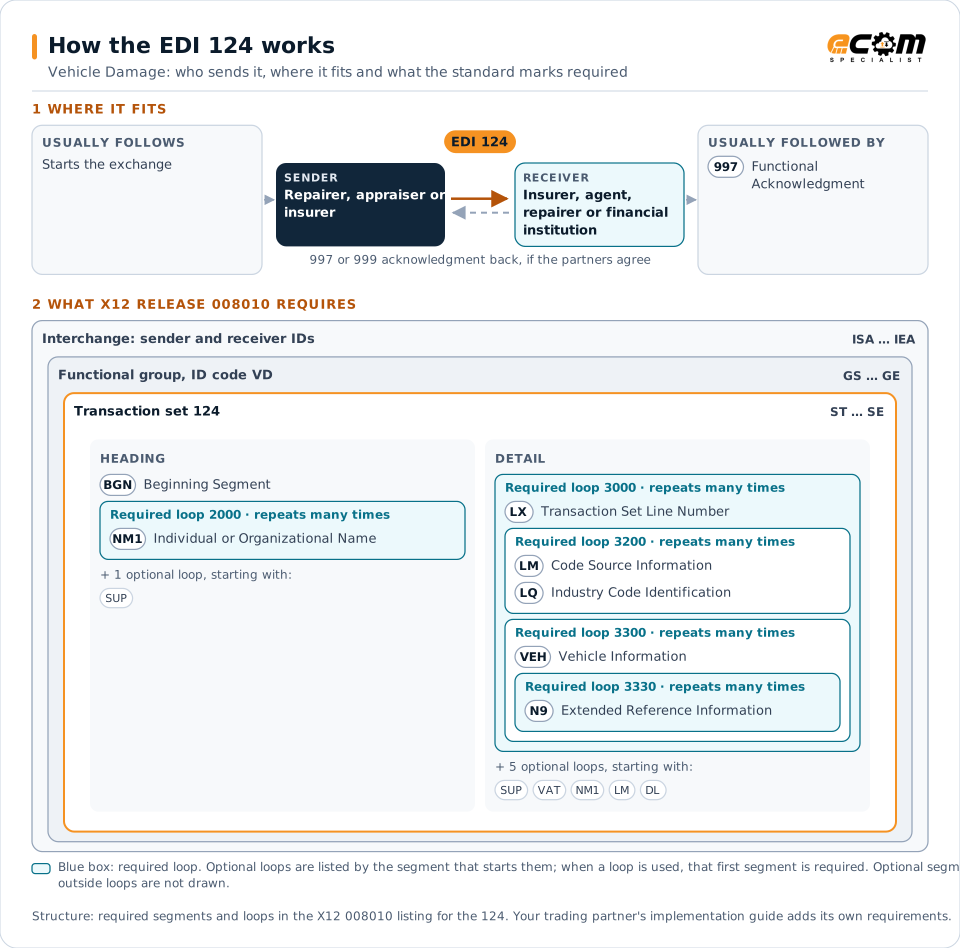
How to read this diagram: the top row shows who sends the 124, to whom, and which documents usually come before and after it. The lower part shows what X12 release 008010 itself requires: the envelopes around the 124 and the segments and loops the standard marks as required, area by area. Optional loops are listed by the segment that starts them rather than drawn in full. This is the standard's minimum, not a trading partner's requirement: each partner's implementation guide usually makes some optional loops mandatory, restricts the codes and may use a different release.
When it is used
- Sending a damage estimate to an insurer
- Reporting parts and labor for a repair
- Supplementing an estimate after hidden damage is found
Where it fits in the document flow
Structure
Mandatory segments in the 124 (X12 release 008010)
The segments X12 release 008010 marks as mandatory at their level, in order. Segments inside optional loops are needed only when the loop is used. This is the standard's requirement, not your trading partner's: each partner's implementation guide names the release it uses, adds the optional segments it requires and restricts the values. The requirement status comes from one published X12 reference listing and has not been checked against a second source.
- ST
- BGN
- SUP
- NM1
- LX
- LM
- LQ
- VEH
- VAT
- AMT
- N9
- DL
- SE
Practical example
The 124 in practice
A body shop assesses a car after a collision. It sends the insurer a 124 with the vehicle identification number, the damaged areas, the parts to replace with prices, the labor hours and paint costs. The insurer's claims system checks the estimate against its guidelines and authorizes the repair.
Implementation
Implementation considerations for the 124
- Use the parts and labor references insurers rely on.
- Identify the vehicle by its vehicle identification number.
- Send supplements for damage found during repair.
- Protect claimants' personal data under applicable law.
How ECOM helps
Automate the 124 with ECOM
Industry
Financial Services
Secure file transfer and B2B integration for banks and financial institutions.
Industry
Automotive
Schedules, ship notices, labels, self-billing and multi-plant routing for automotive suppliers.
Solution
B2B Integration
Connect every customer, supplier, carrier and bank across EDI, API, file and portal channels.
More general questions about EDI are answered in the EDI FAQ.
Related transactions
Related healthcare and insurance documents
- 112Property Damage Report
- 100Insurance Plan Description
- 111Individual Insurance Policy and Client Information
- 148Report of Injury, Illness or Incident
- 186Insurance Underwriting Requirements Reporting
- 187Premium Audit Request and Return
- 252Insurance Producer Administration
- 255Underwriting Information Services
- 256Periodic Compensation
- 259Residential Mortgage Insurance Explanation of Benefits
- 260Application for Mortgage Insurance Benefits
- 263Residential Mortgage Insurance Application Response
Need help with the EDI 124?
ECOM maps, tests and monitors X12 documents for your trading partners and integrates them with your ERP.