
X12 transaction guide · Finance
EDI 200 Mortgage Credit Report
The X12 document that carries the data of a mortgage credit report, in response to a mortgage credit report order.
- Sent by
- Credit reporting agency
- Received by
- Mortgage lender
- Standard
- ANSI ASC X12
What is an EDI 200?
The EDI 200 Mortgage Credit Report is the ANSI X12 transaction set used to transmit the data that makes up a mortgage credit report. It is the electronic response to the Mortgage Credit Report Order (833).
A mortgage credit report typically merges information from several credit bureaus, with the borrower's accounts, payment history, public records and inquiries, and sometimes credit scores. Delivering it as data lets underwriting systems analyze it automatically. The industry largely uses MISMO XML for credit reports today.
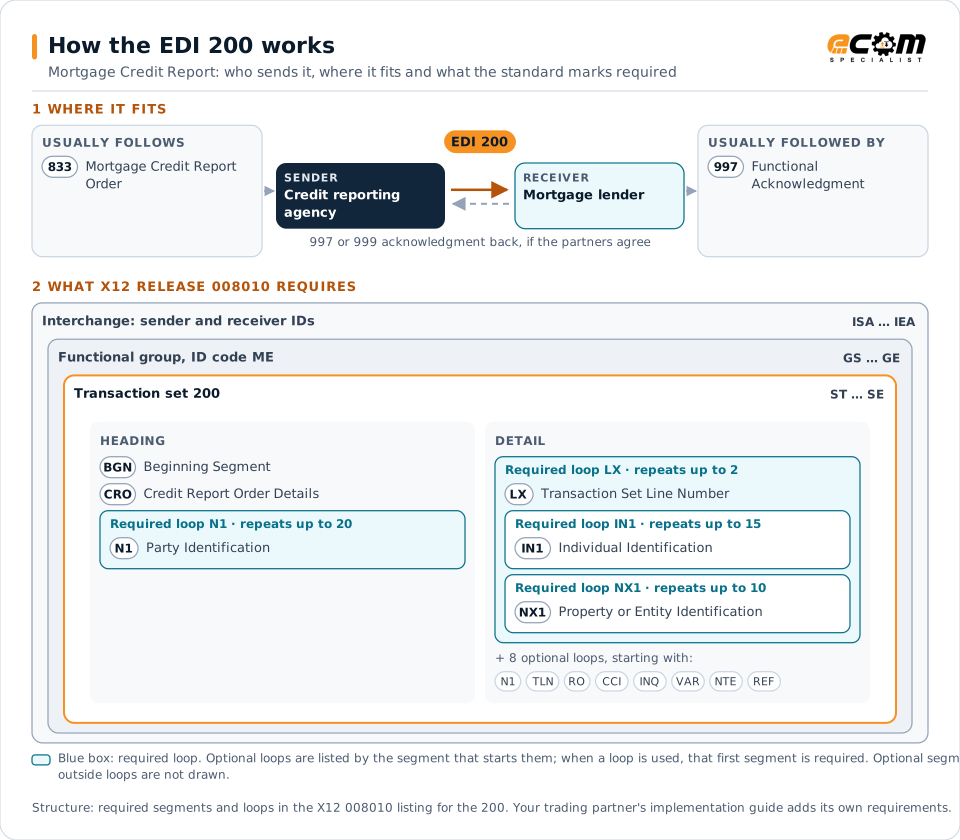
How to read this diagram: the top row shows who sends the 200, to whom, and which documents usually come before and after it. The lower part shows what X12 release 008010 itself requires: the envelopes around the 200 and the segments and loops the standard marks as required, area by area. Optional loops are listed by the segment that starts them rather than drawn in full. This is the standard's minimum, not a trading partner's requirement: each partner's implementation guide usually makes some optional loops mandatory, restricts the codes and may use a different release.
When it is used
- Delivering merged credit reports to lenders
- Updating reports after reissues
- Supporting automated underwriting
Where it fits in the document flow
Structure
Mandatory segments in the 200 (X12 release 008010)
The segments X12 release 008010 marks as mandatory at their level, in order. Segments inside optional loops are needed only when the loop is used. This is the standard's requirement, not your trading partner's: each partner's implementation guide names the release it uses, adds the optional segments it requires and restricts the values. The requirement status comes from one published X12 reference listing and has not been checked against a second source.
- ST
- BGN
- CRO
- N1
- LX
- IN1
- NX1
- SOI
- AIN
- TLN
- AMT
- RO
- CCI
- INQ
- VAR
- SCM
- NTE
- REF
- G32
- SE
Practical example
The 200 in practice
A lender orders a credit report for two co-borrowers with an 833. The credit agency merges data from the bureaus and returns a 200 with each borrower's accounts, balances, payment history and scores. The lender's underwriting system calculates debt-to-income ratios from the data.
Implementation
Implementation considerations for the 200
- Comply with consumer credit reporting laws.
- Protect borrowers' personal data under applicable law.
- Check whether partners use MISMO XML instead of X12.
- Match each report to its original order.
How ECOM helps
Automate the 200 with ECOM
Industry
Financial Services
Secure file transfer and B2B integration for banks and financial institutions.
Solution
Financial Document Automation
Automate invoices, remittances, payment files and bank statements from capture to posting.
Solution
EDI Integration
Exchange X12 and EDIFACT documents with partners and integrate them directly with your ERP.
More general questions about EDI are answered in the EDI FAQ.
Related transactions
Related finance documents
- 833Mortgage Credit Report Order
- 155Business Credit Report
- 202Secondary Mortgage Market Loan Delivery
- 203Secondary Mortgage Market Investor Report
- 205Mortgage Note
- 264Mortgage Loan Default Status
- 266Mortgage or Property Record Change Notification
- 820Payment Order/Remittance Advice
- 135Student Aid Origination Record
- 139Student Loan Guarantee Result
- 144Student Loan Transfer and Status Verification
- 191Student Loan Pre-Claims and Claims
Need help with the EDI 200?
ECOM maps, tests and monitors X12 documents for your trading partners and integrates them with your ERP.