
The short answer
Sage 500 ERP runs on Microsoft SQL Server, so EDI integrations commonly load translated partner documents into staging tables, validate them against Sage 500 business rules and then create sales orders through import tools or stored procedures. Shipments and customer invoices are extracted for outbound ship notices and invoices. Keeping partner logic outside Sage 500 eases a future ERP migration.
Read the diagram from top to bottom. Sage 500 does not exchange X12 itself in this design: the integration layer handles the partner connection and translation, and Sage 500 creates and posts the business records. Outbound documents are built from what Sage 500 actually recorded.
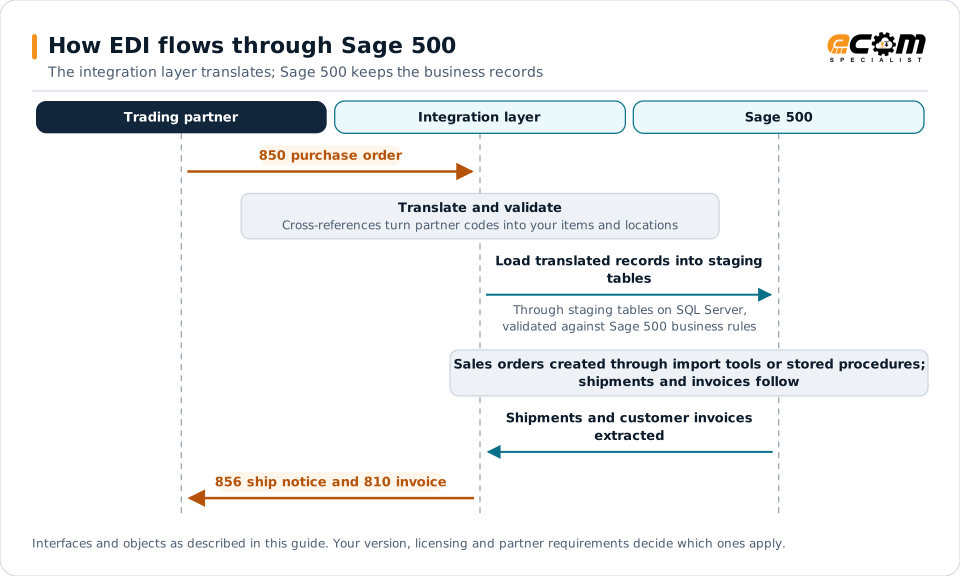
How EDI connects to Sage 500
Sage 500 ERP serves midsize distributors and manufacturers and stores its data in Microsoft SQL Server. Many Sage 500 EDI programs have grown over years of custom procedures. An integration layer handles partner connectivity and translation, while staging and validation in SQL Server protect Sage 500 data.
Document mapping
| EDI document | Direction | Sage 500 object |
|---|---|---|
| 850 purchase order | Inbound | Sales order |
| 855 acknowledgment | Outbound | Sales order status and lines |
| 856 ship notice | Outbound | Shipment |
| 810 invoice | Outbound | Customer invoice |
Inbound flow with staging
- The translator converts the partner’s 850 into records in staging tables.
- Validation checks customers, ship-to locations, items, units of measure, prices and duplicates.
- Valid orders are created through Sage 500 import tools or supported stored procedures that apply its business rules.
- Failed orders stay in staging with clear errors for review.
This keeps bad data out of Sage 500 and makes exceptions visible. See reducing EDI exceptions.
Outbound flow
Outbound processes extract shipments and invoices after they are confirmed and posted, then pass them to the translator. Retail ship notices need carton detail and GS1-128 labels, so capture packing data in the warehouse process or a WMS.
Partner data
- Customer item cross-references for customer item numbers.
- Ship-to addresses for stores and distribution centers.
- Partner settings with identifiers and document requirements, kept in the integration layer where possible.
Planning for the future
Many Sage 500 customers are evaluating newer ERPs. Make EDI migration-ready now:
- Keep partner-specific mapping in the integration layer, not in Sage 500 procedures.
- Document every custom table, procedure and job used by EDI.
- Inventory partners, documents and requirements.
When the time comes, follow the ERP migration checklist.
Best practices
- Never bypass validation by writing directly to production tables.
- Review staging errors daily and assign owners.
- Trigger ship notices at shipment confirmation.
- Monitor orders through acknowledgment, shipment and invoice.