
The short answer
QAD Enterprise Applications, now part of QAD Adaptive ERP, can process EDI through its built-in EDI eCommerce functionality or through QXtend and APIs, with an integration layer handling connectivity and translation. For automotive and industrial suppliers, inbound planning and shipping schedules update customer schedules, and shippers drive outbound ship notices and invoices.
Read the diagram from top to bottom. QAD does not exchange X12 itself in this design: the integration layer handles the partner connection and translation, and QAD creates and posts the business records. Outbound documents are built from what QAD actually recorded.
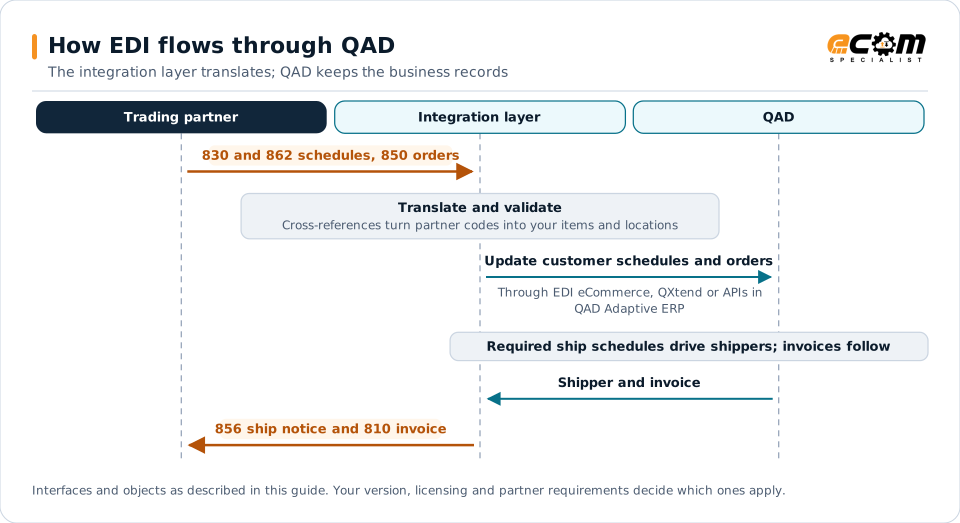
How EDI connects to QAD
QAD is widely used by automotive, industrial, life sciences and consumer products manufacturers. Automotive suppliers in particular exchange a steady flow of schedules, ship notices and invoices with vehicle manufacturers and tier-one customers. QAD offers two broad integration paths: its built-in EDI eCommerce functionality, and QXtend and newer APIs for XML and web service integration.
Document mapping
| EDI document | Direction | QAD object |
|---|---|---|
| 830 planning schedule | Inbound | Customer planning schedule |
| 862 shipping schedule | Inbound | Customer shipping schedule (required ship) |
| 850 purchase order | Inbound | Sales order or scheduled order |
| 856 ship notice | Outbound | Shipper |
| 810 invoice | Outbound | Invoice |
Schedules
Schedule-based customers send updated demand frequently. Good schedule processing:
- Replaces the previous schedule rather than adding to it.
- Separates firm requirements from forecast.
- Reconciles cumulative quantities shipped and received with each customer.
- Flags significant changes inside the frozen period for review.
Shippers and ship notices
In QAD, shippers record what was shipped, including containers and items. Automotive customers expect ship notices within minutes of departure, with container and label details that match AIAG-style or GS1-128 labels. Build ship notices from confirmed shippers and print labels from the same data.
Integration options
- EDI eCommerce: ERP-side processing and mapping for inbound and outbound documents.
- QXtend: XML and web service interfaces for external integration.
- APIs in QAD Adaptive ERP: newer options for real-time scenarios.
The right choice depends on your QAD version, deployment and existing mappings.
Best practices
- Test schedule processing with real schedule histories from each major customer.
- Reconcile cumulative quantities regularly and after any correction.
- Send ship notices immediately on shipper confirmation.
- Keep customer-specific label and packaging rules documented and tested.
- Monitor schedules, shippers and invoices daily and assign owners for exceptions.