
The short answer
JD Edwards EnterpriseOne handles EDI through interface tables. A translator loads inbound documents into EDI staging tables, and batch programs such as the inbound EDI sales order edit/create program validate them and create transactions. Outbound programs extract ship notices and invoices into staging tables for translation. Orchestrator adds REST-based options for real-time integration.
Read the diagram from top to bottom. JD Edwards does not exchange X12 itself in this design: the integration layer handles the partner connection and translation, and JD Edwards creates and posts the business records. Outbound documents are built from what JD Edwards actually recorded.
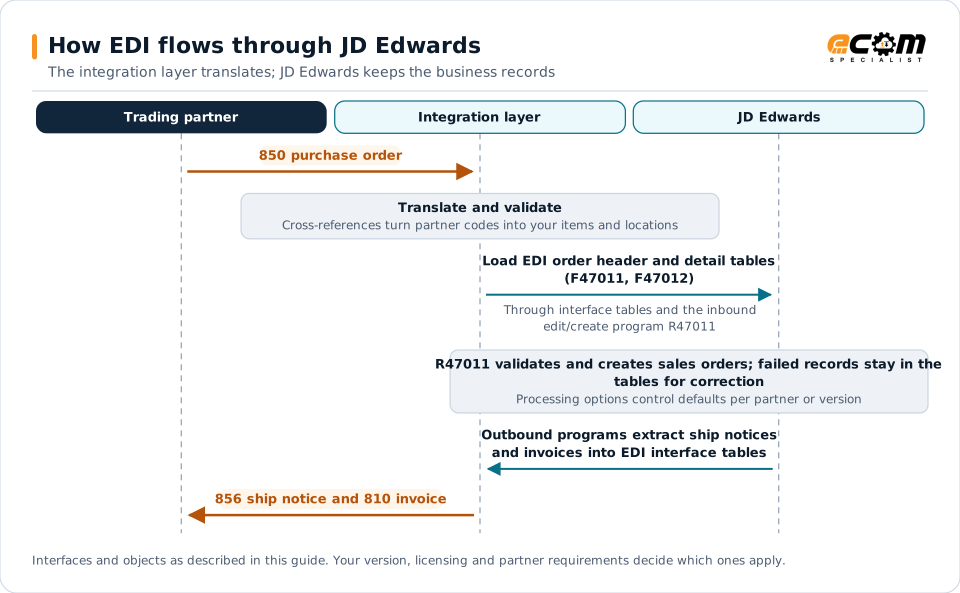
How EDI connects to JD Edwards
JD Edwards EnterpriseOne includes an EDI system built around interface tables. An EDI translator converts partner documents into flat records loaded into these tables; JD Edwards batch programs then validate and process them. Outbound, JD Edwards programs extract data into interface tables, which the translator converts into EDI documents.
Inbound flow: customer orders
- The translator converts an 850 purchase order into records for the EDI order header and detail tables (F47011 and F47012).
- The inbound EDI sales order edit/create program (R47011) validates the data and creates sales orders.
- Records that fail validation remain in the interface tables with errors for review and correction.
Outbound flow
Outbound documents such as order acknowledgments, ship notices and invoices are extracted by JD Edwards outbound programs into their EDI interface tables after the related business event, such as shipment confirmation or invoice printing, and then translated and sent.
Cross-references and partner data
- Item cross-references map customer item numbers to JD Edwards items.
- Customer and address book records store ship-to locations and partner identifiers.
- Processing options on EDI programs control defaults and behavior per partner or version.
Missing cross-references are a leading cause of inbound order errors, so maintain them as part of partner onboarding.
Orchestrator and business services
Newer integrations can use JD Edwards Orchestrator, which exposes business processes as REST services, or business services for SOAP integration. These suit real-time scenarios, such as API orders from marketplaces, while interface tables remain efficient for traditional EDI batches.
Scheduling and monitoring
- Schedule inbound and outbound batch programs often enough to meet partner timing requirements.
- Review interface table errors daily and assign owners for business errors such as unknown items.
- Monitor end to end, from receipt and acknowledgment through order creation, shipment and invoicing, not only batch job completion.
Best practices
- Keep partner-specific mapping in the integration layer and use standard JD Edwards programs.
- Use separate program versions and processing options for partners with different rules.
- Purge processed interface records regularly to keep tables manageable.
- Document custom extensions to EDI tables or programs.
- Plan EDI early in upgrades and migrations. See the ERP migration checklist.