
The short answer
Dynamics 365 Finance and Operations does not translate EDI itself. An integration layer converts partner documents into data entity payloads, such as sales order headers and lines, which are imported in bulk through the Data management framework and recurring integrations or in real time through OData. Packing slips and customer invoices drive outbound ship notices and invoices.
Read the diagram from top to bottom. Finance and Operations does not exchange X12 itself in this design: the integration layer handles the partner connection and translation, and Finance and Operations creates and posts the business records. Outbound documents are built from what Finance and Operations actually recorded.
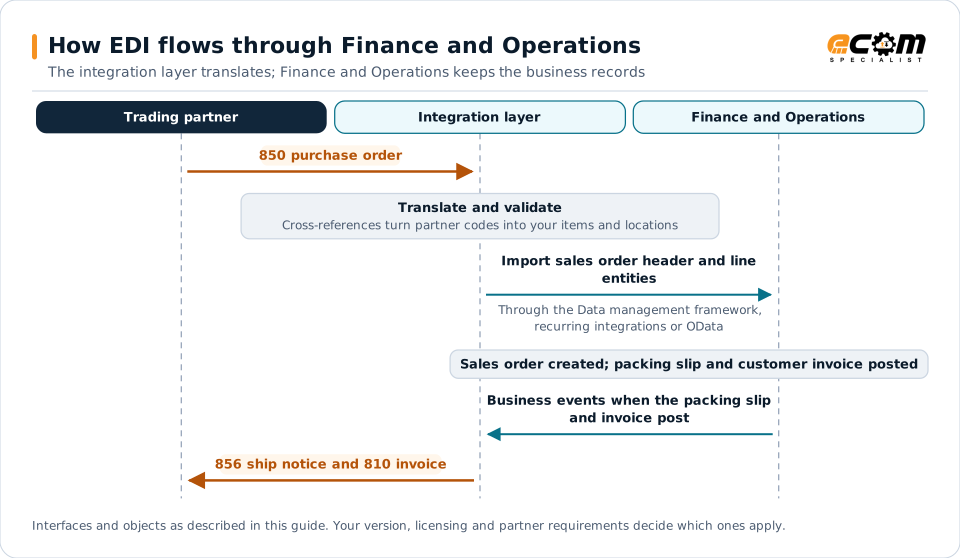
How EDI connects to Finance and Operations
Microsoft Dynamics 365 Finance and Operations, including Supply Chain Management, runs distribution and manufacturing for large and midsize enterprises, many of which trade EDI with retailers, distributors and manufacturers. Finance and Operations exposes its business objects as data entities, and an integration layer translates partner documents to and from those entities.
Document-to-entity mapping
| EDI document | Direction | Finance and Operations object |
|---|---|---|
| 850 purchase order | Inbound | Sales order header and line entities |
| 860 order change | Inbound | Sales order updates |
| 855 acknowledgment | Outbound | Sales order confirmation |
| 856 ship notice | Outbound | Packing slip, packing structures |
| 810 invoice | Outbound | Customer invoice |
| 820 remittance | Inbound | Customer payment journal |
Integration options
- Data management framework (DMF): package-based bulk import and export of data entities. Suited to EDI batch volumes and initial loads.
- Recurring integrations: scheduled, queue-based imports and exports built on DMF, a common choice for ongoing partner flows.
- OData: real-time create and read operations on data entities, useful for low volumes or synchronous checks such as price and availability.
- Business events: notifications when documents are posted, used to trigger outbound EDI promptly.
- Custom data entities: extensions for partner-specific fields that standard entities do not cover.
Partner data
- Customer accounts hold partner identifiers, often in extended fields.
- External item descriptions map customer item numbers to released products.
- Delivery addresses store retailer store and distribution center codes.
- Legal entities and warehouses must be mapped correctly when one partner orders from several companies or sites.
Shipping and invoicing
Ship notices are typically built from posted packing slips. Retail partners need carton-level detail and GS1-128 labels, which usually come from warehouse management (WMS) processes such as containerization and packing, or from an external WMS. Customer invoices drive outbound 810s; keep the partner’s original purchase order and line references so the invoice echoes them exactly.
Performance and throttling
Finance and Operations applies service protection limits to API traffic. To stay within them:
- Prefer DMF and recurring integrations for high-volume inbound orders.
- Batch OData calls and avoid chatty, line-by-line requests.
- Schedule batch jobs to post imported orders often enough to meet partner acknowledgment windows.
Best practices
- Validate customers, items, prices and delivery addresses before orders are created.
- Keep partner-specific mapping in the integration layer rather than custom X++ code.
- Use staging and error review for imported orders instead of silent failures.
- Monitor each order through confirmation, packing slip and invoice.
- Plan EDI early in implementations and upgrades. See the ERP migration checklist.