
The short answer
Automating order-to-cash with EDI means each step triggers the next without re-keying: inbound orders post as sales orders, acknowledgments go out automatically, warehouse confirmation generates ship notices and labels, billing generates invoices, and remittance data drives cash application. Validation and monitoring at every step keep exceptions small.
The steps match the sections of this guide; the tags show the X12 documents usually involved.
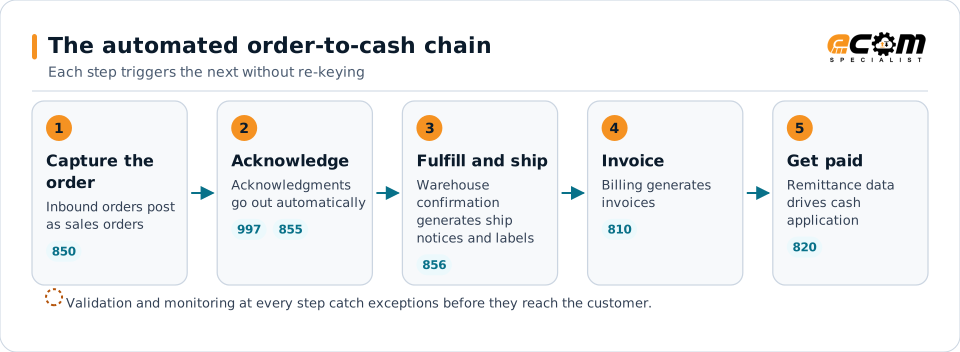
The order-to-cash chain
Order-to-cash links sales, operations, warehouse and finance. In a manual process, each handoff involves someone re-keying or checking data. In an automated process, each step is triggered by the previous one, and people work only on exceptions.
Step 1: Capture the order
Document: 850 purchase order, or API, portal or converted document orders.
Automation: translate the order, validate customers, items, prices and locations, and create the sales order in the ERP.
Controls: reject or hold orders with unknown items or price differences, and route them to the right team.
Step 2: Acknowledge
Document: 855 purchase order acknowledgment, where the customer requires it.
Automation: generate the acknowledgment from the sales order, including backorders or changes.
Controls: alert when an order approaches its acknowledgment deadline without a response.
Step 3: Fulfill and ship
Document: 856 advance ship notice and GS1-128 labels.
Automation: generate labels and the ship notice from the same pick and pack data at shipment confirmation.
Controls: block or flag shipments whose labels and ship notice disagree; alert on shipments without a ship notice.
Step 4: Invoice
Document: 810 invoice.
Automation: generate the invoice from ERP billing as soon as the shipment is confirmed.
Controls: invoice shipped quantities at agreed prices; check that every shipment is invoiced once.
Step 5: Get paid and apply cash
Document: 820 remittance advice and bank payment files.
Automation: match payments and remittance detail to open invoices and post cash in the ERP.
Controls: route deductions with reason codes to deduction management; flag unmatched payments.
Tie it together with visibility
Each step can be automated separately, but the real value comes from tracking each order across all of them. A single view of every order, from purchase order to cash, shows where orders are stuck and which customers or documents cause the most exceptions.
Measuring success
| Measure | What improvement looks like |
|---|---|
| Orders posted without manual touch | Rising share of orders flowing straight through |
| On-time acknowledgments and ship notices | Fewer late documents and compliance issues |
| Time from shipment to invoice | Shorter, often same day |
| Unapplied cash | Lower balances and faster application |
| Deductions | Fewer compliance-related deductions |
Start with the highest-volume customers and documents, prove the process, then extend it to the rest of your partners and channels.