
EDIFACT message guide · Travel and tourism
SKDREQ Schedule request
The UN/EDIFACT interactive message used to request travel schedule update information, with selection criteria, to update a schedule database.
- Sent by
- Journey planner, ticketing system or partner operator
- Received by
- Travel service provider
- Standard
- UN/EDIFACT · Interactive (I-EDI) message
- X12 equivalent
- No direct equivalent
What is the EDIFACT SKDREQ message?
SKDREQ is the UN/EDIFACT schedule request. The directory defines it as a message used to request travel service schedule update information to update the requester's schedule database, with selection criteria for the information requested.
Rather than receiving every schedule, a requester can ask for the services, routes or periods it needs, or only changes since a date. The provider answers with schedule updates (SKDUPD). This lets journey planners, ticketing systems and partner operators keep their schedule databases current without loading full timetables every time, and recover after an outage by requesting what they missed.
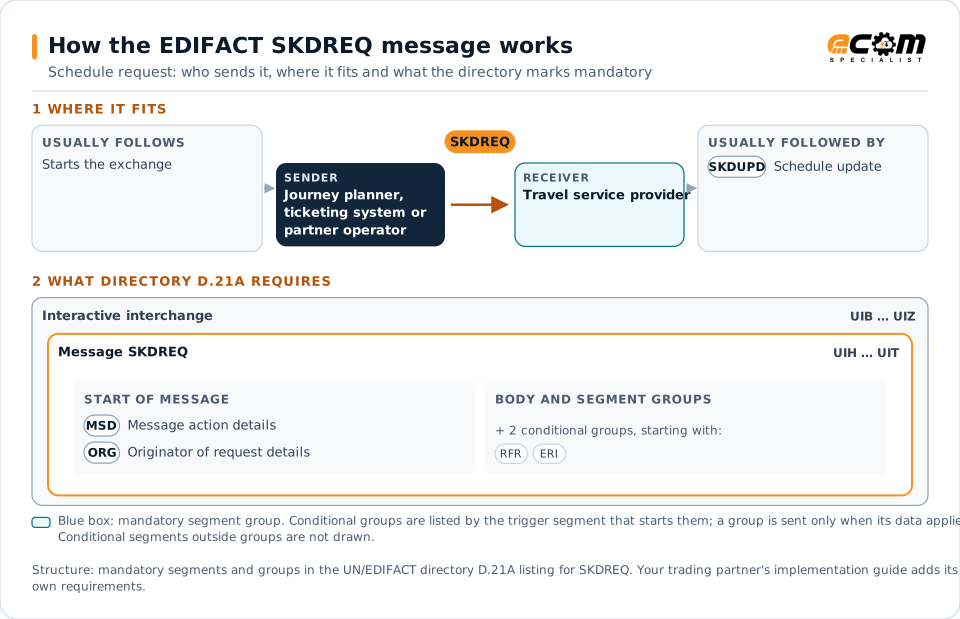
How to read this diagram: the top row shows who sends SKDREQ, to whom, and which messages usually come before and after it. The lower part shows what the directory D.21A itself requires: the envelopes around SKDREQ and the segments and segment groups it marks mandatory. Conditional groups are listed by their trigger segment rather than drawn in full. This is the directory's minimum, not a trading partner's requirement: a message implementation guide usually makes some conditional groups mandatory, restricts the codes and may use an older directory.
When it is used
- Requesting schedules for selected routes
- Requesting changes since the last update
- Refreshing a schedule database after an outage
Where it fits in the message flow
Structure
Mandatory segments in SKDREQ (directory D.21A)
In UN/EDIFACT directory D.21A, the SKDREQ message has 12 segment positions arranged in 2 segment groups. These are the segments and segment groups marked mandatory at message level, in order; a mandatory group is shown with the segment that starts it. Segments inside conditional groups are needed only when the group is used. This is the directory’s requirement, not your trading partner’s: each partner’s message implementation guide names the directory it uses, often an older one such as D.96A or D.01B where the structure can differ, makes some conditional segments mandatory and restricts the codes. This structure comes from one published copy of the directory and has not been independently verified: confirm it before you build a map.
- UIH
- MSD
- ORG
- UIT
Practical example
SKDREQ in practice
A journey planning service updates its database every night. It sends each operator an SKDREQ for schedule changes since the previous night on the routes it covers. The operators answer with SKDUPD messages, and the planner applies the changes before morning.
Implementation
Implementation considerations for SKDREQ
- Use selection criteria to limit data to what is needed.
- Track the last update received from each provider.
- Handle full reloads as well as incremental updates.
- Check which providers support schedule requests.
How ECOM helps
Automate SKDREQ with ECOM
Industry
Trucking and Transportation
Load tenders, responses, status and freight invoices for carriers, brokers and shippers, integrated with the TMS.
Industry
Hospitality
Procurement, invoicing and supplier integration for hotels, restaurant groups and foodservice suppliers.
Solution
EDI Integration
Exchange X12 and EDIFACT documents with partners and integrate them directly with your ERP.
Compare X12 and EDIFACT, or see answers to general questions in the EDI FAQ.
Related messages
Related travel and tourism messages
- SKDUPDSchedule update
- TSDUPDTimetable static data update
- AVLREQAvailability request
- AVLRSPAvailability response
- RESREQReservation request
- RESRSPReservation response
- TIQREQTravel, tourism and leisure information inquiry request
- TIQRSPTravel, tourism and leisure information inquiry response
- PASREQTravel, tourism and leisure product application status request
- PASRSPTravel, tourism and leisure product application status response
- RESMSGReservation
- STLRPTSettlement transaction reporting
Need help with SKDREQ?
ECOM maps, tests and monitors EDIFACT messages for your trading partners and integrates them with your ERP.