
EDIFACT message guide · Travel and tourism
SKDUPD Schedule update
The UN/EDIFACT interactive message travel service providers use to send schedule information to other providers, agencies and publishers.
- Sent by
- Travel service provider, such as a rail or bus operator
- Received by
- Other providers, authorities or timetable publishers
- Standard
- UN/EDIFACT · Interactive (I-EDI) message
- X12 equivalent
- No direct equivalent
What is the EDIFACT SKDUPD message?
SKDUPD is the UN/EDIFACT schedule update message. The directory defines it as a message containing information about travel service schedules, sent by a travel service provider to other service providers or to agencies such as government departments, traffic authorities and timetable publishing companies.
Schedules describe services, their stops and times and the days they run. Publishing them electronically keeps journey planners, ticketing systems and partner operators in step when timetables change. Static data such as locations is sent separately with TSDUPD.
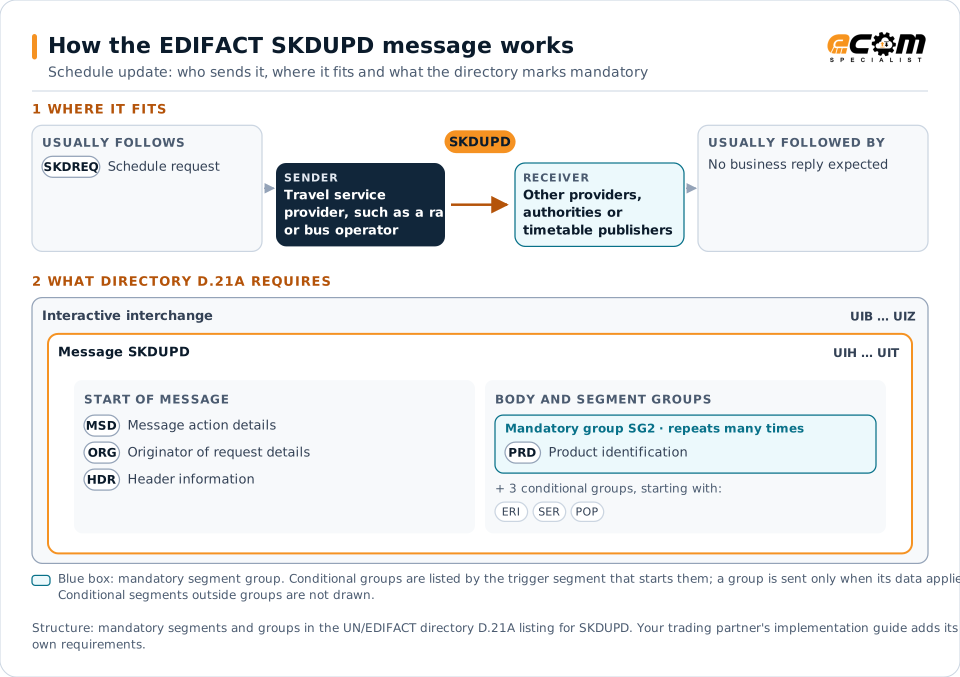
How to read this diagram: the top row shows who sends SKDUPD, to whom, and which messages usually come before and after it. The lower part shows what the directory D.21A itself requires: the envelopes around SKDUPD and the segments and segment groups it marks mandatory. Conditional groups are listed by their trigger segment rather than drawn in full. This is the directory's minimum, not a trading partner's requirement: a message implementation guide usually makes some conditional groups mandatory, restricts the codes and may use an older directory.
When it is used
- Distributing new timetables to partners
- Updating schedules for changes and disruptions
- Supplying schedules to journey planners
Where it fits in the message flow
Structure
Mandatory segments in SKDUPD (directory D.21A)
In UN/EDIFACT directory D.21A, the SKDUPD message has 45 segment positions arranged in 10 segment groups. These are the segments and segment groups marked mandatory at message level, in order; a mandatory group is shown with the segment that starts it. Segments inside conditional groups are needed only when the group is used. This is the directory’s requirement, not your trading partner’s: each partner’s message implementation guide names the directory it uses, often an older one such as D.96A or D.01B where the structure can differ, makes some conditional segments mandatory and restricts the codes. This structure comes from one published copy of the directory and has not been independently verified: confirm it before you build a map.
- UIH
- MSD
- ORG
- HDR
- SG2 (PRD)
- UIT
Practical example
SKDUPD in practice
A rail operator introduces its winter timetable. It sends ticketing partners, the traffic authority and a journey planning provider SKDUPD messages with every service, its stops, times and operating days. The partners load the timetable so tickets and journey plans reflect the new services from the change date.
Implementation
Implementation considerations for SKDUPD
- Send static location data (TSDUPD) before schedules that reference it.
- State the validity period of each schedule.
- Handle changes and cancellations as updates.
- Coordinate with partners on the timetable change date.
How ECOM helps
Automate SKDUPD with ECOM
Industry
Trucking and Transportation
Load tenders, responses, status and freight invoices for carriers, brokers and shippers, integrated with the TMS.
Industry
Hospitality
Procurement, invoicing and supplier integration for hotels, restaurant groups and foodservice suppliers.
Solution
EDI Integration
Exchange X12 and EDIFACT documents with partners and integrate them directly with your ERP.
Compare X12 and EDIFACT, or see answers to general questions in the EDI FAQ.
Related messages
Related travel and tourism messages
- TSDUPDTimetable static data update
- SKDREQSchedule request
- TUPREQTravel, tourism and leisure data update request
- TUPRSPTravel, tourism and leisure data update response
- AVLREQAvailability request
- AVLRSPAvailability response
- PASREQTravel, tourism and leisure product application status request
- PASRSPTravel, tourism and leisure product application status response
- RESMSGReservation
- RESREQReservation request
- RESRSPReservation response
- STLRPTSettlement transaction reporting
Need help with SKDUPD?
ECOM maps, tests and monitors EDIFACT messages for your trading partners and integrates them with your ERP.