
EDIFACT message guide · Projects and construction
CONPVA Payment valuation
The UN/EDIFACT message used between a contractor and the client's representative to approve the value of, and payment for, work completed in a period.
- Sent by
- Contractor or client's representative
- Received by
- Client's representative or contractor
- Standard
- UN/EDIFACT · Batch message
- X12 equivalent
- No direct equivalent
What is the EDIFACT CONPVA message?
CONPVA is the UN/EDIFACT payment valuation message. The directory describes it as typically used between a contractor and the client's representative during the approval of the value of, and payment for, work completed in a given period.
The valuation applies contract rates to the agreed quantities, adds variations and adjustments and deducts retention and previous payments to reach the amount due. Exchanging it electronically keeps both parties' figures aligned before an invoice is issued. The agreed valuation is the basis for the contractor's invoice for the period.
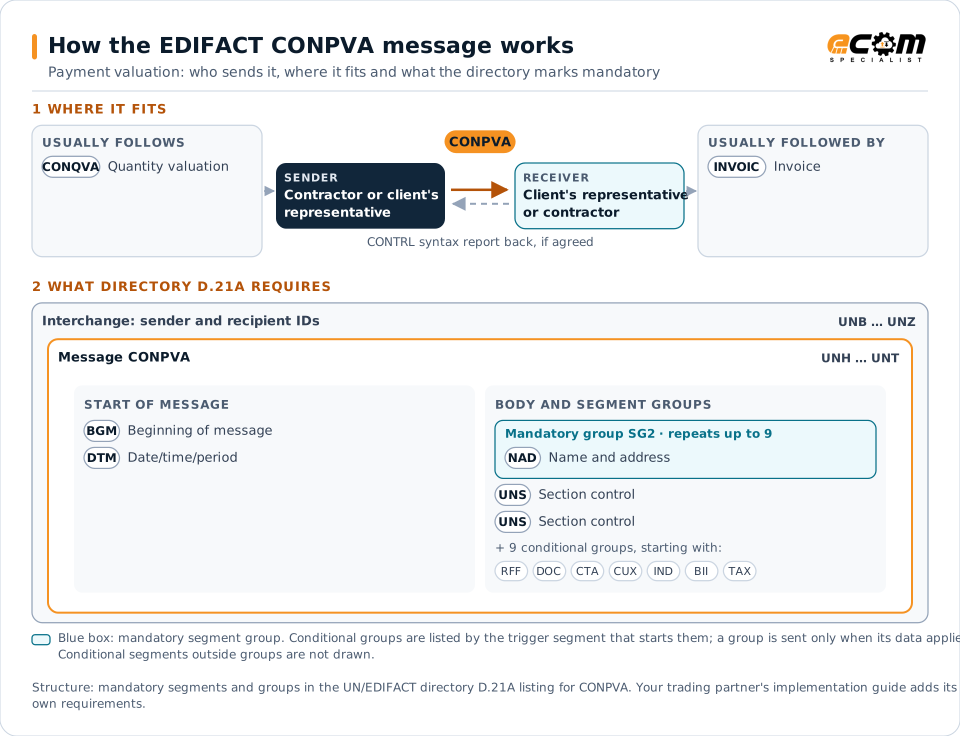
How to read this diagram: the top row shows who sends CONPVA, to whom, and which messages usually come before and after it. The lower part shows what the directory D.21A itself requires: the envelopes around CONPVA and the segments and segment groups it marks mandatory. Conditional groups are listed by their trigger segment rather than drawn in full. This is the directory's minimum, not a trading partner's requirement: a message implementation guide, such as an industry subset or a partner’s own guide, usually makes some conditional groups mandatory, restricts the codes and may use an older directory.
When it is used
- Agreeing the amount due for a period's work
- Applying retention and previous payments
- Supporting interim and final payments
Where it fits in the message flow
Structure
Mandatory segments in CONPVA (directory D.21A)
In UN/EDIFACT directory D.21A, the CONPVA message has 96 segment positions arranged in 34 segment groups. These are the segments and segment groups marked mandatory at message level, in order; a mandatory group is shown with the segment that starts it. Segments inside conditional groups are needed only when the group is used. This is the directory’s requirement, not your trading partner’s: each partner’s message implementation guide names the directory it uses, often an older one such as D.96A or D.01B where the structure can differ, makes some conditional segments mandatory and restricts the codes.
- UNH
- BGM
- DTM
- SG2 (NAD)
- UNS
- UNS
- UNT
Practical example
CONPVA in practice
After agreeing a month's quantities, the client's quantity surveyor sends the contractor a CONPVA valuing the work at contract rates, adding two approved variations, deducting five percent retention and the previous payments. The contractor accepts the valuation and invoices the amount due.
Implementation
Implementation considerations for CONPVA
- Use the contract rates from the established contract.
- Show retention and previous payments explicitly.
- Keep variations traceable to their approvals.
- Reconcile valuations with invoices and payments.
How ECOM helps
Automate CONPVA with ECOM
Industry
Industrial Manufacturing
Distributor, OEM customer and supplier integration for industrial manufacturers.
Solution
Financial Document Automation
Automate invoices, remittances, payment files and bank statements from capture to posting.
Solution
Procure-to-Pay Automation
Automate purchasing, receiving and supplier invoicing across EDI, portals and documents.
Compare X12 and EDIFACT, or see answers to general questions in the EDI FAQ.
Related messages
Related projects and construction messages
Need help with CONPVA?
ECOM maps, tests and monitors EDIFACT messages for your trading partners and integrates them with your ERP.