
EDIFACT message guide · Transport
COARRI Container discharge/loading report
The UN/EDIFACT message a container terminal uses to report which containers were discharged from, or loaded onto, a seagoing vessel.
- Sent by
- Container terminal
- Received by
- Shipping line or its agent
- Standard
- UN/EDIFACT · Batch message
- X12 equivalent
- No direct equivalent
What is the EDIFACT COARRI message?
COARRI is the UN/EDIFACT container discharge/loading report. The directory defines it as a message by which a container terminal reports that specified containers have been discharged from a seagoing vessel (as ordered, overlanded or shortlanded) or loaded onto one. It is one of the family of container messages designed to streamline intermodal container handling.
Shipping lines use COARRI to confirm that their discharge and loading orders (COPRAR) were carried out, to update equipment tracking and to trigger the next events, such as arrival notices and invoicing for terminal services.
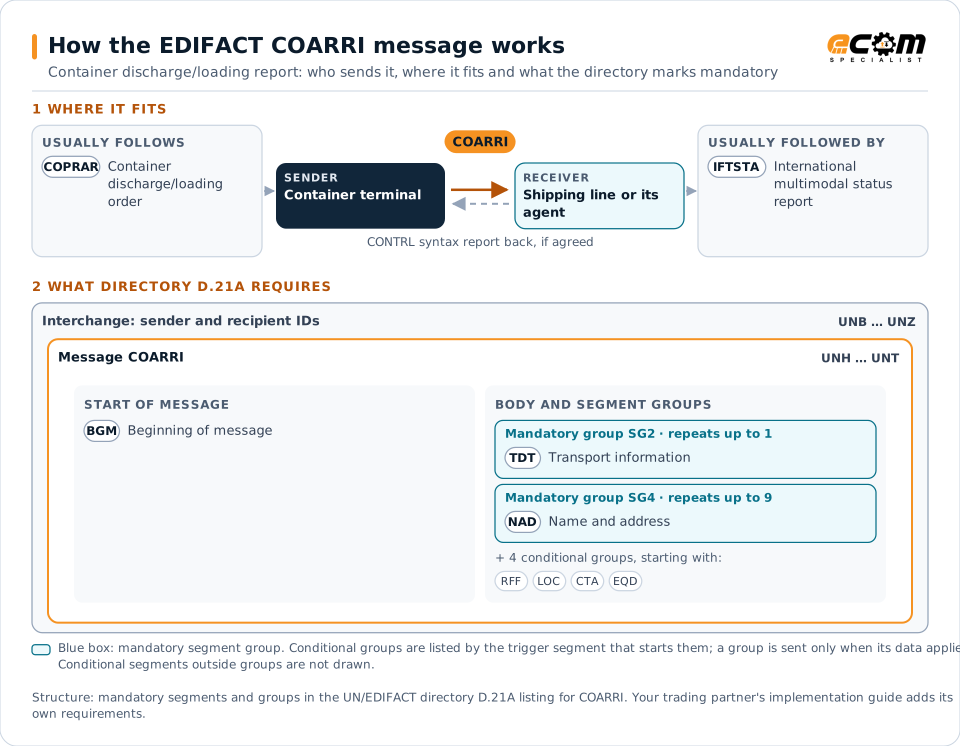
How to read this diagram: the top row shows who sends COARRI, to whom, and which messages usually come before and after it. The lower part shows what the directory D.21A itself requires: the envelopes around COARRI and the segments and segment groups it marks mandatory. Conditional groups are listed by their trigger segment rather than drawn in full. This is the directory's minimum, not a trading partner's requirement: a message implementation guide, such as an industry subset or a partner’s own guide, usually makes some conditional groups mandatory, restricts the codes and may use an older directory.
When it is used
- Reporting containers discharged from a vessel
- Reporting containers loaded onto a vessel
- Reporting overlanded or shortlanded containers
Where it fits in the message flow
Structure
Mandatory segments in COARRI (directory D.21A)
In UN/EDIFACT directory D.21A, the COARRI message has 48 segment positions arranged in 13 segment groups. These are the segments and segment groups marked mandatory at message level, in order; a mandatory group is shown with the segment that starts it. Segments inside conditional groups are needed only when the group is used. This is the directory’s requirement, not your trading partner’s: each partner’s message implementation guide names the directory it uses, often an older one such as D.96A or D.01B where the structure can differ, makes some conditional segments mandatory and restricts the codes.
- UNH
- BGM
- SG2 (TDT)
- SG4 (NAD)
- UNT
Practical example
COARRI in practice
A terminal completes discharge of 900 containers from a vessel for one shipping line. It sends the line a COARRI listing each container discharged, with its time and position in the yard, and flags two containers that were on the discharge list but not found on board. The line updates its tracking and investigates the shortlanded boxes.
Implementation
Implementation considerations for COARRI
- Reconcile COARRI with the COPRAR order and report differences.
- Report promptly; events drive customer status updates.
- Use container numbers and vessel call references exactly.
- Follow SMDG or port community guidelines where used.
How ECOM helps
Automate COARRI with ECOM
Industry
Trucking and Transportation
Load tenders, responses, status and freight invoices for carriers, brokers and shippers, integrated with the TMS.
Solution
Supply Chain Visibility
Track orders, shipments and invoices across partners and catch exceptions early.
Solution
Logistics Automation
Automate tenders, status updates, freight invoices and warehouse orders with logistics partners.
Compare X12 and EDIFACT, or see answers to general questions in the EDI FAQ.
Related messages
Related transport messages
- COPRARContainer discharge/loading order
- MOVINSStowage instruction
- IFTSTAInternational multimodal status report
- COPARNContainer announcement
- COREORContainer release order
- CODECOContainer gate
- COHAORContainer special handling order
- COPINOContainer pre-notification
- COSTCOContainer stuffing/stripping confirmation
- COSTORContainer stuffing/stripping order
- BAPLIEBayplan/stowage plan occupied and empty locations
- BERMANBerth management
Need help with COARRI?
ECOM maps, tests and monitors EDIFACT messages for your trading partners and integrates them with your ERP.