
EDIFACT message guide · Transport
COPINO Container pre-notification
The UN/EDIFACT message an inland carrier uses to notify a terminal or depot of an upcoming container delivery or pickup.
- Sent by
- Inland carrier (road, rail or barge)
- Received by
- Terminal or depot
- Standard
- UN/EDIFACT · Batch message
- X12 equivalent
- No direct equivalent
What is the EDIFACT COPINO message?
COPINO is the UN/EDIFACT container pre-notification message. The directory defines it as a message by which an inland carrier notifies the delivery or pick-up of containers. It is part of the family of container messages designed to streamline the intermodal handling of containers.
Terminals use pre-notifications to plan gate operations and yard moves, and many require them before a truck, train or barge arrives. A pre-notified visit can pass the gate quickly because the terminal already knows which containers to accept or hand over.
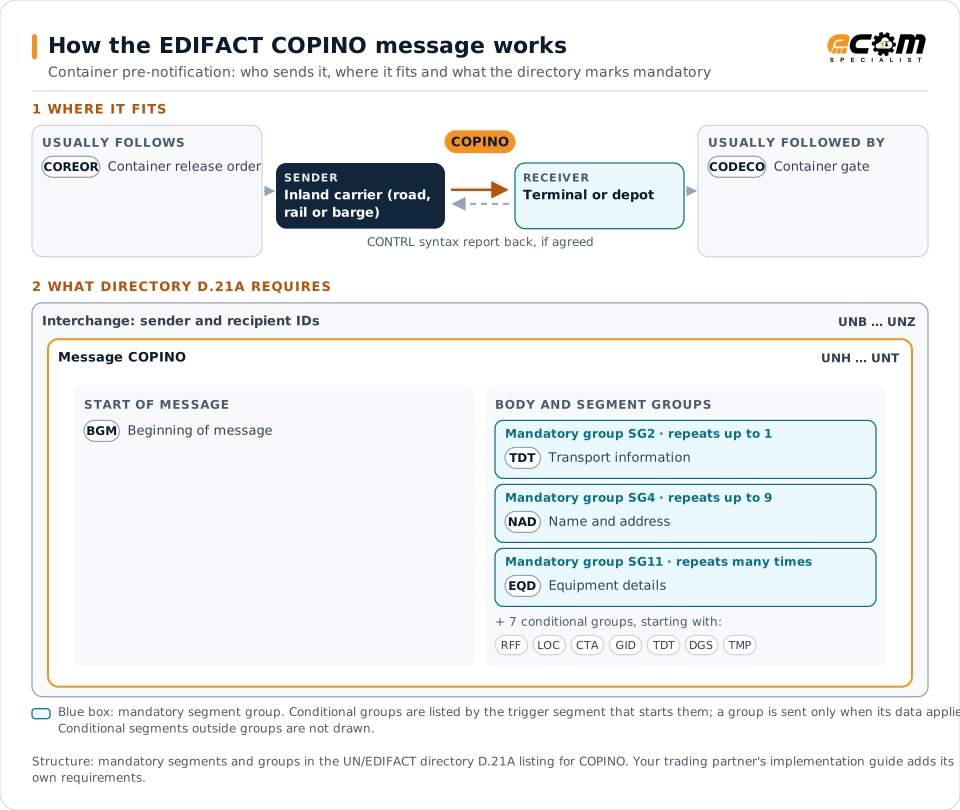
How to read this diagram: the top row shows who sends COPINO, to whom, and which messages usually come before and after it. The lower part shows what the directory D.21A itself requires: the envelopes around COPINO and the segments and segment groups it marks mandatory. Conditional groups are listed by their trigger segment rather than drawn in full. This is the directory's minimum, not a trading partner's requirement: a message implementation guide, such as an industry subset or a partner’s own guide, usually makes some conditional groups mandatory, restricts the codes and may use an older directory.
When it is used
- Announcing a truck's arrival to deliver an export container
- Announcing a pickup of an import container
- Pre-notifying rail or barge visits
Where it fits in the message flow
Structure
Mandatory segments in COPINO (directory D.21A)
In UN/EDIFACT directory D.21A, the COPINO message has 55 segment positions arranged in 16 segment groups. These are the segments and segment groups marked mandatory at message level, in order; a mandatory group is shown with the segment that starts it. Segments inside conditional groups are needed only when the group is used. This is the directory’s requirement, not your trading partner’s: each partner’s message implementation guide names the directory it uses, often an older one such as D.96A or D.01B where the structure can differ, makes some conditional segments mandatory and restricts the codes.
- UNH
- BGM
- SG2 (TDT)
- SG4 (NAD)
- SG11 (EQD)
- UNT
Practical example
COPINO in practice
A haulier will collect an import container at a Hamburg terminal the next morning. Its transport system sends the terminal a COPINO with the container number, the release reference, the truck's license plate and the planned arrival time. The terminal stages the container, and the truck passes the automated gate in minutes.
Implementation
Implementation considerations for COPINO
- Send pre-notifications within the terminal's time windows.
- Include release references and vehicle details the terminal checks.
- Update or cancel notifications when plans change.
- Follow the port community system's specification where one applies.
How ECOM helps
Automate COPINO with ECOM
Industry
Trucking and Transportation
Load tenders, responses, status and freight invoices for carriers, brokers and shippers, integrated with the TMS.
Solution
Logistics Automation
Automate tenders, status updates, freight invoices and warehouse orders with logistics partners.
Industry
3PL and Warehousing
Warehouse orders, shipping advice, receipts and inventory reporting between brands, 3PLs, carriers and retailers.
Compare X12 and EDIFACT, or see answers to general questions in the EDI FAQ.
Related messages
Related transport messages
- COREORContainer release order
- CODECOContainer gate
- COPARNContainer announcement
- COSTCOContainer stuffing/stripping confirmation
- COSTORContainer stuffing/stripping order
- IFCSUMForwarding and consolidation summary
- IFTMBCBooking confirmation
- IFTMBFFirm booking
- IFTMBPProvisional booking
- IFTMCAConsignment advice
- IFTMINInstruction
- IFTSAIForwarding and transport schedule and availability information
Need help with COPINO?
ECOM maps, tests and monitors EDIFACT messages for your trading partners and integrates them with your ERP.