
X12 transaction guide · Transportation
EDI 928 Automotive Inspection Detail
The X12 document used to report motor vehicle inspection results to manufacturers, carriers and other interested parties.
- Sent by
- Vehicle manufacturer, inspection agency or carrier
- Received by
- Manufacturer, carrier or other interested party
- Standard
- ANSI ASC X12
What is an EDI 928?
The EDI 928 Automotive Inspection Detail is the ANSI X12 transaction set automotive manufacturers, inspection agencies and carriers use to report motor vehicle inspection results to other interested parties. Results identify each vehicle and any damage found, using standard codes for damage area, type and severity.
Vehicles are inspected when they change hands between carriers and at delivery. The 928 records the condition at each point, which establishes where damage occurred and supports any claim filed with the 924. Results can be reported per vehicle or in batches.
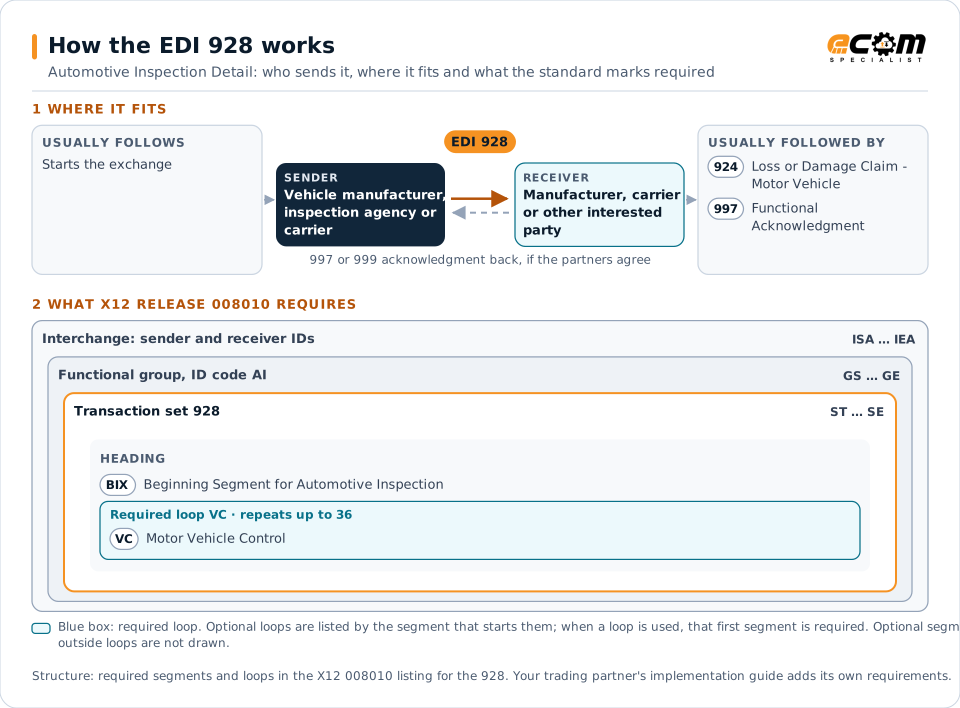
How to read this diagram: the top row shows who sends the 928, to whom, and which documents usually come before and after it. The lower part shows what X12 release 008010 itself requires: the envelopes around the 928 and the segments and loops the standard marks as required, area by area. Optional loops are listed by the segment that starts them rather than drawn in full. This is the standard's minimum, not a trading partner's requirement: each partner's implementation guide usually makes some optional loops mandatory, restricts the codes and may use a different release.
When it is used
- Reporting inspection results at a rail ramp or port
- Recording vehicle condition at handover between carriers
- Supporting damage claims with inspection data
Where it fits in the document flow
Structure
Mandatory segments in the 928 (X12 release 008010)
The segments X12 release 008010 marks as mandatory at their level, in order. Segments inside optional loops are needed only when the loop is used. This is the standard's requirement, not your trading partner's: each partner's implementation guide names the release it uses, adds the optional segments it requires and restricts the values. The requirement status comes from one published X12 reference listing and has not been checked against a second source.
- ST
- BIX
- VC
- SE
Practical example
The 928 in practice
An inspection agency checks new vehicles as they are unloaded from rail cars at a distribution ramp. For each vehicle it sends the manufacturer and the railroad a 928 with the vehicle identification number and any damage, coded by area, type and severity. The manufacturer routes damaged vehicles for repair and uses the reports to claim against the responsible carrier.
Implementation
Implementation considerations for the 928
- Use standard industry damage area, type and severity codes.
- Record inspection location and time precisely.
- Send results promptly, since they determine claim responsibility.
- Link inspection records to shipment and claim data.
How ECOM helps
Automate the 928 with ECOM
Industry
Automotive
Schedules, ship notices, labels, self-billing and multi-plant routing for automotive suppliers.
Industry
Trucking and Transportation
Load tenders, responses, status and freight invoices for carriers, brokers and shippers, integrated with the TMS.
Solution
Supply Chain Visibility
Track orders, shipments and invoices across partners and catch exceptions early.
More general questions about EDI are answered in the EDI FAQ.
Related transactions
Related transportation documents
- 924Loss or Damage Claim - Motor Vehicle
- 120Vehicle Shipping Order
- 121Vehicle Service
- 125Multilevel Railcar Load Details
- 127Vehicle Baying Order
- 421Estimated Time of Arrival and Car Scheduling
- 453Railroad Service Commitment Advice
- 228Equipment Inspection Report
- 104Air Shipment Information
- 106Motor Carrier Rate Proposal
- 107Request for Motor Carrier Rate Proposal
- 108Response to a Motor Carrier Rate Proposal
Need help with the EDI 928?
ECOM maps, tests and monitors X12 documents for your trading partners and integrates them with your ERP.