
X12 transaction guide · Planning
EDI 867 Product Transfer and Resale Report
The X12 document used to report product transferred between locations, or sold from locations to end customers, often by distributors to manufacturers.
- Sent by
- Distributor, reseller or buyer (sometimes the seller)
- Received by
- Manufacturer or supplier
- Standard
- ANSI ASC X12
- EDIFACT equivalent
- SLSRPT
What is an EDI 867?
The EDI 867 Product Transfer and Resale Report is the ANSI X12 transaction set used to report product movement. It can report product transferred from one location to another, sales of product from one or more locations to end customers, or those sales together with demand beyond actual sales, such as lost orders. Either the buyer or the seller can issue it.
Manufacturers use 867 data to see sell-through at their distributors, calculate rebates and chargebacks on contract sales, and plan production. Distributors often must send it to qualify for contract pricing.
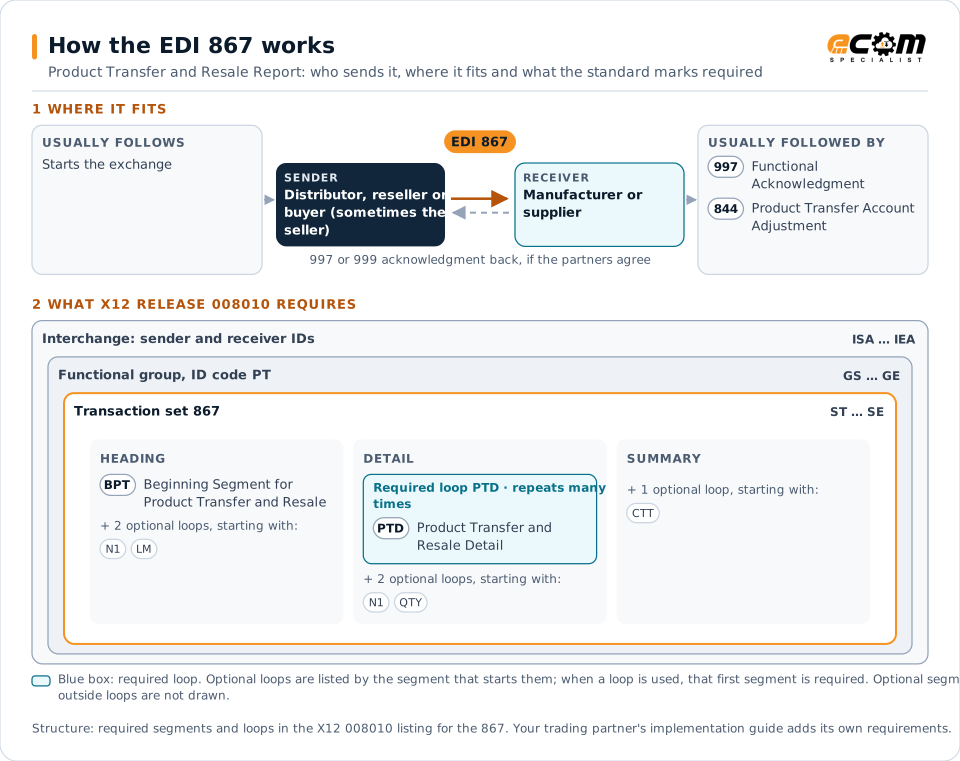
How to read this diagram: the top row shows who sends the 867, to whom, and which documents usually come before and after it. The lower part shows what X12 release 008010 itself requires: the envelopes around the 867 and the segments and loops the standard marks as required, area by area. Optional loops are listed by the segment that starts them rather than drawn in full. This is the standard's minimum, not a trading partner's requirement: each partner's implementation guide usually makes some optional loops mandatory, restricts the codes and may use a different release.
When it is used
- Distributors reporting sales to end customers
- Supporting contract pricing rebates and chargebacks
- Reporting transfers between warehouse locations
- Sharing lost-order demand for planning
Where it fits in the document flow
Structure
Mandatory segments in the 867 (X12 release 008010)
The segments X12 release 008010 marks as mandatory at their level, in order. Segments inside optional loops are needed only when the loop is used. This is the standard's requirement, not your trading partner's: each partner's implementation guide names the release it uses, adds the optional segments it requires and restricts the values. The requirement status comes from one published X12 reference listing and has not been checked against a second source.
- ST
- BPT
- N1
- PER
- LM
- LQ
- PTD
- SII
- QTY
- LX
- FA1
- FA2
- CTT
- SE
Practical example
The 867 in practice
An electrical distributor buys wire at standard cost but sells it to a contractor at a manufacturer-approved contract price. At month end, it sends the manufacturer an 867 listing each contract sale, the end customer and the quantities. The manufacturer uses the report to validate the distributor's claim for the price difference.
Implementation
Implementation considerations for the 867
- Identify end customers and contracts consistently, because rebates depend on exact matches.
- Agree the reporting period and whether the report covers sales, transfers or both.
- Reconcile reported quantities with purchases from the manufacturer to catch gaps early.
Trading partners
Integration guides that include the 867

How ECOM helps
Automate the 867 with ECOM
Industry
Wholesale Distribution
Customer orders, supplier purchasing, catalogs and drop-ship for distributors.
Industry
Manufacturing
Customer schedules, supplier connectivity and shipping integrated with the ERP for manufacturers.
Solution
EDI Integration
Exchange X12 and EDIFACT documents with partners and integrate them directly with your ERP.
More general questions about EDI are answered in the EDI FAQ.
Related transactions
Related planning documents
Need help with the EDI 867?
ECOM maps, tests and monitors X12 documents for your trading partners and integrates them with your ERP.