
X12 transaction guide · Planning
EDI 866 Production Sequence
The X12 document a receiver of goods, usually a manufacturer, uses to set the sequence in which shipments arrive or goods are unloaded and used.
- Sent by
- Manufacturer or receiving plant
- Received by
- Supplier
- Standard
- ANSI ASC X12
What is an EDI 866?
The EDI 866 Production Sequence is the ANSI X12 transaction set the receiver of goods uses to request the order in which shipments arrive at one or more locations, the order in which goods are unloaded from the conveyance, or both. It specifies the sequence in which goods enter materials handling or are consumed in production.
The 866 is central to sequenced delivery in automotive and other assembly industries, where parts such as seats or modules must arrive in the exact order of the vehicles on the line. It works alongside the 830 planning schedule and 862 shipping schedule.
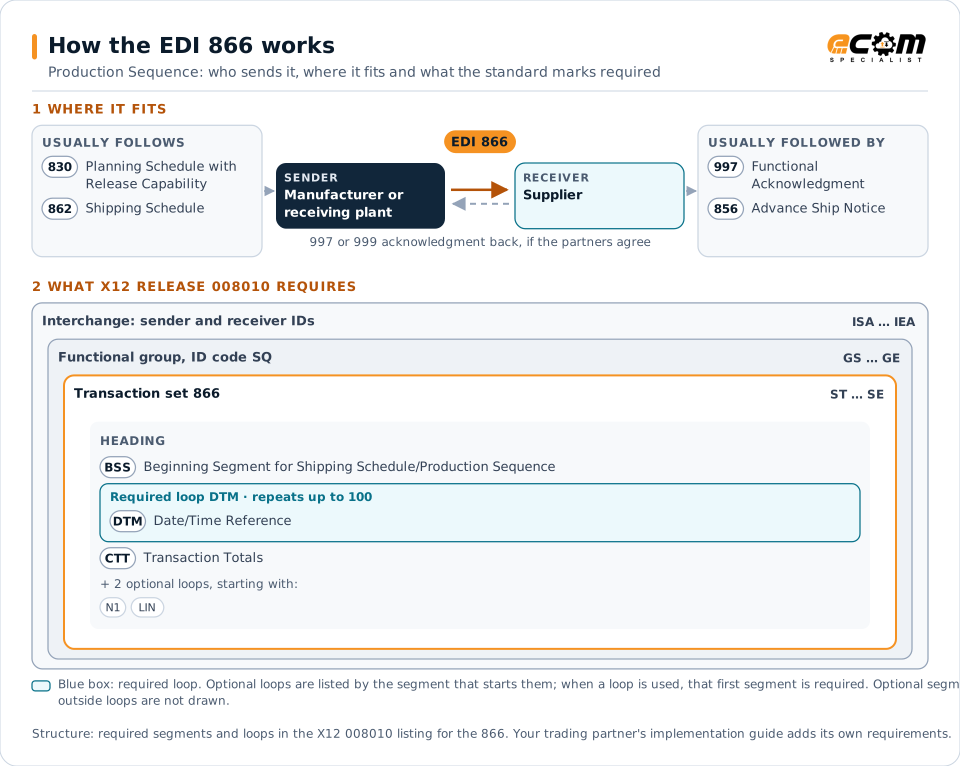
How to read this diagram: the top row shows who sends the 866, to whom, and which documents usually come before and after it. The lower part shows what X12 release 008010 itself requires: the envelopes around the 866 and the segments and loops the standard marks as required, area by area. Optional loops are listed by the segment that starts them rather than drawn in full. This is the standard's minimum, not a trading partner's requirement: each partner's implementation guide usually makes some optional loops mandatory, restricts the codes and may use a different release.
When it is used
- Sequenced parts delivery to automotive assembly lines
- Setting unload order for mixed-load deliveries
- Just-in-sequence supply of modules and assemblies
Where it fits in the document flow
Structure
Mandatory segments in the 866 (X12 release 008010)
The segments X12 release 008010 marks as mandatory at their level, in order. Segments inside optional loops are needed only when the loop is used. This is the standard's requirement, not your trading partner's: each partner's implementation guide names the release it uses, adds the optional segments it requires and restricts the values. The requirement status comes from one published X12 reference listing and has not been checked against a second source.
- ST
- BSS
- N1
- DTM
- LIN
- SLN
- PID
- CTT
- SE
Practical example
The 866 in practice
A vehicle assembly plant builds cars with different seat colors in a planned order. It sends the seat supplier an 866 listing the sequence of vehicles and the seat set each needs. The supplier builds and loads seats in that order, so each set reaches the line exactly when its vehicle arrives.
Implementation
Implementation considerations for the 866
- Treat sequence data as time-critical and process it as soon as it arrives.
- Load and label shipments in the exact sequence received, and confirm with the 856.
- Plan for resequencing when the plant changes its build order.
Trading partners
Integration guides that include the 866


How ECOM helps
Automate the 866 with ECOM
Industry
Automotive
Schedules, ship notices, labels, self-billing and multi-plant routing for automotive suppliers.
Industry
Manufacturing
Customer schedules, supplier connectivity and shipping integrated with the ERP for manufacturers.
Solution
EDI Integration
Exchange X12 and EDIFACT documents with partners and integrate them directly with your ERP.
More general questions about EDI are answered in the EDI FAQ.
Related transactions
Related planning documents
Need help with the EDI 866?
ECOM maps, tests and monitors X12 documents for your trading partners and integrates them with your ERP.