
X12 transaction guide · Shipping and logistics
EDI 857 Shipment and Billing Notice
The X12 document that gives a shipment's recipient the data for both receipt planning and payment, combining a ship notice and invoice.
- Sent by
- Supplier or seller
- Received by
- Buyer's receiving and accounts payable functions
- Standard
- ANSI ASC X12
What is an EDI 857?
The EDI 857 Shipment and Billing Notice is the ANSI X12 transaction set that provides the recipient of a shipment with data for both receipt planning and payment generation. In many relationships a seller sends a ship notice (856) to the buyer's receiving function and an invoice (810) to payables, even though most of their content overlaps. The 857 consolidates the two into one document.
It is used where the buyer pays on receipt or where shipment and billing are inherently linked, as in some direct store delivery and evaluated receipt arrangements. The buyer's systems must split the content between receiving and accounts payable.
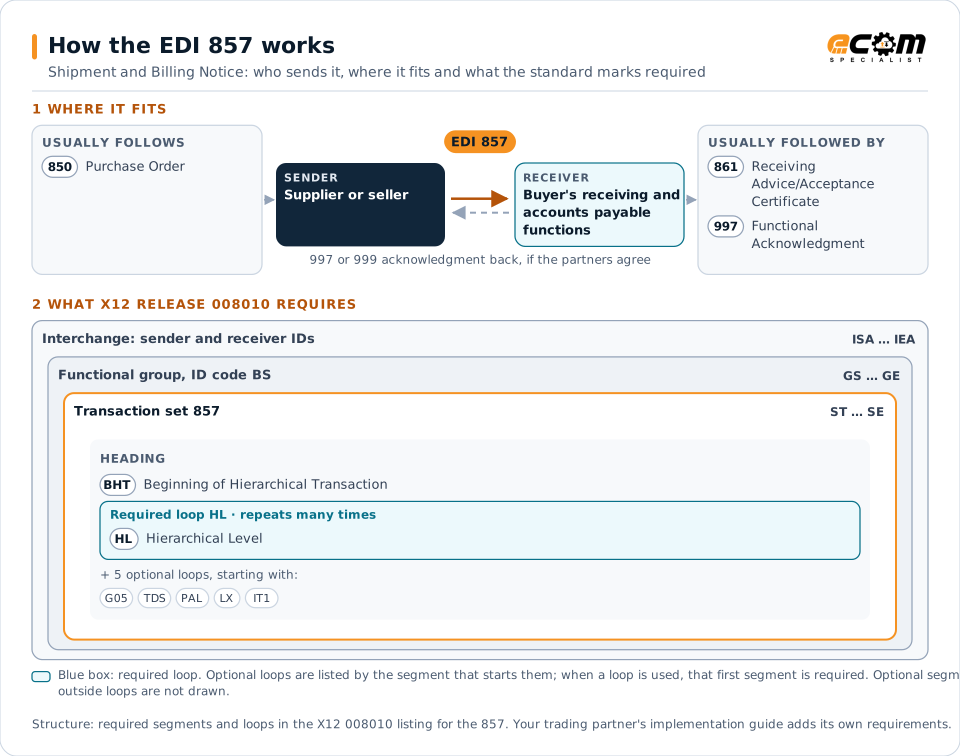
How to read this diagram: the top row shows who sends the 857, to whom, and which documents usually come before and after it. The lower part shows what X12 release 008010 itself requires: the envelopes around the 857 and the segments and loops the standard marks as required, area by area. Optional loops are listed by the segment that starts them rather than drawn in full. This is the standard's minimum, not a trading partner's requirement: each partner's implementation guide usually makes some optional loops mandatory, restricts the codes and may use a different release.
When it is used
- Replacing a separate 856 and 810 for the same shipment
- Supporting pay-on-receipt arrangements
- Sending shipment and billing details from one event
Where it fits in the document flow
Structure
Mandatory segments in the 857 (X12 release 008010)
The segments X12 release 008010 marks as mandatory at their level, in order. Segments inside optional loops are needed only when the loop is used. This is the standard's requirement, not your trading partner's: each partner's implementation guide names the release it uses, adds the optional segments it requires and restricts the values. The requirement status comes from one published X12 reference listing and has not been checked against a second source.
- ST
- BHT
- HL
- G05
- N1
- LM
- LQ
- TDS
- SAC
- FA1
- FA2
- PAL
- LX
- IT1
- PID
- SLN
- SE
Practical example
The 857 in practice
A packaging supplier delivers corrugated boxes to a beverage plant several times a week under a blanket order. Instead of an 856 and an 810 per delivery, it sends one 857 with the shipment, the cartons and pallets, the items and quantities, and the prices and totals. The plant receives against the shipment data and its payables system schedules payment from the same document.
Implementation
Implementation considerations for the 857
- Agree with the buyer that the 857 replaces both the 856 and 810, not just one of them.
- Make sure the buyer's systems route the receiving and billing content to the right functions.
- Handle quantity differences found at receipt, since the billing figures come from the shipment.
- Check tax and charge requirements that an 810 would normally carry.
How ECOM helps
Automate the 857 with ECOM
Solution
Order-to-Cash Automation
Automate the flow from purchase order to payment across every customer channel.
Solution
Procure-to-Pay Automation
Automate purchasing, receiving and supplier invoicing across EDI, portals and documents.
Industry
Manufacturing
Customer schedules, supplier connectivity and shipping integrated with the ERP for manufacturers.
More general questions about EDI are answered in the EDI FAQ.
Related transactions
Related shipping and logistics documents
Need help with the EDI 857?
ECOM maps, tests and monitors X12 documents for your trading partners and integrates them with your ERP.