
X12 transaction guide · Shipping and logistics
EDI 214 Transportation Carrier Shipment Status Message
The X12 document a carrier sends to report shipment status events such as pickup, in-transit checkpoints, appointments and delivery.
- Sent by
- Carrier
- Received by
- Shipper, consignee, broker or 3PL
- Standard
- ANSI ASC X12
- EDIFACT equivalent
- IFTSTA
What is an EDI 214?
The EDI 214 Transportation Carrier Shipment Status Message is the ANSI X12 transaction set carriers use to report what is happening to a shipment. Each status message carries a status code, a reason code, the date and time of the event and the location, along with references that tie the update to the shipment and the original tender.
Shippers and brokers use 214 data for track and trace, customer notifications, dock and labor scheduling and carrier performance measurement. Because status codes vary in meaning and use between partners, mapping them consistently to internal milestones is essential for reliable visibility.
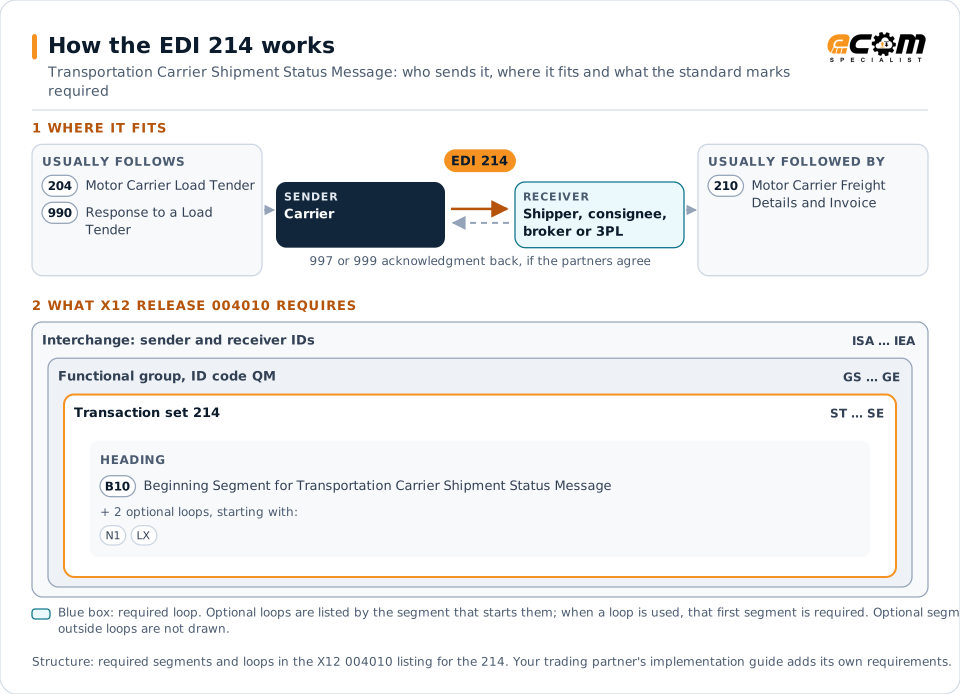
How to read this diagram: the top row shows who sends the 214, to whom, and which documents usually come before and after it. The lower part shows what X12 release 004010 itself requires: the envelopes around the 214 and the segments and loops the standard marks as required, area by area. Optional loops are listed by the segment that starts them rather than drawn in full. This is the standard's minimum, not a trading partner's requirement: each partner's implementation guide usually makes some optional loops mandatory, restricts the codes and may use a different release.
When it is used
- Reporting pickup, in-transit, arrival and delivery events
- Communicating appointment scheduling and delays with reasons
- Feeding visibility and customer notification systems
- Supporting carrier on-time performance measurement
Where it fits in the document flow
Structure
Key segments in the 214
The segments most implementations use, described in plain language. The last column shows what X12 release 004010 itself requires: "Required" marks a segment the standard requires in every 214; "Optional, common" marks a segment the standard leaves optional, or that sits in an optional loop, but that implementations often use. This is the standard's requirement, not your trading partner's: each partner's implementation guide names the release it uses, makes some optional segments mandatory and restricts the values, and requirements can differ between releases. The requirement status comes from one published X12 reference listing and has not been checked against a second source.
| Segment | Name | What it carries | In X12 004010 |
|---|---|---|---|
| B10 | Beginning Segment for Transportation Carrier Shipment Status Message | Carrier reference such as PRO number, the shipment identification number from the tender and the carrier SCAC. | Required |
| L11 | Business Instructions and Reference Number | Additional references such as purchase order or bill of lading numbers. | Optional, common |
| LX loop | Assigned Number | Groups each status detail. | Optional, common |
| AT7 | Shipment Status Details | Status code, reason code, date, time and time zone of the event. | Optional, common |
| MS1 | Equipment, Shipment or Real Property Location | City and state or coordinates where the event occurred. | Optional, common |
Example
Sample EDI 214
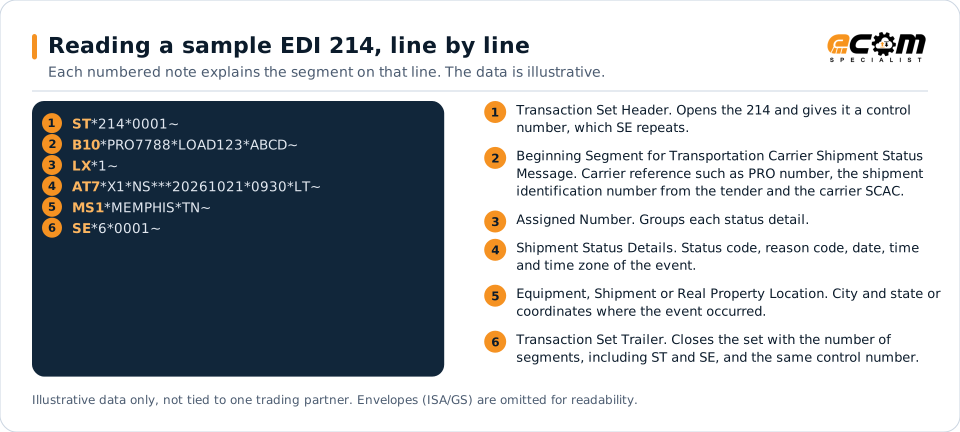
Carrier ABCD reports that shipment LOAD123 (PRO 7788) arrived at the delivery location (X1) on schedule (NS) at 09:30 local time in Memphis, Tennessee.
Illustrative data only, not tied to one X12 release or trading partner. The interchange (ISA/IEA) and functional group (GS/GE) envelopes are omitted for readability.
ST*214*0001~
B10*PRO7788*LOAD123*ABCD~
LX*1~
AT7*X1*NS***20261021*0930*LT~
MS1*MEMPHIS*TN~
SE*6*0001~The sample is the same one shown above, with a note beside each segment the first time it appears. Segment IDs are highlighted at the start of each line; the fields after them are separated by asterisks, and each segment ends with a tilde.
Avoid problems
Common 214 errors and how to prevent them
Inconsistent status codes
Different carriers use codes differently. Map each carrier's codes to standard internal milestones.
Missing references
Status updates without the shipment identification from the tender cannot be linked to orders.
Stale updates
Delayed status messages undermine visibility. Monitor for loads with no updates within expected windows.
Trading partners
Integration guides that include the 214








How ECOM helps
Automate the 214 with ECOM
Solution
Supply Chain Visibility
Track orders, shipments and invoices across partners and catch exceptions early.
Solution
Logistics Automation
Automate tenders, status updates, freight invoices and warehouse orders with logistics partners.
Product
PRISM-SCV
Order lifecycle visibility, response monitoring, routed alerts and business-identifier search across your B2B transactions.
EDI 214 FAQs
What is an EDI 214 used for?
It reports shipment status events from the carrier, such as pickup, in-transit checkpoints, appointments and delivery.
What are common 214 status codes?
Commonly used codes include X3 for arrived at pickup, AF for departed pickup, X1 for arrived at delivery and D1 for completed delivery. Each partner defines the codes it uses.
Can APIs replace the 214?
Many carriers offer tracking APIs that complement or replace 214 messages for real-time updates. Some shippers combine both.
More general questions about EDI are answered in the EDI FAQ.
Related transactions
Related shipping and logistics documents
Need help with the EDI 214?
ECOM maps, tests and monitors X12 documents for your trading partners and integrates them with your ERP.