
X12 transaction guide · Transportation
EDI 315 Status Details (Ocean)
The X12 document ocean carriers and terminals use to report status events for shipments and containers, such as gate-in, loaded and discharged.
- Sent by
- Ocean carrier or terminal
- Received by
- Shipper, forwarder, consignee or other interested party
- Standard
- ANSI ASC X12
- EDIFACT equivalent
- IFTSTA
What is an EDI 315?
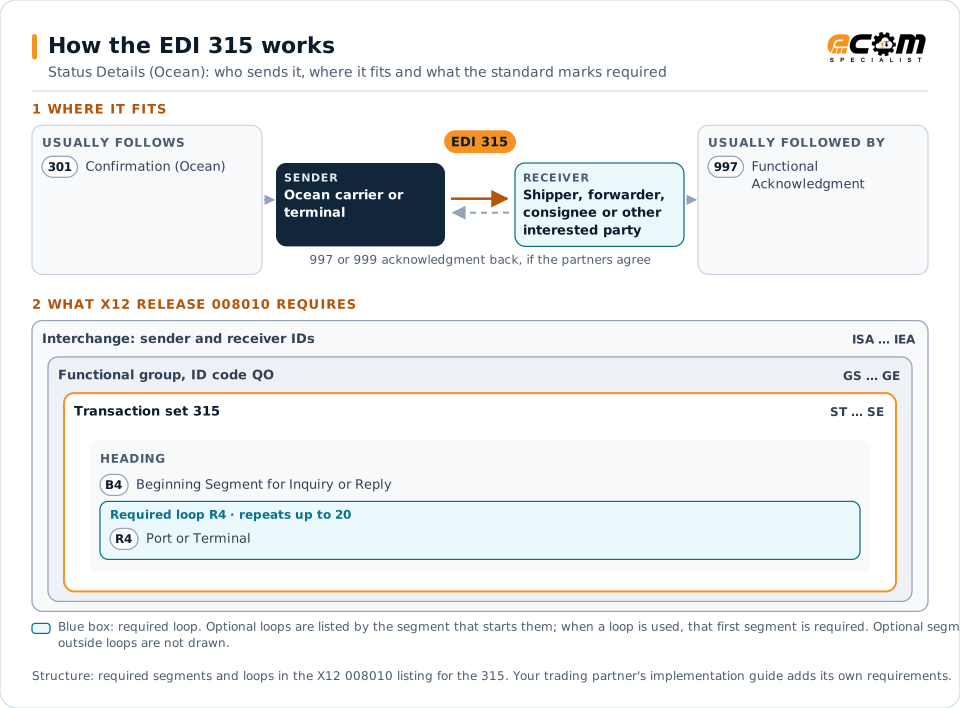
The EDI 315 Status Details (Ocean) is the ANSI X12 transaction set used to report status or event details for selected shipments or containers. One 315 can report one event for many shipments or containers, or several events for a single shipment or container.
Typical events include an empty container released, gate-in at the port, loaded on the vessel, vessel departure and arrival, discharge and gate-out at destination. Shippers and consignees use 315 events to track international shipments, plan inland transport and warn customers of delays.
How to read this diagram: the top row shows who sends the 315, to whom, and which documents usually come before and after it. The lower part shows what X12 release 008010 itself requires: the envelopes around the 315 and the segments and loops the standard marks as required, area by area. Optional loops are listed by the segment that starts them rather than drawn in full. This is the standard's minimum, not a trading partner's requirement: each partner's implementation guide usually makes some optional loops mandatory, restricts the codes and may use a different release.
When it is used
- Tracking containers from origin port to destination
- Planning inland pickup after discharge
- Measuring carrier transit times and delays
Where it fits in the document flow
Structure
Mandatory segments in the 315 (X12 release 008010)
The segments X12 release 008010 marks as mandatory at their level, in order. Segments inside optional loops are needed only when the loop is used. This is the standard's requirement, not your trading partner's: each partner's implementation guide names the release it uses, adds the optional segments it requires and restricts the values. The requirement status comes from one published X12 reference listing and has not been checked against a second source.
- ST
- B4
- R4
- SE
Practical example
The 315 in practice
An importer tracks containers of electronics from Shanghai to Los Angeles. As events occur, the carrier sends 315 messages: loaded on vessel, vessel departed, vessel arrived and discharged. When the discharge event arrives, the importer's system books a drayage pickup and updates the expected arrival at its warehouse.
Implementation
Implementation considerations for the 315
- Map event codes to your own milestones, because carriers may report the same event differently.
- Handle events that arrive late or out of order without overwriting newer status.
- Link containers to purchase orders so status can be shared with planners and customers.
How ECOM helps
Automate the 315 with ECOM
Industry
Trucking and Transportation
Load tenders, responses, status and freight invoices for carriers, brokers and shippers, integrated with the TMS.
Industry
Retail
Retail and eCommerce EDI for suppliers and retailers, from purchase order to payment, with compliance built in.
Solution
EDI Integration
Exchange X12 and EDIFACT documents with partners and integrate them directly with your ERP.
More general questions about EDI are answered in the EDI FAQ.
Related transactions
Related transportation documents
- 301Confirmation (Ocean)
- 313Shipment Status Inquiry (Ocean)
- 312Arrival Notice (Ocean)
- 310Freight Receipt and Invoice (Ocean)
- 163Transportation Appointment Schedule Information
- 213Motor Carrier Shipment Status Inquiry
- 326Consignment Summary List
- 109Vessel Content Details
- 125Multilevel Railcar Load Details
- 300Reservation (Booking Request) (Ocean)
- 303Booking Cancellation (Ocean)
- 323Vessel Schedule and Itinerary (Ocean)
Need help with the EDI 315?
ECOM maps, tests and monitors X12 documents for your trading partners and integrates them with your ERP.