
The short answer
Sage 300 does not translate EDI itself. An integration layer converts partner documents and creates order entry (O/E) orders through Sage 300's business logic views, called through the SDK, or through the REST-based Web API in supported versions. O/E shipments and invoices then drive outbound ship notices and invoices. Optional fields hold partner references.
Read the diagram from top to bottom. Sage 300 does not exchange X12 itself in this design: the integration layer handles the partner connection and translation, and Sage 300 creates and posts the business records. Outbound documents are built from what Sage 300 actually recorded.
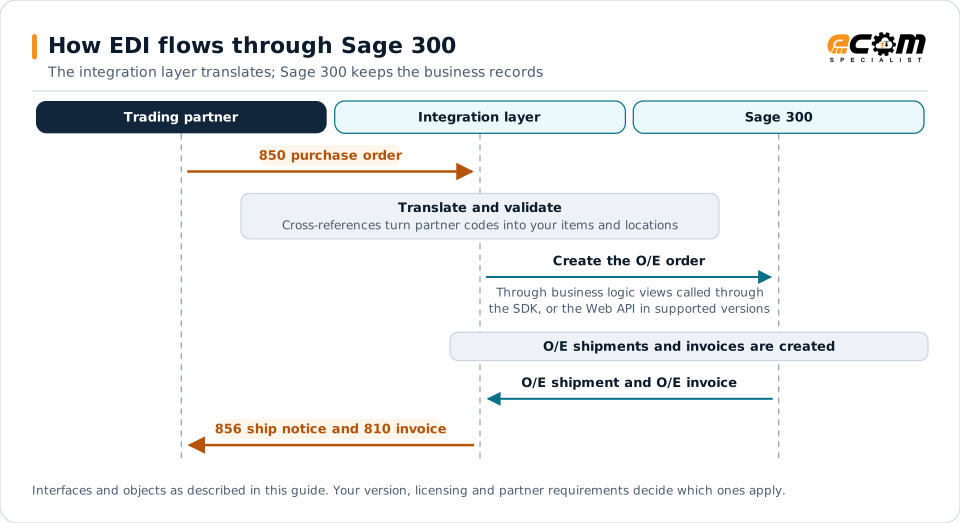
How EDI connects to Sage 300
Sage 300 serves small and midsize distributors and manufacturers, many of whom need EDI to sell to retailers and large distributors. An integration layer handles partner connectivity and translation and exchanges data with Sage 300.
Document mapping
| EDI document | Direction | Sage 300 object |
|---|---|---|
| 850 purchase order | Inbound | O/E order |
| 855 acknowledgment | Outbound | O/E order status and lines |
| 856 ship notice | Outbound | O/E shipment |
| 810 invoice | Outbound | O/E invoice |
| 846 inventory | Outbound | Item quantities by location |
Integration options
- Business logic views: Sage 300’s views, called through the SDK, apply the same validation as the user interface.
- Web API: a REST-based API in newer versions for reading and creating records. Availability depends on your version.
- Import and export: file-based transfer for simple scenarios and initial loads.
Avoid writing directly to Sage 300 database tables; it bypasses business rules and can corrupt data.
Partner data
- Customer item number cross-references, maintained in Sage 300 or in the integration layer.
- Ship-to locations for retailer stores and distribution centers.
- Optional fields for EDI identifiers and the partner’s original purchase order line numbers.
Shipping data
Retail ship notices need carton detail and GS1-128 labels, which O/E shipments do not hold by default. Packing data usually comes from a warehouse add-on, a WMS or the EDI solution. Plan this with the warehouse team before go-live.
Best practices
- Validate customers, items and prices before creating O/E orders.
- Create shipments from actual picking so ship notices reflect what shipped.
- Keep partner-specific rules in the integration layer.
- Retest integrations after Sage 300 upgrades.
- Start with web EDI for low-volume partners. See web EDI vs integrated EDI.