
Guides

Oracle E-Business Suite EDI integration guide: e-Commerce Gateway and open interfaces

How Oracle E-Business Suite exchanges EDI documents through e-Commerce Gateway, open interface tables and newer XML and web service options.

2 min read · Updated October 19, 2026

The short answer

Oracle E-Business Suite exchanges EDI through e-Commerce Gateway, which imports and exports flat files that an EDI translator converts to and from X12 or EDIFACT. Inbound purchase orders load through Order Import open interface tables and concurrent programs, while outbound transactions extract ship notices and invoices. XML Gateway and Integrated SOA Gateway add XML and web service options.

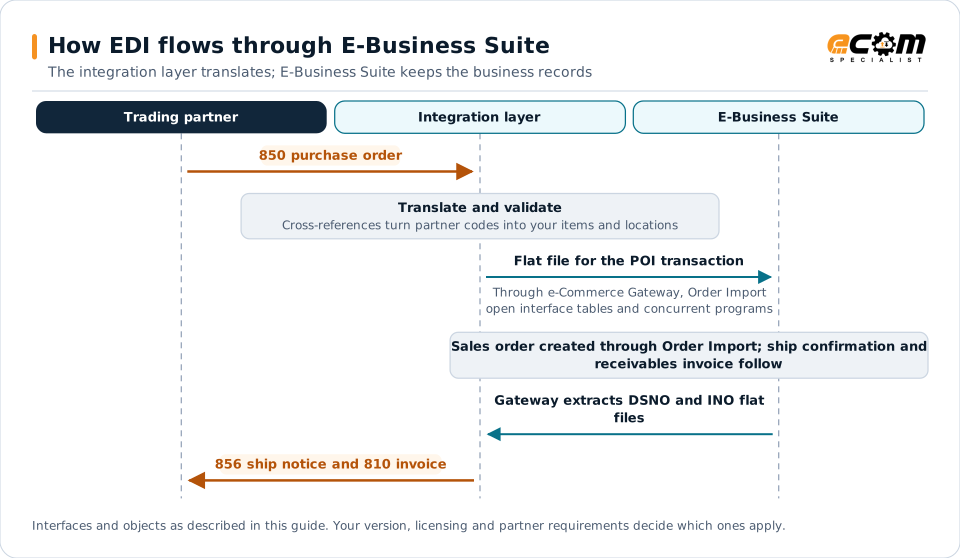
How EDI flows through E-Business SuiteSequence diagram for E-Business Suite. The trading partner sends a 850 purchase order to the integration layer, which translates and validates it and flat file for the POI transaction through e-Commerce Gateway, Order Import open interface tables and concurrent programs. In E-Business Suite, sales order created through Order Import; ship confirmation and receivables invoice follow. Gateway extracts DSNO and INO flat files, and the integration layer sends the 856 ship notice and 810 invoice to the partner.How EDI flows through E-Business SuiteThe integration layer translates; E-Business Suite keeps the business recordsTrading partnerIntegration layerE-Business Suite850 purchase orderTranslate and validateCross-references turn partner codes into your items and locationsFlat file for the POI transactionThrough e-Commerce Gateway, Order Importopen interface tables and concurrent programsSales order created through Order Import; ship confirmation andreceivables invoice followGateway extracts DSNO and INO flatfiles856 ship notice and 810 invoiceInterfaces and objects as described in this guide. Your version, licensing and partner requirements decide which ones apply.
How EDI flows through E-Business SuiteSequence diagram for E-Business Suite. The trading partner sends a 850 purchase order to the integration layer, which translates and validates it and flat file for the POI transaction through e-Commerce Gateway, Order Import open interface tables and concurrent programs. In E-Business Suite, sales order created through Order Import; ship confirmation and receivables invoice follow. Gateway extracts DSNO and INO flat files, and the integration layer sends the 856 ship notice and 810 invoice to the partner.How EDI flows throughE-Business SuiteThe integration layer translates; E-BusinessSuite keeps the business recordsTradingpartnerIntegrationlayerE-BusinessSuite850 purchase orderTranslate and validateCross-references turnpartner codes into youritems and locationsFlat file for the POItransactionThrough e-CommerceGateway, Order Import openinterface tables and concurrentprogramsSales order createdthrough Order Import;ship confirmation andreceivables invoicefollowGateway extracts DSNOand INO flat files856 ship notice and 810invoiceInterfaces and objects as described in this guide.Your version, licensing and partner requirementsdecide which ones apply.

Read the diagram from top to bottom. E-Business Suite does not exchange X12 itself in this design: the integration layer handles the partner connection and translation, and E-Business Suite creates and posts the business records. Outbound documents are built from what E-Business Suite actually recorded.
Expand diagram Download SVG

How EDI connects to E-Business Suite

Oracle E-Business Suite (EBS) has supported EDI for decades, and many EBS instances run large, mature trading partner programs, often with IBM Sterling or another translator. EBS offers several integration mechanisms; most EDI programs use e-Commerce Gateway and open interface tables, sometimes alongside XML Gateway.

Common transactions

EDI documentDirectione-Commerce Gateway transactionEBS object
850 purchase orderInboundPOISales order through Order Import
860 order changeInboundPOCISales order change through Order Import
855 acknowledgmentOutboundPOAOOrder acknowledgment
856 ship noticeOutboundDSNOShip confirmation
810 invoiceOutboundINOReceivables invoice

Inbound flow: customer orders

  1. The translator converts the partner’s 850 into an e-Commerce Gateway flat file.
  2. The e-Commerce Gateway inbound program loads the data into the Order Import open interface tables.
  3. The Order Import concurrent program validates the data and creates sales orders.
  4. Records that fail validation stay in the interface with error messages for correction in the Order Import corrections form.

Outbound flow

Outbound programs extract data after the business event, such as ship confirmation for ship notices or Receivables invoice creation for invoices, write flat files and pass them to the translator. Schedule these concurrent programs often enough to meet partner deadlines.

Trading partner setup

  • e-Commerce Gateway trading partners link partner identifiers and enabled transactions to customer or supplier sites.
  • Customer items and cross-references map customer item numbers to inventory items.
  • Code conversions translate partner codes, such as units of measure, to EBS values.

Other integration options

  • XML Gateway exchanges XML business documents, including OAGIS-style messages.
  • Integrated SOA Gateway exposes EBS business services as REST or SOAP web services for real-time scenarios.

Upgrades and the road ahead

Many EBS customers plan upgrades within release 12.2 or a move to Oracle Fusion Cloud ERP. Keep partner-specific logic in the integration layer and document custom extensions so EDI can move with the ERP. See the ERP migration checklist.

Best practices

  • Review Order Import interface errors daily and assign owners.
  • Maintain customer item cross-references as part of partner onboarding.
  • Use code conversions consistently rather than hard-coding values in maps.
  • Monitor end to end, not only concurrent program completion.
  • Document customizations to EDI programs and interface tables.
Oracle E-Business Suite integration and implementationIntegration methods, document mappings and ECOM services for Oracle E-Business Suite.

Frequently asked questions

What is Oracle e-Commerce Gateway?

e-Commerce Gateway is the E-Business Suite module that imports and exports flat files for standard EDI transactions. An EDI translator converts those files to and from X12 or EDIFACT.

Which e-Commerce Gateway transactions are used most?

Common transactions include inbound purchase orders (POI) and purchase order changes (POCI), and outbound ship notices (DSNO) and invoices (INO), alongside purchasing documents for suppliers.

Can we integrate without e-Commerce Gateway?

Yes. The integration layer can load Order Import open interface tables directly or use XML Gateway or Integrated SOA Gateway web services, depending on the transaction.

How does a move to Oracle Fusion Cloud ERP affect EDI?

Fusion Cloud ERP uses different interfaces, such as REST services and file-based data import, so EDI maps and processes need to be redesigned. Keeping partner logic in the integration layer reduces that effort.

Have an EDI question we did not answer?

ECOM's integration specialists can review your partners, documents and systems and recommend next steps.