
The short answer
Infor M3 connects to EDI through an integration layer that translates partner documents. Data reaches M3 through M3 APIs, such as the customer order API, through Infor ION using Business Object Documents, or through M3 Enterprise Collaborator (MEC) mappings in many existing landscapes. Deliveries and customer invoices drive outbound ship notices and invoices.
Read the diagram from top to bottom. Infor M3 does not exchange X12 itself in this design: the integration layer handles the partner connection and translation, and Infor M3 creates and posts the business records. Outbound documents are built from what Infor M3 actually recorded.
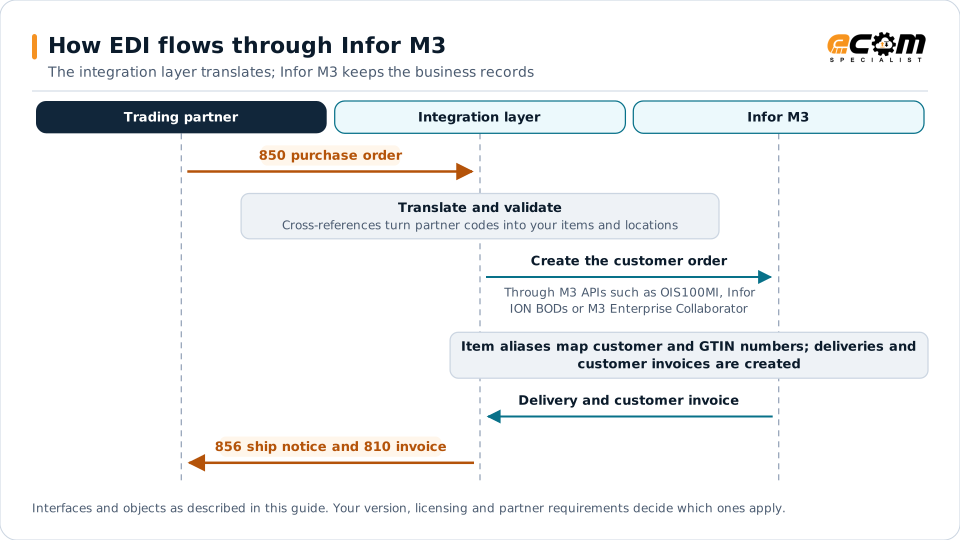
How EDI connects to Infor M3
Infor M3 serves manufacturers and distributors in industries such as food and beverage, fashion, equipment and chemicals. Many trade EDI with large retailers and global suppliers. An integration layer handles partner connectivity and translation; M3 receives and provides data through M3 APIs, Infor ION or M3 Enterprise Collaborator (MEC).
Document mapping
| EDI document | Direction | M3 object |
|---|---|---|
| 850 purchase order | Inbound | Customer order |
| 860 order change | Inbound | Customer order changes |
| 855 acknowledgment | Outbound | Order confirmation |
| 856 ship notice | Outbound | Delivery |
| 810 invoice | Outbound | Customer invoice |
Integration options
- M3 APIs: function-based programs such as the customer order API (OIS100MI) for creating order headers and lines, plus APIs for reading deliveries and invoices.
- Infor ION: message-based integration using Business Object Documents (BODs), with workflows and monitoring in ION. Central in Infor’s multi-tenant cloud.
- M3 Enterprise Collaborator (MEC): mapping and messaging used in many existing B2B landscapes. Review existing MEC mappings before a cloud move, because they often contain years of partner logic.
Partner data
- Customer records hold partner identifiers and order defaults.
- Item alias numbers map customer and GTIN item numbers to M3 items.
- Delivery addresses store store, distribution center and plant codes.
- Order types can separate EDI orders and apply partner-specific defaults.
Deliveries and ship notices
Ship notices are built from M3 deliveries and their packages. Retail partners need carton detail and GS1-128 labels, so align packing and labeling in the warehouse with the ship notice data.
Best practices
- Inventory existing MEC mappings and partner rules before upgrades or cloud migration.
- Validate customers, items and prices before creating customer orders.
- Use order types and defaults instead of custom code where possible.
- Monitor ION and API errors daily and route business errors to owners.
- Plan EDI early in migrations. See the ERP migration checklist.