
EDIFACT message guide · Customs and regulatory
SANCRT International movement of goods governmental regulatory
The UN/EDIFACT message traders use to apply to national agencies for certificates or permits for imported or exported products, and agencies use to issue them.
- Sent by
- Commercial operator or issuing authority
- Received by
- National agency or applicant
- Standard
- UN/EDIFACT · Batch message
- X12 equivalent
- No direct equivalent
What is the EDIFACT SANCRT message?
SANCRT is the UN/EDIFACT international movement of goods governmental regulatory message. The directory defines it as a message that lets a commercial operator apply to a national agency for a certificate, permit or authorization for products to be imported or exported. It also lets the issuing authority transmit the certificate or its decision to the applicant and to other authorities.
Typical uses are sanitary and phytosanitary certificates for food, plants and animals, which border agencies check before goods are released.
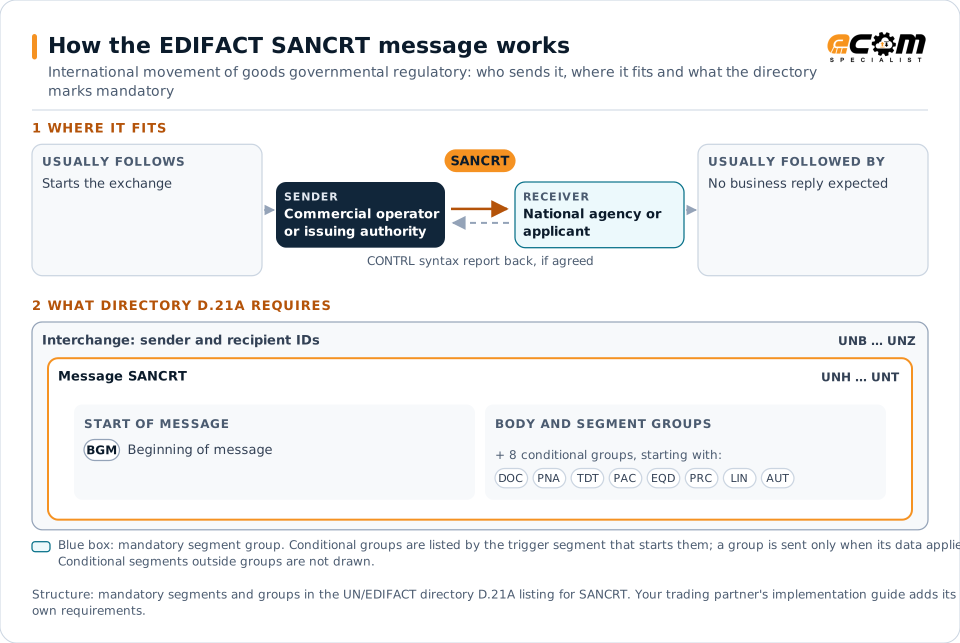
How to read this diagram: the top row shows who sends SANCRT, to whom, and which messages usually come before and after it. The lower part shows what the directory D.21A itself requires: the envelopes around SANCRT and the segments and segment groups it marks mandatory. Conditional groups are listed by their trigger segment rather than drawn in full. This is the directory's minimum, not a trading partner's requirement: a message implementation guide, such as an industry subset or a partner’s own guide, usually makes some conditional groups mandatory, restricts the codes and may use an older directory.
When it is used
- Applying for a phytosanitary or veterinary certificate
- Transmitting issued certificates to border authorities
- Applying for import or export permits
Where it fits in the message flow
No other message routinely comes directly before or after SANCRT; it is exchanged when the business event occurs. If the partners agree, the receiver confirms each interchange with a CONTRL syntax and service report.
Structure
Mandatory segments in SANCRT (directory D.21A)
In UN/EDIFACT directory D.21A, the SANCRT message has 90 segment positions arranged in 21 segment groups. These are the segments and segment groups marked mandatory at message level, in order; a mandatory group is shown with the segment that starts it. Segments inside conditional groups are needed only when the group is used. This is the directory’s requirement, not your trading partner’s: each partner’s message implementation guide names the directory it uses, often an older one such as D.96A or D.01B where the structure can differ, makes some conditional segments mandatory and restricts the codes.
- UNH
- BGM
- UNT
Practical example
SANCRT in practice
A fruit exporter ships apples to an overseas market that requires a phytosanitary certificate. Its system sends the national plant protection agency a SANCRT application with the consignment, origin and inspection details. After inspection, the agency issues the certificate electronically and transmits it to the importing country's authority.
Implementation
Implementation considerations for SANCRT
- Check which certificates each destination requires.
- Coordinate inspections with the application timing.
- Keep consignment references consistent with customs declarations.
- Follow the agency's specification and any bilateral certificate exchange rules.
How ECOM helps
Automate SANCRT with ECOM
Industry
Food and Beverage
Grocery and foodservice EDI for food and beverage manufacturers, with lot, date and inventory data.
Industry
Trucking and Transportation
Load tenders, responses, status and freight invoices for carriers, brokers and shippers, integrated with the TMS.
Solution
EDI Integration
Exchange X12 and EDIFACT documents with partners and integrate them directly with your ERP.
Compare X12 and EDIFACT, or see answers to general questions in the EDI FAQ.
Related messages
Related customs and regulatory messages
- GOVCBRGovernment Cross Border Regulatory
- DGRECADangerous goods recapitulation
- CODENOPermit expiration/clearance ready notice
- CUSCARCustoms cargo report
- CUSDECCustoms declaration
- CUSEXPCustoms express consignment declaration
- CUSPEDPeriodic customs declaration
- CUSREPCustoms conveyance report
- CUSRESCustoms response
- PAXLSTPassenger list
- WASDISWaste disposal information
Need help with SANCRT?
ECOM maps, tests and monitors EDIFACT messages for your trading partners and integrates them with your ERP.