
EDIFACT message guide · Customs and regulatory
CUSCAR Customs cargo report
The UN/EDIFACT message a carrier uses to send cargo data to a customs administration to meet cargo reporting requirements.
- Sent by
- Carrier or its agent
- Received by
- Customs administration
- Standard
- UN/EDIFACT · Batch message
- X12 equivalent
- 309 Customs Manifest
What is the EDIFACT CUSCAR message?
CUSCAR is the UN/EDIFACT customs cargo report. The directory defines it as a message that transfers data from a carrier to a customs administration to meet customs cargo reporting requirements.
A cargo report lists the consignments carried, usually per bill of lading, with shippers, consignees, goods descriptions, packages, weights and equipment. Customs authorities use it for risk assessment before arrival or departure, under deadlines set in national law. It is reported alongside the conveyance report (CUSREP), and customs answers with CUSRES.
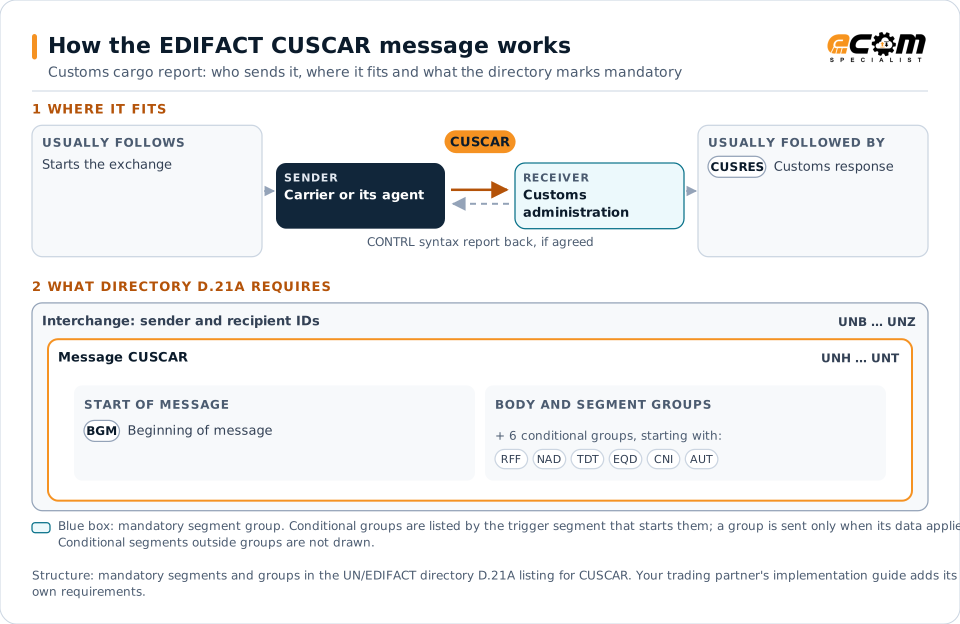
How to read this diagram: the top row shows who sends CUSCAR, to whom, and which messages usually come before and after it. The lower part shows what the directory D.21A itself requires: the envelopes around CUSCAR and the segments and segment groups it marks mandatory. Conditional groups are listed by their trigger segment rather than drawn in full. This is the directory's minimum, not a trading partner's requirement: a message implementation guide, such as an industry subset or a partner’s own guide, usually makes some conditional groups mandatory, restricts the codes and may use an older directory.
When it is used
- Filing an advance cargo manifest before arrival
- Reporting cargo loaded for export
- Amending previously reported cargo data
Where it fits in the message flow
Structure
Mandatory segments in CUSCAR (directory D.21A)
In UN/EDIFACT directory D.21A, the CUSCAR message has 72 segment positions arranged in 17 segment groups. These are the segments and segment groups marked mandatory at message level, in order; a mandatory group is shown with the segment that starts it. Segments inside conditional groups are needed only when the group is used. This is the directory’s requirement, not your trading partner’s: each partner’s message implementation guide names the directory it uses, often an older one such as D.96A or D.01B where the structure can differ, makes some conditional segments mandatory and restricts the codes.
- UNH
- BGM
- UNT
Practical example
CUSCAR in practice
An ocean carrier's vessel will arrive in Antwerp in three days. Its agent sends customs a CUSCAR listing each bill of lading with the cargo description, packages, weight, containers and parties. Customs returns CUSRES messages accepting most bills and requesting a better goods description for one, which the agent corrects before arrival.
Implementation
Implementation considerations for CUSCAR
- Follow the national customs specification and its filing deadlines.
- Use precise goods descriptions; vague ones are rejected.
- Keep cargo data consistent with bookings and bills of lading.
- Process customs responses promptly and correct errors before arrival.
How ECOM helps
Automate CUSCAR with ECOM
Industry
Trucking and Transportation
Load tenders, responses, status and freight invoices for carriers, brokers and shippers, integrated with the TMS.
Solution
Logistics Automation
Automate tenders, status updates, freight invoices and warehouse orders with logistics partners.
Solution
EDI Integration
Exchange X12 and EDIFACT documents with partners and integrate them directly with your ERP.
Compare X12 and EDIFACT, or see answers to general questions in the EDI FAQ.
Related messages
Related customs and regulatory messages
- CUSRESCustoms response
- CUSDECCustoms declaration
- CUSEXPCustoms express consignment declaration
- CUSPEDPeriodic customs declaration
- CUSREPCustoms conveyance report
- CODENOPermit expiration/clearance ready notice
- DGRECADangerous goods recapitulation
- GOVCBRGovernment Cross Border Regulatory
- PAXLSTPassenger list
- SANCRTInternational movement of goods governmental regulatory
- WASDISWaste disposal information
Need help with CUSCAR?
ECOM maps, tests and monitors EDIFACT messages for your trading partners and integrates them with your ERP.