
EDIFACT message guide · Catalogs and pricing
PRICAT Price/sales catalogue
The UN/EDIFACT message used to send pricing and catalogue details for goods and services from a seller to a buyer, or back.
- Sent by
- Seller (or buyer, for responses and negotiated prices)
- Received by
- Buyer (or seller)
- Standard
- UN/EDIFACT · Batch message
- X12 equivalent
- 832 Price/Sales Catalog
What is the EDIFACT PRICAT message?
PRICAT is the UN/EDIFACT price/sales catalogue message. The directory defines it as a message for transmitting pricing and catalogue details for goods and services offered by a seller to a buyer. It can also be sent by a buyer to a seller, as an acceptance or rejection of a catalogue received, or as a notification of negotiated prices.
Later orders and invoices depend on the catalogue data being right. A PRICAT carries product identifiers, descriptions, packaging, ordering units and prices with their validity dates, so the buyer can set up items before ordering them.
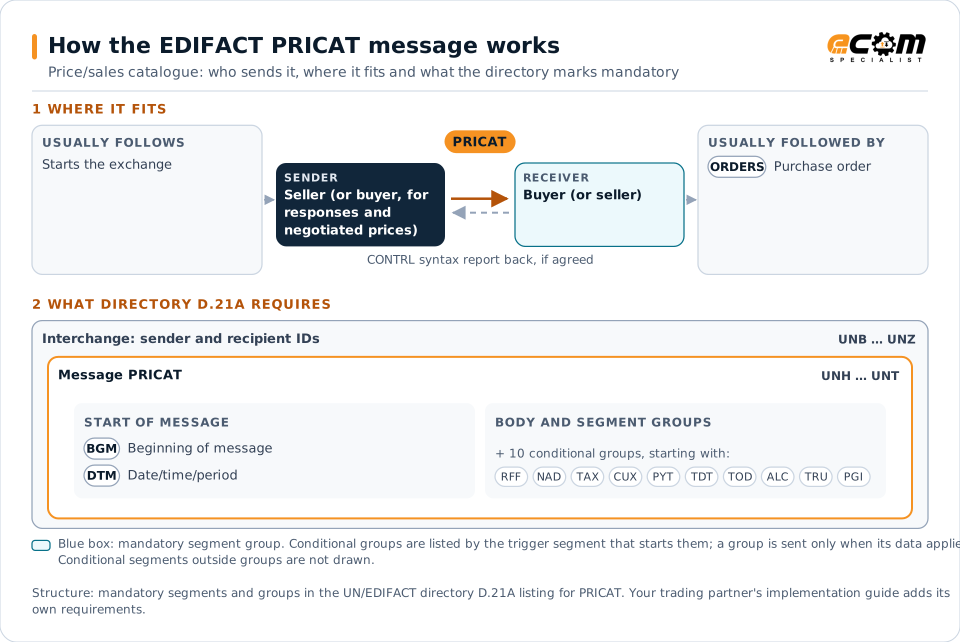
How to read this diagram: the top row shows who sends PRICAT, to whom, and which messages usually come before and after it. The lower part shows what the directory D.21A itself requires: the envelopes around PRICAT and the segments and segment groups it marks mandatory. Conditional groups are listed by their trigger segment rather than drawn in full. This is the directory's minimum, not a trading partner's requirement: a message implementation guide, such as an industry subset or a partner’s own guide, usually makes some conditional groups mandatory, restricts the codes and may use an older directory.
When it is used
- Introducing new products to a buyer
- Announcing price changes with effective dates
- Confirming negotiated prices
- Accepting or rejecting catalogue data received
Where it fits in the message flow
Structure
Mandatory segments in PRICAT (directory D.21A)
In UN/EDIFACT directory D.21A, the PRICAT message has 180 segment positions arranged in 60 segment groups. These are the segments and segment groups marked mandatory at message level, in order; a mandatory group is shown with the segment that starts it. Segments inside conditional groups are needed only when the group is used. This is the directory’s requirement, not your trading partner’s: each partner’s message implementation guide names the directory it uses, often an older one such as D.96A or D.01B where the structure can differ, makes some conditional segments mandatory and restricts the codes.
- UNH
- BGM
- DTM
- UNT
Practical example
PRICAT in practice
A cosmetics brand launches eight new products with a pharmacy chain. It sends a PRICAT with each product's GTIN, description, case and pallet configuration, ordering unit and list price from the launch date. The chain's item management team approves the data, and the products can be ordered the following week.
Implementation
Implementation considerations for PRICAT
- Send prices with effective dates well before they apply.
- Align packaging levels and ordering units with how products will be ordered.
- Agree whether catalogues are sent in full or as changes only.
- Process acceptance or rejection responses to keep both sides synchronized.
How ECOM helps
Automate PRICAT with ECOM
Industry
Retail
Retail and eCommerce EDI for suppliers and retailers, from purchase order to payment, with compliance built in.
Industry
Consumer Goods
Retail, distributor, marketplace and direct-channel integration for consumer brands.
Solution
B2B Integration
Connect every customer, supplier, carrier and bank across EDI, API, file and portal channels.
Compare X12 and EDIFACT, or see answers to general questions in the EDI FAQ.
Need help with PRICAT?
ECOM maps, tests and monitors EDIFACT messages for your trading partners and integrates them with your ERP.