
X12 transaction guide · Warehousing
EDI 943 Warehouse Stock Transfer Shipment Advice
The X12 document a depositor sends to tell a warehouse, often a 3PL, that a transfer shipment of its product has been sent to that warehouse.
- Sent by
- Depositor (product owner) or its agent
- Received by
- Warehouse or 3PL
- Standard
- ANSI ASC X12
What is an EDI 943?
The EDI 943 Warehouse Stock Transfer Shipment Advice is the ANSI X12 transaction set a depositor, or an agent acting for it, uses to advise a receiving location that a transfer shipment has been made. It gives the warehouse the detail of the product being shipped to it, such as items, quantities, lot numbers and carrier references.
For third-party logistics providers, the 943 is the advance notice of inbound inventory. It lets the warehouse plan dock appointments and labor, and receive goods against expected quantities rather than counting blind.
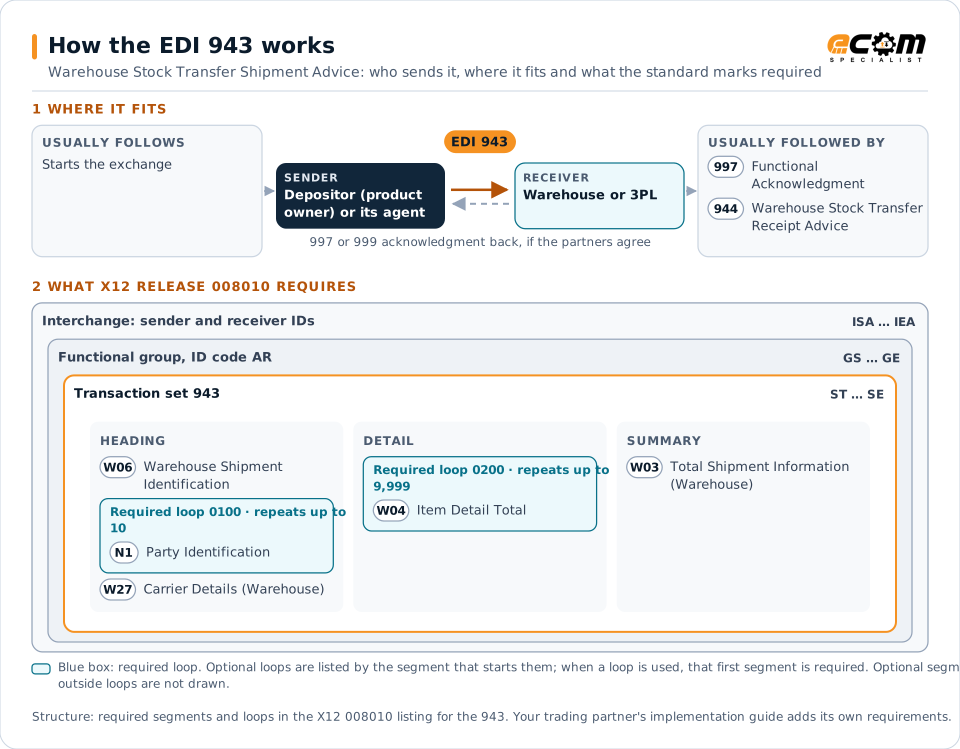
How to read this diagram: the top row shows who sends the 943, to whom, and which documents usually come before and after it. The lower part shows what X12 release 008010 itself requires: the envelopes around the 943 and the segments and loops the standard marks as required, area by area. Optional loops are listed by the segment that starts them rather than drawn in full. This is the standard's minimum, not a trading partner's requirement: each partner's implementation guide usually makes some optional loops mandatory, restricts the codes and may use a different release.
When it is used
- Sending inventory from a plant to a 3PL warehouse
- Transferring stock between a depositor's warehouses
- Giving advance notice of inbound containers or trailers
Where it fits in the document flow
Structure
Mandatory segments in the 943 (X12 release 008010)
The segments X12 release 008010 marks as mandatory at their level, in order. Segments inside optional loops are needed only when the loop is used. This is the standard's requirement, not your trading partner's: each partner's implementation guide names the release it uses, adds the optional segments it requires and restricts the values. The requirement status comes from one published X12 reference listing and has not been checked against a second source.
- ST
- W06
- N1
- W27
- W04
- W03
- SE
Practical example
The 943 in practice
A beverage manufacturer ships two trailers of finished goods from its plant to a 3PL distribution center. When the trailers leave, it sends a 943 listing each item, lot and quantity. The 3PL schedules unloading, receives against the expected quantities and returns a 944 confirming what arrived.
Implementation
Implementation considerations for the 943
- Send the 943 when the shipment leaves, early enough for the warehouse to plan receiving.
- Use the item identifiers and units of measure set up in the warehouse system.
- Match each 944 receipt back to its 943 and resolve differences quickly.
How ECOM helps
Automate the 943 with ECOM
Industry
3PL and Warehousing
Warehouse orders, shipping advice, receipts and inventory reporting between brands, 3PLs, carriers and retailers.
Industry
Manufacturing
Customer schedules, supplier connectivity and shipping integrated with the ERP for manufacturers.
Solution
EDI Integration
Exchange X12 and EDIFACT documents with partners and integrate them directly with your ERP.
More general questions about EDI are answered in the EDI FAQ.
Related transactions
Related warehousing documents
Need help with the EDI 943?
ECOM maps, tests and monitors X12 documents for your trading partners and integrates them with your ERP.